

The loss of valuable files may be frustrating, particularly when there is a lack of a trusted recovery program. In this case, you need a data recovery tool to help you. The 4DDiG Data Recovery tool is widely used when it comes to accidental deletion or any unexpected crash in the systems. However, in a real-life scenario, is it really providing safe and true results, and is it cost-effective? In this article, we will discuss features, performance, price, and a better alternative. Let’s dive in.

What is Tenorshare 4DDiG Data Recovery?
Tenorshare 4DDiG Data Recovery is developed to support common data losses on PCs. It is an easy to use program that assists the user in retrieving lost or deleted data. This software offers rapid scanning, comprehensive recovery, and compatibility with a variety of files on various storage devices. Here are the pros and cons of 4DDiG Data Recovery:
Pros
- Easy to use with a simple and clean interface.
- High data recovery rate in many common scenarios.
- Supports many file formats and storage devices.
- Offers a free preview before final recovery.
- Works well for both beginners and advanced users.
Cons
- Full recovery requires a paid version.
- Limited recovery for heavily damaged or formatted drives.
- The free version has strict limits on recovery.
- Scan speed can be slow on large drives.
Is Tenorshare 4DDiG Data Recovery safe and free?
Yes, Tenorshare 4DDiG Data Recovery is a safe tool and does not contain viruses. The software is from a reputable company. The free version supports file recovery partially, and the paid version is necessary in order to get all features. The software is suggested to be downloaded from the official website as a precaution.
How Much does Tenorshare 4DDiG Cost?
Tenorshare 4DDiG Data Recovery software comes in several paid plans, starting at about $45.95 for a 1-month license for one PC. A 1-year license costs approximately $59.95, and a lifetime license costs approximately $79.95. The free version will allow the scanning and previewing of files, but not full recovery unless it is purchased.
How to Use 4DDiG Windows Data Recovery?
The following is the process of using 4DDiG data recovery software:
- Download this program only from the official website.
- Install the program and launch it on your computer.
- Select the drive or folder where your lost files were located.
- Click “Scan” to search for recoverable files.
- Preview the files found by the scan before recovery.
- Choose the files you want to recover.
- Click”Recover” and save the files to a safe location.

Can I Use 4DDiG Data Recovery Crack Safely?
No. 4DDiG data recovery crack is not safe to use. It is frequently altered by an unknown author, and it may contain malware or spyware. These variations may be harmful to your system and even damage your storage drives. You will also not receive updates, support, and security patches using the cracked software.
Why You Need a Better Alternative?
Numerous users give 4DDiG Data Recovery both good and bad feedback. It is easy to use and useful for simple cases of data loss, though some users have reported problems like poor performance or a refund. There is both positive and negative user feedback, implying the software is not appropriate for all users.
User Feedback – Pros
- Some users recover lost files successfully with simple steps.
- Several reviewers say the interface is easy, even for beginners.
- Fast scanning and preview options help users see results before recovery.
- Helpful for recovering many common file types from various drives.
User Feedback – Cons
- Many users complain about denied or difficult refunds.
- Some reviewers say subscription and payment practices are confusing.
- A number of users report failures to recover certain files.
- Reports of recovered files being distorted or unusable.
Best Alternative to 4DDiG Data Recovery? Answered Here
Some features of 4DDiG Data Recovery are limited. And user feedback is variable, which leads many users to seek an alternative. iToolab RecoverGo Windows Data Recovery is a powerful solution if you are interested in more reliable work and effective support. It provides effective scanning, expansive device protection, and a clean interface. It provides a more successful recovery and less complex operation for many users.
Here are the important characteristics of iToolab RecoverGo Windows Data Recovery:
- User-friendly interface helps beginners recover data in just a few simple steps.
- Successfully recover permanently deleted files with a 99% success rate.
- Restore 1000+ file formats such as photos, documents, videos, and other important file types.
- Retrieve data from 2000+ devices, including hard drives, SD cards, USB drives, and more storage devices.
- Recover files lost from various common situations due to accidental deletion, system crashes, or other data loss scenarios.
Here’s how to use iToolab Windows Data Recovery:
Step 1 Launch the Program: Open RecoverGo Windows Data Recovery. Select the place where you intend to scan data and press the “Search for Lost Data” button.

Step 2 Scan Your Drive: The tool will start scanning your drive. In order to maximize the rate of recovery, you may employ a quick scan or deep scan, an advanced scan. To enhance the scanning process, do not use your computer at the time of scanning.
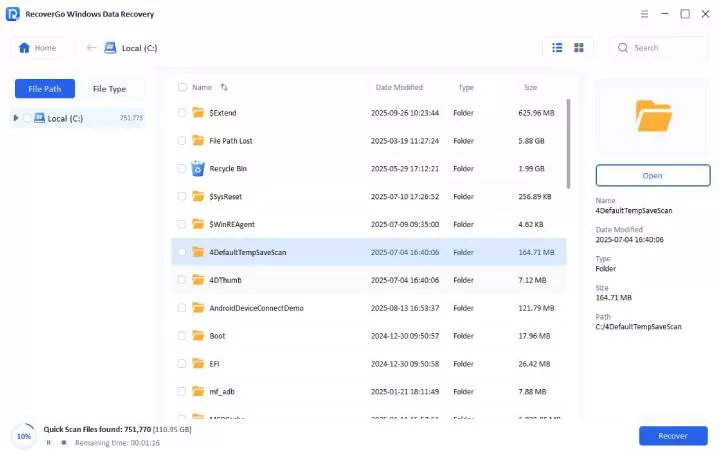
Step 3 Preview and Recover the Files: Once you have found the deleted files, you can check them with the preview button on the right panel. Click the “Recover” button in case it is the file that you require.

In Conclusion
4DDiG Data Recovery is helpful but not without flaws—its limited free version and mixed user feedback may leave you disappointed. If you’re looking for an effective workflow, iToolab RecoverGo Windows Data Recovery is the best choice. It offers faster scanning, higher recovery success rates, and a more intuitive interface. Don’t settle now—choose iToolab Windows Data Recovery. It won’t let you down.