

A quick look at the available data recovery market shows that there are so many tools available. So, it’s only natural for a user to feel overwhelmed when they start looking for data recovery software in the event of data loss. One such tool is AnyRecover data recovery software. The tool is marketed as an all-in-one solution and developers claim it can be used in more than 500 data loss scenarios. Also, the software claims support for 1000+ file formats and 2000+ storage devices. But is iMyfone AnyRecover actually good enough to trust with your lost files? In this AnyRecover review, we will explore the features, pros/cons, and real-world performance of AnyRecover. More importantly, we will tell you if AnyRecover is good enough for data recovery in 2026!

Part 1: AnyRecover Data Recovery Review
AnyRecover is a data recovery software from iMyFone, which helps users recover lost/deleted files in different data loss scenarios. But it still offers powerful recovery capabilities, which means it can also be used by advanced users.
Key Features of AnyRecover
Here’s a quick list of the key features offered by AnyRecover data recovery:
- File Preview: The tool allows users to preview certain file types before restoring them. However, the preview feature can struggle to open some files correctly in some cases.
- Scan Modes: The tool offers a quick scan, which is fast but limited. There’s also a deep scan mode, which is slower but more thorough and can find more lost/deleted files.
- Bootable Recovery: AnyRecover also allows users to create a bootable USB device to recover data from crashed systems.
Overall, AnyRecover can be used to recover data from different drives and also has a very beginner-friendly interface, which is yet another plus point. It is important to note that all of these features of AnyRecover are also available in other data recovery tools. So in that sense, there’s nothing extraordinary in AnyRecover.
Is AnyRecover data recovery free?
AnyRecover is not a completely free tool, as most of the features require a paid subscription. The free trial of AnyRecover can be used to scan and preview the scanned files for free. However, the user must upgrade to the AnyRecover data recovery full version (paid) to recover the lost/deleted files. In a nutshell, you can use the tool to scan and preview lost/deleted files. However, you must upgrade to actually recover the files on HDD, SSD.
Is AnyRecover data recovery safe?
Yes, the AnyRecover data recovery software is completely safe from any virus or malware. We have checked AnyRecover with the leading Antivirus software (BitDefender, Kaspersky, and Avast) and all of them showed it is 100% safe. But, it is important to remember that you must only use the AnyRecover software free download link from the official website. You shouldn’t try any cracked version of AnyRecover, as such versions are known to contain viruses/malware. iMyfone AnyRecover also operates locally on the device and doesn’t upload any files to external servers. So, you don’t have to worry about the safety of your files when using AnyRecover.
AnyRecover Performance and Real-World Experience
For this review, we tested the AnyRecover data recovery software on these storage devices:
- USB 3.0 Flash Drive (256 GB)
- 500 GB External HDD
- 1TB HDD
These storage devices had a mix of file types such as MP4 videos, JPG images, DOC files, and PDF documents. Some of the files were deleted recently, while others were removed after formatting the drive. In simple scenarios, AnyRecover recovered the recently deleted files quickly. Most of the files were detected using a quick scan in minutes, and the software also performed recovery without any issues. However, in more complex scenarios, AnyRecover’s performance was less consistent. For example, the deep scan on the formatted drive took a long time, and even then, the results were mixed. A large number of files were found after the scan, but many were:
- Poorly organized
- Renamed
- Partially corrupted
The data recovery rate was lower in complex scenarios, highlighting that iMyfone AnyRecover is best suited for light data recovery.
Part 2: How to Use AnyRecover for Free?
AnyRecover does offer a free trial, but it’s worth mentioning that the functionality is very limited in that one. Here’s a quick step-by-step on how to use AnyRecover for Windows:
- Visit the official website and download the AnyRecover Windows. After that, install the AnyRecover tool and then launch it.
- Click on the “PC and hard disk data recovery” tab, and then select a location where the lost/deleted files were present. Once a location is selected, start the scanning process.
- Double-clicking on a file results in a pop-up window where you can preview its contents. If it’s the file you require, click the “Recover” button and your recovery will be finished.

Part 3: Is It Worth Paying for AnyRecover Data Recovery?
AnyRecover data recovery software has a 4.7/5.0 rating on Trustpilot. Most of the reviews are positive, but there are also some negative reviews that must be considered. Many users have praised how easy it is to use AnyRecover, and the interface is also very straightforward. The users have also mentioned that AnyRecover performs well when dealing with simple tasks (data recovery). What users don’t like about AnyRecover is its high price and the lack of responsive customer support. Many users have reported that, despite cancelling the AnyRecover subscription, they were still charged! Last but not least, users have also reported that the preview feature showed files perfectly in the free version. But when they upgraded to the paid version, AnyRecover failed to actually recover the files.
John said this on Trustpilot:
“The tool managed to recover the deleted files, but they were corrupted. So, I was not really able to open any of the recovered files.”
Christine said this on Trustpilot:
“I was able to recover files from a corrupted SD card using AnyRecover. Overall, I am very satisfied with the program’s functionality.”
Tom said this on Trustpilot:
“AnyRecover charged for the 2nd month even though I had canceled my plan. Even after contacting them, they didn’t issue me a refund.”
Is It Worth the Price?
AnyRecover has a 94% success rate based on users’ reviews and ratings. And given its high price ($59.99 – $79.99 per month), it doesn’t make sense to buy this data recovery tool when there are more affordable options out there!
Part 4: Is AnyRecover Better Than Other Recovery Tools?
AnyRecover data recovery tool has decent features, but this alone doesn’t make it the best. When we look at its high price and recovery rate, it becomes clear that there are far better data recovery tools out there! iToolab RecoverGo Windows Data Recovery is actually a much better alternative. RecoverGo works on Windows 7/8/10/11 and can be used to recover data from thousands of data loss scenarios. The software is designed with a focus on high recovery accuracy and ease of use. This makes it suitable for both beginners and more advanced users.
Why RecoverGo Is Better?
Here’s a quick list of reasons why RecoverGo is better than AnyRecover data recovery software:
- Higher Recovery Success Rate: RecoverGo has a recovery rate of up to 99% and can also handle advanced data loss scenarios. Our own testing and user reviews show that RecoverGo can handle different types of data loss scenarios with a high success rate.
- Advanced Deep Scan Technology: RecoverGo has a very advanced deep scan technology, which is not present in AnyRecover. With the RecoverGo’s deep scan, it is possible to find lost files even in corrupted or formatted drives. Our tests also show that RecoverGo’s deep scans are much faster and more efficient than AnyRecover. So, if you have some lost files that can’t be found with a quick scan, then RecoverGo can be a good option.
- Effective File Filtering: RecoverGo offers built-in filters to sort files by path, type, modification date, and so on. This makes it easy to find the files after the scanning is complete. If you think about it, scanning can easily uncover a lot of lost/deleted files. In such a scenario, the RecoverGo’s file filtering can be a lifesaver as it allows you to quickly find the exact files you want to recover.
- Easier for Beginners: RecoverGo offers a very simple recovery process that only involves 3 steps: Select Files -> Scan -> Recover. The user interface is also clean and straightforward, which makes it very user-friendly for everyone.
- Better Pricing Options: RecoverGo is more cost-effective than AnyRecover and most other data recovery tools! So, for those who want to recover files and still want a cost-effective solution, then RecoverGo can be a good option.
How to Use iToolab RecoverGo Windows Data Recovery
You can follow these steps:
Step 1 Install RecoverGo: Install iToolab RecoverGo on your computer and launch it. Choose a location and then click on “Search for Lost Data”.

Step 2 Select a Location: RecoverGo will start to scan for lost/deleted files in the selected location. To improve performance and recovery rate, it is best to not use the computer during scanning.
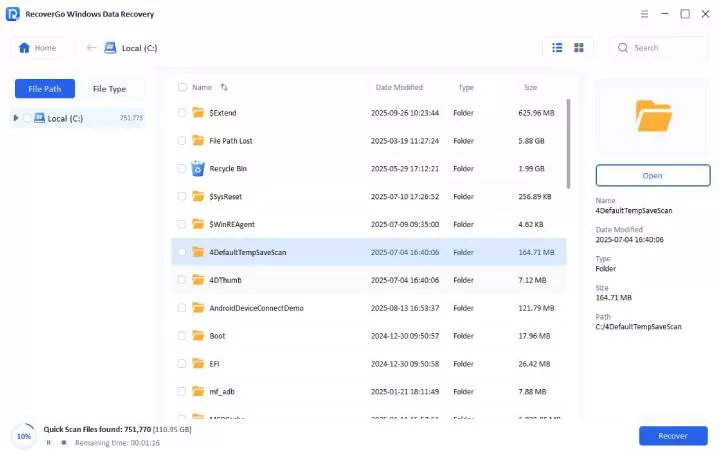
Step 3 Preview and Recover: Once the scan is completed, you can also use the search filters to find the exact lost/deleted file. After locating the lost data, you can use the “Preview” button and then click on “Recover” and then choose a location to save it.

FAQs About AnyRecover
How successful is AnyRecover’s recovery?
AnyRecover works well if you want to recover recently deleted files. But the success rate will drop in more complex cases, such as overwritten or formatted drives. The average data recovery rate of AnyRecover is around 94% based on our testing and real user reviews.
How long does AnyRecover take?
A quick scan usually only takes a few minutes, while a deep scan can take 30 minutes to 1 hour. However, the exact time for scanning and recovery depends on the drive size and condition.
Does AnyRecover recover deleted photos?
Yes, AnyRecover can be used to recover deleted photos from HDD, SD card, USB flash drive, and so on. The tool supports all the known image file formats, such as JPG, PNG, PSD, RAW, and more.
In Conclusion
This AnyRecover data recovery review shows that the tool is easy to use and works well for basic recovery. However, AnyRecover struggles with complex data loss situations, and the pricing doesn’t match its performance. Users dealing with serious data loss might want to consider more reliable alternatives. A best alternative is iToolab RecoverGo Windows Data Recovery. This tool offers a higher recovery success rate, faster scanning, and better overall value. All of these make it a more trusted choice for serious data recovery needs.