

I looked online and found software called “EaseUS Data Recovery Wizard.” It worked great and was able to recover and repair all my files, videos, and pictures, but I could only preview them and not move them to a non-broken USB. It said to recover unlimited data, then I would need to buy the pro version, which was very overpriced. I don’t think I need to go to an expert or anything, I just need to find software that is very cheap that can recover/repair my things without a limit. Any recommendations?
— From Reddit Community
In this guide, we’ll take a closer look at EaseUS Data Recovery Wizard and explore a more affordable alternative. If you’re facing the same issue, keep reading—you might find the solution you’re looking for.
Part 1: What Is EaseUs Data Recovery Wizard?

EaseUs Data Recovery Wizard is a powerful data recovery tool, designed to restore lost or deleted files from various storage devices, including memory card, USB drives and laptops. It also supports recovering files from deletion, formatting, system crashes, or other common issues. Here are the pros and cons of EaseUs Data Recovery Wizard:
What We Like:
User-friendly interface: Clean interface guides users through three clear steps.
Preview before recovery: Preview the found files before choosing to recover them.
Comprehensive Scanning: Quick scan and deep scan modes allow data recovery in various scenarios.
What We Don’t Like:
Slow scanning speed on large drives: Scanning large drives can be time-consuming, particularly during deep scans where the software analyzes every sector to locate lost files. This can take several hours on large disks with a lot of data.
High subscription cost: The software frequently annoys users with pop-up ads for other products, which cannot be turned off, detracting from the overall user experience.
Inaccurate time estimations: The software often gives incorrect time estimates for recovery operations, resulting in potential frustration and wasted time.
Limited preview ability: The preview function only supports a small number of formats, and popular photo formats may not be visible, making it harder to identify files prior to recovery.
Part 2: How to Use EaseUs Data Recovery Wizard Free Version?
Before downloading, you need to know:
Most cracked software may leak your privacy or harm your PC, so please avoid searching for “free” activation keys or cracked versions.
Here’s the safe, official guide:
- Install EaseUs Data Recovery Wizard free version from official website.
- Select the location where files are lost, and then click “Search for Lost Data”.
- Scan for lost files and recover them.
- Preview the recoverable files and click “Recover” to restore them.

Note:
Always save recovered files to a different location to avoid overwriting original data.
Part 3: Is EaseUs Data Recovery Wizard Really Free?
Not completely. EaseUs Data Recovery Wizard offers a free version, which allows users to recover 2GB of data.
But it comes with a significant limitation:
- Only suitable for small recoveries: Available for recovering smaller amount of important documents, images, or files.
- No technical support: Without any help or guide before upgrading pro version.
- Lower successful rate of SSD Recovery: Restore data from SSDs is often less successful than from traditional hard drives.
Most users consider the free version as “demo” without any advanced functions, which makes it hard to fully test the software before upgrading. If your data exceeds 2GB or involves complex recovery scenarios, upgrading to the EaseUS Data Recovery Wizard professional version becomes necessary, as it offers unlimited data recovery, technical support and free lifetime upgrades.
Part 4: What Is Better Than EaseUs? A Cheaper Alternative
Compared to EaseUs Data Recovery Wizard starts at $69.95 per month, iToolab RecoverGo Windows Data Recovery is priced at $39.99 per month and claims a 99% recovery rate, making it a more affordable choice for most users.
So if you want a tool that’s easy on your wallet and still gets the job done, iToolab RecoverGo Windows Data Recovery is the way to go.
iToolab RecoverGo Windows Data Recovery is a powerful solution for recovering data and files from various storage devices. What’s more, its simple and user-friendly interface guides users to recover data in just a few simple clicks. It is designed for home users without any technical skills. You don’t need to be an expert.
Main Features:
- Quick scan: Low memory usage to keep a smooth and efficient scanning.
- 99% high success rate: Advanced algorithms guarantee a high recovery rate and greatly improve your recovery efficiency.
- 3-step simple recovery: Restore your data in just three clicks—select, scan, and recover.
- Works in various data loss situations: Such as accidental deletion, emptied recycle bin, physical damage, virus or malware attacks, formatted hard drive.
- Supports 1000+ file type: Recover important photos, videos, documents, audios, emails, and more immediately.
- Supports 2000+ devices: Instantly recover data from hard drive, sd card, USB flash drive, and more.
How to Use iToolab RecoverGo Windows Data Recovery?
Easy steps to follow:
Step 1 Choose the location of lost files: Choose a location that you want to recover lost or deleted data. Then click the “Search for Lost Data” button.

Step 2 Scan the device: The recovery rate can be increased with quick scan and advanced scan and the scan time depends on the size of your data and drive.
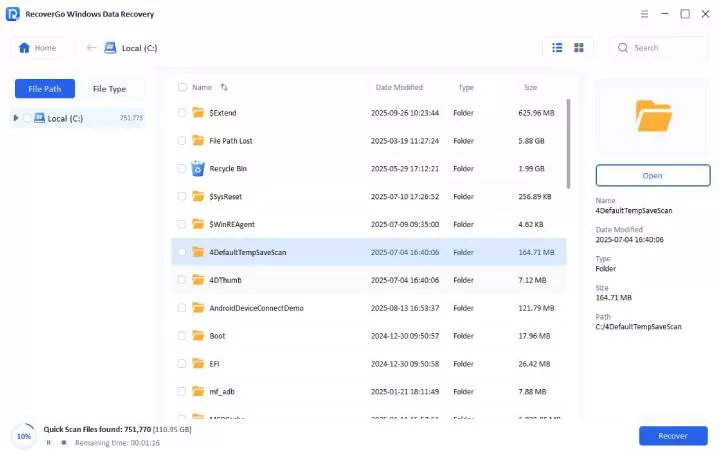
Step 3 Preview and recover files: Locate the deleted data, then click the “Preview” button on the right panel and just click the “Recover” button to recover it.

It is simple to use it, isn’t it? Now, download the tool. Retrieve your important data immediately.
FAQs About EaseUs Data Recovery Wizard
What Is the Success Rate of EaseUs Recovery?
EaseUs Data Recovery Wizard claims up to a 99.7 percent success rate. But its real success rate varies, depending on whether your old data has been overwritten.
Is EaseUS Data Recovery Wizard Worth?
EaseUS Data Recovery Wizard free version offers file recovery, which is a good choice for simple tasks. However, it lacks advanced functions like disk imaging or deep customization.
Is EaseUs Recovery Wizard Legit?
Yes. EaseUS Data Recovery Wizard can balance well between functionality and ease of use, making it a reliable solution for data recovery needs.
In Conclusion
EaseUs Data Recovery Wizard is a useful tool for basic data recovery tasks. However, its 2GB free limit and high subscription cost may not suit all users. If you prefer a more cost-effective and valuable option, download a more affordable alternative: iToolab RecoverGo Windows Data Recovery– with no recovery limits and higher success rates.