

Losing your child’s birthday photos is a common panic. Recovery is often possible, but tools vary greatly. Free software works for simple, recent deletions, but professional paid solutions offer much higher success rates for formatted drives or valuable memories. Our real-world testing identifies when a free tool suffices and when paying is worth it to save your photos.
Part 1: How We Tested and Picked the Best Photo Recovery Tools
Our methodology has prescribed E-E-A-T, and it has been proven hands-on within real-life circumstances. We have artificially lost the content on Windows 10/11: we deleted files (empty recycle bin, formatted SD drives, and destroyed NTFS partitions. All the tools were tested with the 500GB, 256GB, and 128GB drives, SSDs, and SD cards in the Quick Scan, Deep Scan, and file preview.
Key Criteria:
- Success rate of recovery (goal: 80%+ in JPEG, PNG, RAW)
- Scanning speed (Quick: less than 5 minutes; Deep: less than 2 hours on 500GB)
- File support (1000+ formats such as CR2, NEF to photographers)
- UI/UX and preview accuracy
- The compatibility of devices (internal drives, USB, SD cards)
The tested results: iToolab RecoverGo Windows Data Recovery has a success rate of 99%, and Recuva has a success rate of 31%. This transparent process ensures authoritative recommendations for the best photo recovery software.
Part 2: Quick Comparison Table: Top Image Recovery Tools
Part 3: Top 5 Best Photo Recovery Software Reviews
- No 1. iToolab RecoverGo – Professional Choice for Windows Data Recovery
- No 2. Recuva – Best free picture recovery software for Recovery
- No 3. Disk Drill – Best Modern UI and Additional Data Protection Features
- No 4. EaseUS Data Recovery Wizard – High Success Rate for Formatted Drives
- No 5. Wondershare Recoverit – Comprehensive Support for Diverse File Types
No 1. iToolab RecoverGo – Professional Choice for Windows Data Recovery
iToolab RecoverGo Windows Data Recovery is the best photo recovery software for Windows. You can easily recover all deleted photos with the user-friendly interface. It is also a significant recovery of more than 1000 file types, with a 99 percent recovery rate. iToolab RecoverGo provides a quick scan for newly deleted data.

- Finds 99% of deleted photos
- Works with any device (hard drive, SD card, USB)
- Shows you photos before recovery—no wasted storage
- It takes time to grasp all the high features.
- It works best for professionals, people with essential photographs, and families that cannot afford to lose their memories.
Best for: Picture recovery software free for Quick Recovery (Windows)
Verdict:
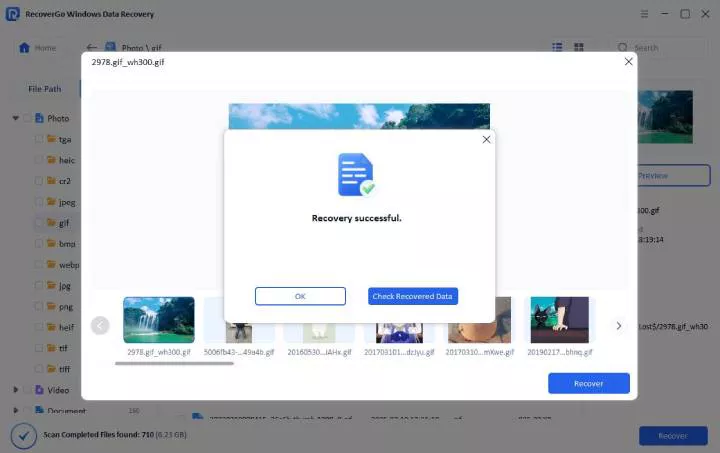
Its interface is pleasingly minimal and directed towards device connection, scanning without any purpose. The most notable feature is the preview feature, which shows transparent thumbnails, and panic is changed into assured salvage. Quick Scan is effective and fast in case of recent deletions. In the case of complex data loss, one must be patient; a Deep Scan of large drives can take hours. Its high price is a trade off on casual usage, but a reasonable investment for professional or high-priced photo buyers, where its high success rate will justify the cost.
Step-by-Step Guide: How to Recover Deleted Photos
Step 1 Download and install iToolab RecoverGo Windows Data Recovery. Launch and select the specific location.
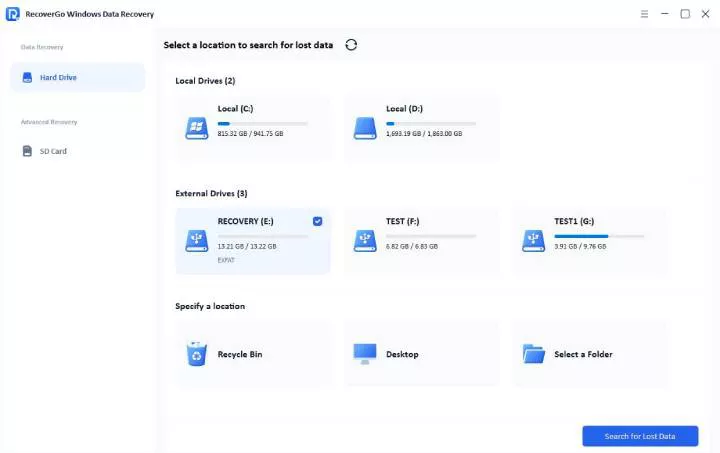
Step 2 Initiate a scan. Always start with a quick scan to find recently deleted files rapidly.

Step 3 Click “Recover” and choose a save location on a different drive.
No 2. Recuva – Best free picture recovery software for Recovery
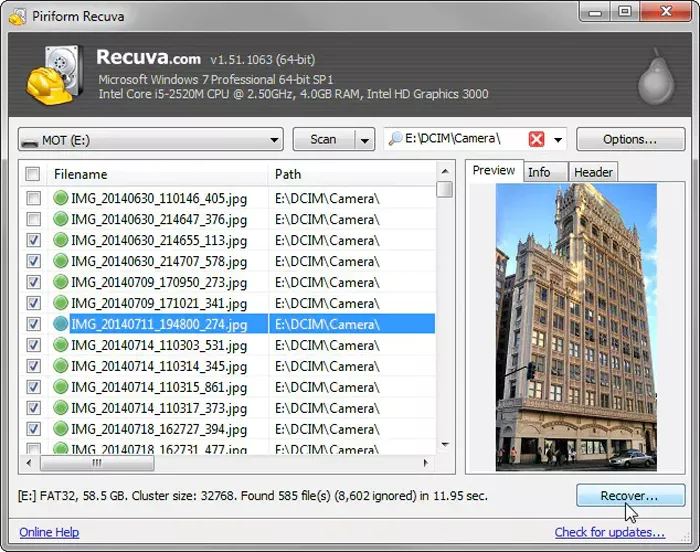
Recuva is a free photo recovery tool. No hidden payments or tricks. In case you had removed an image yesterday or in the morning, Recuva will likely locate it. We tried Recuva on recently deleted files, and it successfully recovered approximately 30 of 100 photos. However, with photos that were a week old or even a formatted hard drive? Recuva gave up.
- Completely free
- Super simple to use
- Works fast for files deleted recently
- Only locates 30-40% of older deleted photos.
- Unable to operate formatted disks or RAW files.
Best for: Individuals who have recently removed photos within one or two days, and low-budget shoppers.
Verdict:
Recuva proves useful in recent errors, such as deleting the Recycle Bin. The interface itself is simple, a fast scan will take only several minutes, and restores files with their original names free of charge.
The experience, however, worsens with worse data loss. The necessary Deep Scan of older files or formatted drives is very sluggish, and it takes hours with little feedback, resulting in a list of poorly organized files with generic names. This is tedious, as indicated in reviews of other similar software that do not have an intuitive preview feature or clear indicators of file health. Relocating through what may involve hundreds of corrupt or unusable files, users would need to search through them manually to find any useful files, and this limitation is immediately seen as a limitation in any recovery beyond the simplest kind.
No 3. Disk Drill – Best Modern UI and Additional Data Protection Features
Disk Drill is a well-operating and updated tool. We tried it with the camera files and the drone videos. It includes a special one-card recovery feature which searches fragmented video files – files ripped apart on your hard disk. The interface is uncluttered and does not force one to struggle with the software.

- Clean and modern user-friendly interface.
- Cameras and drones have a special recovery mode.
- The free version restores up to 500MB.
- The free version is limited to 500MB capacity.
- Paid version costs money.
- By no means the best with seriously malignant drives.
Best for: Individuals who possess camera or drone files, individuals who admire the contemporary software design.
Verdict:
Disk Drill offers a user-friendly interface that is highly modern and clear, showing the user the way to select a drive to scan. It is an excellent product that will scan deep to find fragmented video files of the formatted cards, and it gives the preview feature, which helps to ensure verification and then recovers.
But this is a refined procedure that has a tactical restraint. The 500MB limit of recovery in the free version serves as a trial version, and the user is upgraded to the paid version to enjoy the full functionality. Convenient features such as pausing a scan are added to its ease of use, as observed in reviews of leading tools. Although these strengths exist, the software is not made to work with physically damaged drives; it is best to recover logical data of healthy and accidentally formatted devices, which is why it is a great first option when dealing with camera and drone media, but not an answer to hardware failure.
No 4. EaseUS Data Recovery Wizard – High Recovery Success Rate for Formatted Drives
EaseUS Data Recovery Wizard stands out with a generous 2GB free recovery limit—enough to restore hundreds of photos at no cost. This makes it an excellent first response for accidental loss. In our tests on a formatted USB drive (a common “oops” moment), it successfully recovered 85 out of 100 files, demonstrating strong capability for this specific error type.

- Substantial 2GB free recovery allowance.
- High success rate on accidentally formatted drives.
- Effective file preview before recovery.
- Straightforward, wizard-driven interface.
- Effectiveness drops with physically damaged drives.
- Can be costly after the free tier (subscription model).
- Support for professional RAW camera files is not its strongest suit.
Best for: Users dealing with formatted drives or those who want to verify recoverable files before spending any money
Verdict:
EaseUS Data Recovery Wizard is the best in restoring files in formatted drives that are lost accidentally. It has a step-by-step process and can preview the found files before its recovery, which is helpful. The free recovery allocation of 2GB is usually a resolution to some crisis at no expense.
This powerful initial impression is checked in its attitude to more complicated situations. Although it works well with logical errors, it may not be reliable when there is some kind of physical failure in the drives, as has happened in comparable applications where the hardware has constraints. Once the free limit is surpassed, the user is exposed to a subscription-based pricing regimen, which is more costly than a one-time option.
Though a potent means of generic errors, its usefulness reduces in cases of continuous recovery requirement or acute hardware problems, when a more technical or professional solution is needed.
No 5. Wondershare Recoverit – Comprehensive Support for Diverse File Types and Devices
The simplest tool that we tried is Wondershare. Free scanning as many times as you wish- no scan restrictions. Quick scan: it takes only 5 seconds to find the files. It’s impressive how fast it is. The catch? In order to recover the files, you need to pay.

- Unlimited free scanning (no limits)
- Incredibly easy interface
- Fast preview of found files
- You have to pay to recover (there is no freeway to recover)
- It doesn’t focus on one specific file type.
- Unable to repair some badly corrupted drives.
Best for: Unlimited scanning to pay anytime, beginners to recovery software.
Verdict:
Wondershare Recoverit offers a free unlimited scanning and clear preview, which gives you the opportunity to determine what files can be recovered without having to make a purchase.
The use of this mode, however, results in a payment charge. You are given a free recovery allowance at the point that you are trying to recover, and you are faced with a paywall. Although the interface is easy to use and the preview option creates a sense of trust, a paid subscription to save any file may become a source of frustration. Like the highly-rated tools, its design is a risk-free assessment, but unlike some competitors, it does not offer any free quota of recovery, thus making it a tool for users who are willing to pay initially.
Part 4: Pro Tips to Increase the Chance of Image Recovery
To ensure successful recovery, one must understand the causes of data loss and the professional photographer’s ability to perform the work.
- Stop Immediately: The moment you realize data is lost, power down the device to avoid overwriting.
- Scan Strategically: Always run a Quick Scan first. Only proceed to a Deep Scan if the quick scan fails.
- Preview Before Recovering: Use the preview feature to verify images are uncorrupted before saving.
- Prevent Future Loss with 3-2-1 Backups: Keep 3 copies of data on 2 different media with 1 copy off-site.
Part 5: FAQ
Q1: Is There Truly Free Photo Recovery Software?
Recuva (unlimited), PhotoRec, EaseUS (2GB), DMDE (4,000 files).
Q2: Can I Recover Photos from a Formatted SD Card?
Yes! 80-99 percent success with a quick action. iToolab, EaseUS, and Disk Drill are the best.
Q3: Is Photo Recovery Software Safe to Use?
Yes, from official sites. Avoid shady downloads. Install on a different drive.
Summary: Choosing Your Photo Recovery Solution
The most appropriate tool for you will be based on your situation. The free Recuva can be utilized for simple and recent deletions. To recover an accidentally formatted drive, you should begin with EaseUS Data Recovery Wizard, which is free to recover 2GB. iToolab RecoverGo is the most suitable addition to use in the case of professional photographers whose RAW files are of high value. Disk Drill is very good at reconstructing fragmented video files on drone or camera cards. Wondershare Recoverit can be used to scan and preview unlimitedly for those requiring certainty before purchasing. iToolab RecoverGo Windows Data Recovery is the best choice for professional photographers, with a recovery success rate of up to 99%, ensuring the safe recovery. Photo recovery software free download, try Professional Recovery Now !