

Deleting a Facebook picture accidentally is awful. Perhaps it was during a visit in 2019, or it was lost last week in a profile clean-up. In any case, it does not necessarily mean that those memories will not be there anymore. It is important to know how to recover deleted photos from Facebook legitimately, whether they were lost yesterday or years ago.
This guide breaks down four methods that actually work. Some are embedded in Facebook, others require cloud backup/recovery software. Select the one that is relevant to the situation.
Can You Recover Deleted Facebook Photos?
Yes—recovery is possible, but timing matters a lot.
Photos on Facebook are not deleted instantly. When one removes a photograph, it enters the Trash, which has a duration of 30 days. The same month, it takes approximately 30 seconds to retrieve it. After 30 days? The picture is erased on Facebook servers.
For older deletions, recovering deleted photos on Facebook from years ago needs different tricks. Examine the data download option of Facebook, search through phone backups, or utilize recovery software.
Quick check: Is the photo deleted or just archived? Photos that are archived are not lost, they are hidden. Go to Activity Log Archive and see whether it is sitting there.
Does Facebook Keep Deleted Photos?
Facebook keeps deleted stuff in Trash for exactly 30 days. After that, it’s gone from their servers. In case the data was backed up before deletion, and the “Download Your Information” tool could contain a copy.How to Recover Deleted Photos from Facebook?
- Method 1: Use Facebook’s “Download Your Information” Tool
- Method 2: Check the Facebook Recycle Bin (Trash)
- Method 3: Recover Deleted FB Photos from Cloud Backups
- Method 4: Use Professional Data Recovery Software
Method 1: Use Facebook’s “Download Your Information” Tool
Facebook allows anyone to download their account history. This includes photos that are no longer visible, even those taken years back.
Here’s how:
- Log in, then in the menu (three lines at the top right).
- select Settings and Privacy and then Settings.
- On the left, click your Facebook information and then download yourinformation.
- Set the date range to All time to take everything.
- Check Photos and Videos in the content list.
- Choose HTML form (more convenient to read).
- Set quality to “High.” Click “Create File.”

Facebook builds the archive, so it could take hours or days, depending on account size. A notification pops up when it’s ready. This archive has every uploaded photo, even deleted ones. It’s the best official method to recover deleted photos on Facebook from any time period.
Method 2: Check the Facebook Recycle Bin (Trash)
Facebook introduced Trash in 2020, giving users a 30-day safety net for deleted stuff.
Recovery is straightforward:
- Open Facebook and click on the profile picture.
- Go to the drop-down menu and choose Activity Log.
- Trash under the left column.
- Go through deleted pictures, images, and videos.
- Choose the photo to be restored and press the Restore button to restore it to the profile.

Photos stay in Trash for exactly 30 days from deletion. After that window closes, they’re gone from Facebook’s active servers.
If you need to get back deleted Facebook photos within 30 days, this is your fastest bet.
Method 3: Recover Deleted FB Photos from Cloud Backups
In case of photos that have been deleted months and years ago, cloud backup services would act as the safety net. Facebook photos could be stored in mobile devices in case automatic photo backup was turned on.
For iPhone users (iCloud):
- Open Settings, tap the name at the top.
- Select iCloud > Photos, and enable iCloud Photos if it’s not already on.
- Open the Photos app, check Albums Recently Deleted (30-day retention).
- Browse All Photos for older Facebook content.

For Android users (Google Photos):
- Open Google Photos, tap the menu icon.
- Select Trash (60-day retention).
- Browse the photo library for older content.
- Use search terms like “Facebook” or specific dates.
- Check Archive for hidden photos.

Why cloud backups matter: This method excels at how to recover deleted photos on Facebook from years ago because cloud services keep independent copies of device photo libraries, including screenshots and downloaded Facebook images.
Cloud backup is only effective when auto-sync is on at the time the Facebook photos are initially downloaded or viewed on the device.
Method 4: Use Professional Data Recovery Software
When Facebook’s built-in tools fail and your cloud backups (such as iCloud or Google Photos) are empty, professional recovery software is the “last line of defense” for recovering permanently deleted photos on Facebook.
If photos have been downloaded from Facebook and subsequently deleted from a Windows computer, Facebook albums can’t restore these images. For users who want to recover downloaded Facebook photos on a computer, employing software for local Facebook photo recovery is the only way.
Why choose iToolab RecoverGo Windows Data Recovery?
iToolab RecoverGo Windows Data Recovery Software helps you recover photos deleted from Facebook albums from local storage.
- It supports over 1,000 file types, also contains Facebook photos.
- It offers an advanced scan and can preview Facebook photos before recovery.
- Search and filter tools help you find your photos quickly.
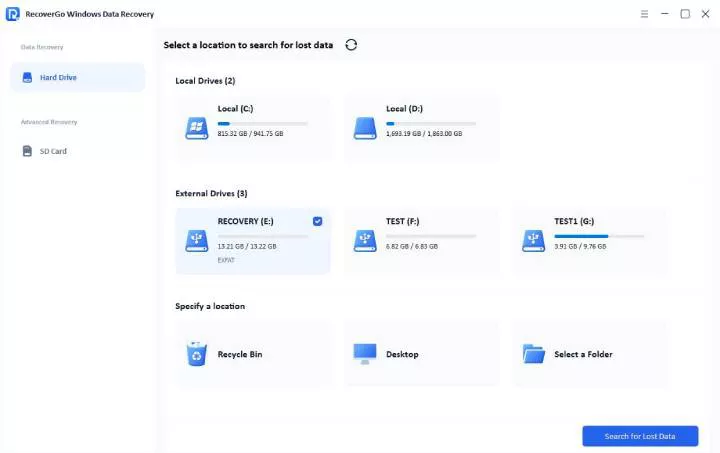
Step 1 Select a Location
Run RecoverGo, select a location where Facebook photos were stored, and click “Search for Lost Data”.
Step 2 Scan your device
Launch the scan process and find the Facebook photos.

Step 3 Recover your data
Once the scan is complete, click “Recover” and then save it to another location.

How to Avoid Losing Facebook Photos Again?
Prevention beats recovery. Even tools like iToolab RecoverGo Data Recovery are powerful for photo recovery. However, the safest way is to build good data management habits. This ensures your precious memories are never at risk. Here are some simple and effective prevention methods.
Turn On Cloud Backup
Google Photos:
- Install app enable “Backup & Sync”.
- Pick quality setting.
- Everything backs up automatically.
iCloud Photos:
- Settings [Name] iCloud Photos.
- Toggle on “iCloud Photos”.
- Pick “Optimize iPhone Storage”.
Archive Instead of Delete
The Archive feature of Facebook keeps the content out of the timelines without being deleted forever, which is ideal in both the organization of timelines and retaining memories. Hover over any image, tap on the three dots, choose to archive, and access archived content in Activity Log at all times. Archived photos are always retrievable in a single click, with no time limit of 30 days and no data recovery hassle.Create Regular Backups
Download Facebook data at least once a year to have a comprehensive archive. Create a calendar alert at the beginning of every year, save all the photos and videos, save the archive in an external hard disk, and keep cloud versions in Google Drive or Dropbox. Entire Facebook archives may be multiple gigabytes, and thus compression utilities or selective downloading can be used to control file sizes.Extra Protection Steps
Two-factor authentication eliminates unauthorized access, which may result in the deletion of photos. Hacking is minimized by strong passwords. Check and save photos where tags are before they are removed by other people. Back up the wedding, vacation, and milestone photo albums once uploaded.Frequently Asked Questions
Q1: Can I Recover Photos from a Deleted Facebook Account?
It is almost impossible to retrieve photos from permanently deleted accounts. Facebook provides a 30-day grace period to cancel deletion. When that window is closed, account data is wiped off the server permanently.
Q2: Where Do Deleted Facebook Photos Go?
Deleted photos move to the Trash folder, accessible through Activity Log. They remain there for 30 days before permanent removal. Copies might still exist in previously downloaded Facebook data archives.
Conclusion
Photos that are lost on Facebook are not always lost permanently. The path is determined by the time and the place where the photos were saved. Check Trash to confirm that nothing was deleted during the last month. Download Facebook data of older information through account archives. Browse through iCloud or Google Photos to find the photos from years ago.
When regular tools fail, iToolab RecoverGo Data Recovery uses advanced scanning technology to recover permanently deleted files in complex situations. The tool is applicable in cases where there is a need for how to recover permanently deleted photos on Facebook, and alternatives have not been successful. Download iToolab RecoverGo Windows Data Recovery for future photo recovery situations. Free scan shows what’s recoverable before purchase. Get those photos back today.