

Did you accidentally delete some important pictures from the SD card? Maybe you formatted a partition on your computer? In cases like these, the first thought that comes to mind is to look for data recovery software. In this search for data recovery software, one option you will likely come across is Puran File Recovery. But, is Puran File Recovery Software still a good option in 2026 and can you use it to recover your data successfully? These questions come to mind after looking at the old-school UI of this tool.
So in this Puran File Recovery review, we will take a closer look at its features, pros and cons, real-world performance. This will help you decide whether you should use it for data recovery or look for a better alternative.
Part 1: What Is Puran File Recovery?

Puran File Recovery has been around since 2013. This makes it one of the oldest data recovery tools. The tool is designed to recover lost or deleted files from different storage devices such as memory cards, USB drives, HDD, SSD, and more. According to developers, anything that can be detected by the Windows OS as a drive can be scanned using this tool. So, this pretty much covers everything you can think of.
Main Features of Puran File Recovery
These are the key features you can find in this data recovery tool:
- Multiple Scan Modes: The tool offers three scan modes (Quick scan, Deep scan and Full scan). These modes can be used to find recently deleted files or to scan entire drives.
- Easy To Use: The program has an easy to use interface and all features are on the same window. This allows users to scan and recover files without going through multiple tabs.
- Custom Scan List: This feature is available in deep scans and allows users to search for a specific file extension, such as JPEG, PSD, or ZIP.
- Multiple File Systems: The tool supports the common file systems such as FAT12, FAT16, FAT32, and NTFS.
Is Puran File Recovery safe?
Yes, Puran File Recovery Windows is completely safe to use. We scanned the Puran File Recovery Setup.exe on VirusTotal, and it shows a 0/71 score. This means the setup was scanned against 71 antivirus tools, and all of them showed it is completely safe.
We also scanned the installed version of Puran File Recovery with AVG and BitDefender. These two antivirus software also showed that this data recovery tool doesn’t contain any virus or malware.
The tool also runs locally and doesn’t upload any files to the cloud during scanning and recovery. So, you also don’t have to worry about data privacy or theft.
However, you shouldn’t download any type of Puran File Recovery crack. After all, the software is free, which means there’s no need to search for any type of crack or Puran File Recovery full version.

Is Puran File Recovery free?
Yes, it is completely free for personal use. The software is free by default which means you don’t need to buy a license to unlock any of the features.
All the features in the Puran File Recovery are completely unlocked and free to use. You only need to use the Puran File Recovery download link from the official website to get the setup file. After that, you can install the data recovery tool and start using it to scan and recover files without any subscription requirements.
Is Puran File Recovery trustworthy?
Yes, it is trustworthy and has been around for more than a decade. The company behind it is Puran Software, which is also a well-known utility software provider.
Also, the Puran File Recovery runs locally, which means you do not have to worry about the privacy of your important data. Although the recovery rate and efficiency of the tool are debatable, there’s no question about its trustworthiness.
Puran File Recovery has a 4.7/5.0 rating on G2. Also, the majority of the reviews are positive. So, if you are looking for a free solution and only need a tool to do basic recovery (nothing complicated), then you can trust it.
Part 2: What is Limitation of Puran File Recovery Windows?
The tool is free but it’s important to talk about its limitations. This allows you to know what you can and what you can’t do with this data recovery tool.
The biggest drawback is that the interface looks outdated. It feels like you are using a tool that was made for Windows XP. The UI is simple enough but it does look ugly which can be off-putting to many users.
The scanning process is also slow and usually does not recover all the files. The recovery rate drops even lower when it comes to complex situations.
The software also doesn’t receive frequent updates. It is common for it to go through years without even a single update.
Pros and Cons of Puran File Recovery
These are the pros and cons of this lightweight data recovery software:
Pros
- Completely free.
- Simple and lightweight software.
- File preview can be very useful to check files before recovery.
- Offers different scan modes (quick, deep and full scan).
Cons
- Too old UI.
- Slow Deep scans on large drives.
- Limited recovery rate in more complex situations.
- Missing advanced features make it a less useful option.
Overall, it is a decent option for only basic file recovery tasks. This includes simple formatted devices or accidentally deleted files. However, the scanning process is slow and the recovery rate drops in even slightly complex data loss situations.
Part 3: How to Use Puran File Recovery?
Follow these simple steps to use the tool on your system:
- Download the Puran File Recovery from the official website. Once the setup is downloaded, launch it.
- Select a drive (internal or external) from the main screen and choose the scan type. Next, press the Scan button and wait for the process to be completed.
- Once the scan is complete, you will see a list of recoverable files.
- You can preview and recover the selected files by pressing the Recover button.
Part 4: Puran File Recovery Performance Test
We tested the Puran File Recovery on the following devices:
- 32 GB SD card
- 500 GB HDD
These storage devices had different files such as JPG, MP4, ZIP files, and DOCX. On the HDD, we directly deleted some of the files, while others were partially corrupted. The SD card was formatted to delete all of the data. Our tests showed the recovery rate was around 80% for recently deleted files. For formatted drives, the recovery rate dropped to around 65%. And for more complex scenarios (format or partially corrupted), the performance dropped to around 40%.
Overall, it works well for basic recovery but struggles with more complex cases. When compared with modern tools, its performance is very subpar.
Part 5: Best Alternative to Puran File Recovery – Free Download
One of the alternatives to Puran File Recovery is iToolab RecoverGo Windows Data Recovery. The program features a polished interface and 99% recovery rate. RecoverGo supports 1000+ file formats and a wide range of storage devices. It can also handle more complex data loss situations such as formatted drives, system crashes and even virus attacks.
iToolab RecoverGo Features
Key features of iToolab RecoverGo Windows Data Recovery are given below:
- Fast Scanning: The scanning modes (Fast and Advanced) of RecoverGo are very fast and efficient. For example, Puran can easily take several hours to scan a drive and may still miss a lot of files. Meanwhile, RecoverGo takes way less time and can uncover a lot more lost/deleted file. Another great thing about RecoverGo’s scanning process is that it can be paused and resumed.
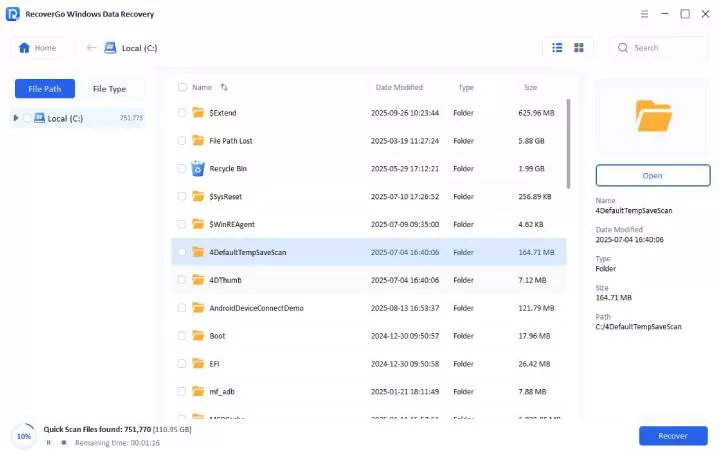
- Modern User Interface: RecoverGo has a modern user interface and allows users to recover files in 3 simple steps (scan -> preview -> recover). The main interface also allows users to select a specific folder for scanning, which is something you will not find in Puran File Recovery.
- Wide File and Storage Type Support: The software supports 1000+ file types and also works on a wide range of storage devices. This includes SD cards, digital cameras, USB flash drives, SSDs, and even HDDs.
- Handles Complex Data Loss Situations: RecoverGo can easily recover recently deleted files. But, it is also designed to handle complex situations such as system crashes, data migration errors, raw partitions, power outages, and more.
- High Success Rate: The recovery rate is what makes or breaks a data recovery tool. That’s where RecoverGo shines as it has a success rate of 99%. RecoverGo Windows Data Recovery is also more good at handling complex cases such as corrupted or formatted drives.
How to Use iToolab RecoverGo Windows Data Recovery?
Step 1 Select a location: If the lost data were inside a folder, choose the “Select a Folder” option. And then click on “Search for Lost Data”.

Step 2 Start the scanning process: Once complete, the program will show a list of all the recoverable files.
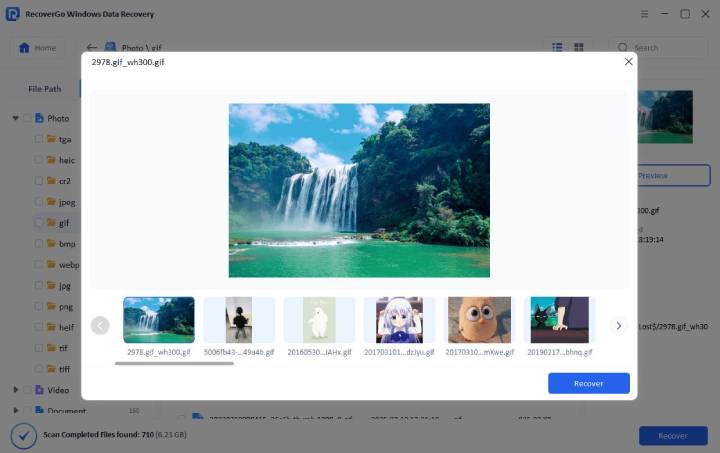
Step 3 Preview before Recovery: You can also preview the files to confirm if this is the file you are looking for.
FAQs About Puran File Recovery
Is Puran File Recovery easy to use?
The interface looks outdated, but all the features are available on the main screen. So, it is very easy to use the Puran File Recovery to scan and recover lost or deleted files. But it is worth noting that the outdated design can make it feel less intuitive than modern tools with better visual guidance.
Is Puran File Recovery still supported?
Yes, the tool is still supported and works on even modern Windows systems. However, the tool is not updated often, and the gap between updates can easily go up to a few years. So, this lack of timely updates means Puran File Recovery may not keep up with the advanced recovery techniques available in other software.
How long does Puran take to scan a drive?
The exact time to scan a drive with Puran depends on the drive size and the scan type. Deep scan can easily take several hours while quick scan usually takes a few minutes. However, the overall scan speed is still low when compared with modern tools.
Can Puran recover files from damaged drives?
Yes, Puran File Recovery can recover files from formatted or partially damaged drives. However, its performance is limited in more complex cases. The tool will struggle with heavily corrupted or fragmented data. Meanwhile, more advanced recovery tools generally provide better results.
In Conclusion
Overall, Puran File Recovery is a good and free option for basic recovery tasks. The scanning process is slow and not as efficient as seen in more modern tools. But regardless of all the downsides, we must remember that it is a free tool. So, if you want a data recovery tool with just an average recovery rate, then Puran File Recovery can be considered. But, if you are really serious about data recovery and want fast scanning and high recovery rates, then you should consider an alternative like iToolab RecoverGo Windows Data Recovery.