

Recoverit claims a recovery rate of 99.5% and support for 1000+ file formats. Another big promise made by Recoverit data recovery is that it can be used in 10,000+ data loss scenarios. This makes one wonder if Recoverit really works or if all of these claims are just hype. So in this Wondershare Recoverit review, we will tell you everything you need to know based on our hands-on testing. We will cover Wondershare Recoverit data recovery software’s features, pros and cons, pricing, and how to use it. We will also look at real user reviews to help you decide if this tool is as good as it claims to be!

Part 1: Wondershare Recoverit Data Recovery Review
Recoverit is developed by Wondershare and has been around since 2003. It is a data recovery tool that allows users to recover lost, deleted, or corrupted files from different storage devices. Recoverit data recovery tool is available on Windows. The tool also supports all the popular file formats and thus can be used to recover photos, videos, documents, or any other file type. This tool can be used to recover files from HDDs, SSDs, SD cards, flash drives, and so on. Overall, the tool supports 1000+ file formats and over 1 million devices (cameras, laptops, PC, so on).
Pros and Cons of Recoverit Data Recovery
Here’s a list of all the pros and cons of Recoverit based on our hands-on testing:
Pros
- 500MB free recovery
- Works really well for common file types
- Easy to use and beginner- friendly interface
- Supports RAID and NAS volumes
- Preview files before recovery
Cons
- More expensive subscription cost
- Slow deep scan on large drives
- Frequent upsells other product in the software
- Inaccurate preview result
Is Recoverit a good software?
Overall, Wondershare Recoverit is a good data recovery software for everyday use. It can be used to recover accidentally deleted files and even files that are lost due to format or corruption. Our testing shows that Recoverit can easily and reliably recover standard file types such as MP4, JPG, DOCX, and so on. However, the performance can vary depending on less common formats or more complex data loss scenarios. So, for an everyday user, Recoverit can be a good choice. But it is not ideal in complex recovery cases, and it is also more expensive than other data recovery tools.
Is Wondershare Recoverit Safe to Use?
Yes, Recoverit is safe to use as long as you download it from the official website. Recoverit is developed by Wondershare, which is a well-known software company. They also have a number of other software and none of them contain any malware. However, the problems arise when people search for Wondershare Recoverit full crack or Wondershare Recoverit crack download. Such cracked versions of Recverit often include malware, spyware, and other malicious files, which can harm your system. Also, using Wondershare Recoverit crack can lead to inconsistent results or data loss, as these versions are often unstable and lack updates. In short, Recoverit data recovery is safe to use and completely trustworthy. The only thing you need to keep in mind is to avoid using any cracked versions of Recoverit.
Is Wondershare Recoverit free?
The Recoverit software can be downloaded and used for free, but it comes with limitations. So in that sense, we can say that Recoverit is more of a freemium product. The Recoverit data recovery free version allows users to scan and preview files. However, the tool limits the users to only recover files up to 500 MB. Once a user hits the cap of 500 MB, the recovery button will show a pop-up asking them to upgrade. Another thing worth mentioning is that the free version shows the upgrade prompt a little too much. So, if you decide to use the free version, be ready to go through multiple prompts during the scanning and recovery process. A user will need a paid plan to recover more than 500 MB and use more advanced features.
Part 2: How to Use Wondershare Recoverit (Step-by-Step Guide)
Wondershare Recoverit is very easy to use, which makes it ideal for beginners and professionals. Here’s a quick step-by-step guide on how to use this data recovery tool:
- Download and install Recoverit from the official website.
- Select location where you lost data;and scan your drive.
- Wait for the scan until it completed.
- Select a folder/file and press the recover button and choose a location to store the recovered files.

Note:
It is important to recover the files to a different drive or folder to avoid overwriting (This increases the chances of data recovery)
Part 3: Recoverit Data Recovery Results
We tested the Wondershare Recoverit on the following storage devices:
- 4 GB USB Drive (FAT 32)
- 1 TB HDD (NTFS)
- 100GB External HDD (NTFS)
- 64 GB SD Card (FAT32)
We filled the storage devices with different file types (common + uncommon). This allowed us to check the performance of Recoverit with different file types and scenarios. Test Results : During our tests, we successfully recovered the common files such as MP4, JPG, RAW image formats (CR2), and DOCX. However, the results were less consistent with the uncommon file types such as SQL database files, HEIC, and JP2 files. Larger video formats like AVI and MKV also showed occasional playback issues after recovery.
Part 4: Wondershare Recoverit Users Reviews
Wondershare Recoverit has mostly positive user views on Review aggregation sites. The Recoverit has a 4.6/5.0 rating on Trustpilot and 4.3/5.0 on G2.
What people like about it: The user experience (easy to use), support for multiple file types, and fast recovery speed.
What people dislike about it: More expensive, poor customer support, and difficult refund process.
Sophie on Trustpilot said:
“Recoverit does exactly what it claims. I was able to recover most of the files, but the tool didn’t retain the original folder structure. So, I had to do some additional effort on my part, but it was a good experience overall. However, the tool is a little expensive, which is something they must work on!”
Darren on Trustpilot said:
“Around 20% of the files were unreadable or had weird names. Still, Recoverit managed to recover 80% of my data which is pretty good.”
Mauro on Trustpilot said:
“The pictures looked perfectly fine in the preview feature. But when i tried to recover it, the tool failed to recover files properly. Now, the customer support team is finding excuses to give me a refund.”
Part 5: A Cheaper Wondershare Recoverit Alternative
One of the biggest issues for most people is the Wondershare Recoverit price! Its price is almost double than most other data recovery tools in the market. A cheap alternative to Wondershare Recoverit is iToolab RecoverGo Windows Data Recovery. For example, the monthly plan of Recoverit costs $64.99, while the RecoverGo Windows Data Recovery only costs $39.99. The best part? You get an easy-to-use user interface, support for all file types, and a high success rate. Quick scan and advanced scan is used for different data loss situations, greatly increases the recovery rate.
Key features of iToolab RecoverGo
- Quick scanning speed: Ultra-fast scanning with minimal memory usage, efficiently recovering files from exfat drives in just minutes.
- High success rate (99%) for data recovery: Advanced algorithms guarantee a high success rate and improves your recovery efficiency.
- Option to pause and resume the recovery process: Reduces the impact of the recovery process on your workflow and makes it more manageable.
- Supports 1000+ file types: Retrieve all permanently deleted file types and formats, including photos, videos, documents, audios, emails, archives, and more.
- Supports 2000+ devices: Such as computers, SD cards, external drives, cameras, more.
Why is it better than Recoverit?
There are several reasons why iToolab RecoverGo Windows Data Recovery is a better choice than Wondershare Recoverit data recovery. The first one is that RecoverGo is more affordable and offers the same core features. Another reason is that RecoverGo has a high success rate (99%) for data recovery. In exFAT scenarios, RecoverGo Windows Data Recovery outperforms Recoverit. Moreover, it can successfully recover even uncommon file types, a task where Recoverit performs less effectively.Also, the scanning process is faster and more efficient in the RecoverGo. On top of that, a user can recover the files in just 3 easy steps. Overall, iToolab strikes a stronger balance between performance, ease of use, and price for most everyday users.
How to use iToolab RecoverGo
iToolab RecoverGo has a very simple user interface, but still uses advanced scanning and recovery algorithms. Here’s a quick list of steps on how to use it:
Step 1 Select a Location: Open the RecoverGo Windows Data Recovery tool and choose a location where you lost files or data. After selecting a drive, click on “Search for Lost Data.”

Step 2 Scan Your Drive: The scan time depends on the size of your drive or data.
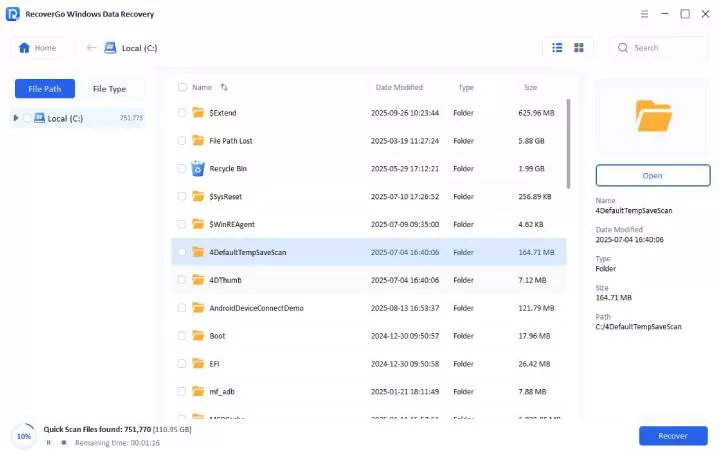
Step 3 Preview and Recover: Once the scan is complete, RecoverGo will list all the lost/deleted files. You can now preview the files and restore the ones you actually need.

Just like that, you can recover any type of file with RecoverGo in just 3 simple and easy steps.
FAQs About Recoverit Data Recovery
How much does Wondershare Recoverit cost?
Wondershare Recoverit comes with multiple plans depending on license type and features. The monthly plan costs $64.99 while the annual plan costs $74.99. Wondershare also offers a lifetime plan of Recoverit for just $134.99. All of these plans for Wondershare Recoverit full version (paid) can be used on up to 2 Windows PCs for data recovery.
Does Wondershare Recoverit really work?
Yes, Recoverit works well in most common data loss situations. It also supports all the popular file types, which allows you to recover lost/deleted photos, videos, and other files. The user reviews and our testing show that Recoverit works for the most part. However, some users have reported that recovery can be slow, and some files are not intact after the recovery. So, the data recovery results vary depending on device condition and file type.
What is the success rate of Recoverit?
Recoverit claims it has a success rate of 99.5% on its official website. However, the actual success rate of Recoverit is around 89% based on user reviews and ratings on independent review sites. It is worth mentioning that the success rate depends on file type, storage conditions, and time. An attempt to recover a file quickly after data loss usually leads to a higher success rate.
In Conclusion
Overall, Recoverit data recovery is an easy-to-use option for data recovery. Its user-friendly user interface makes it a good option for anyone trying to recover photos, videos, and documents from internal/external drives. But the success rate of data recovery drops with uncommon file types or more complex data loss situations. Also, the biggest drawback of Recoverit is that it is expensive! After all, there are more capable data recovery tools like iToolab RecoverGo Windows Data Recovery, which offers a high success rate at a more affordable cost.To conclude, Recoverit is a decent option for most of the home users. But, its high cost is something which can be off-putting to many users, considering there are so many other affordable options.