

If you are reading this, you must be dealing with accidentally deleted GoPro footage. Whether you lost a clip accidentally or have a malfunctioning SD card, there’s good news, gopro recovery is possible in most cases. The key is acting quickly and using the right approach.
In this complete GoPro recovery guide, we will explain why files get lost, what to do before recovery, and walk you through proven methods to get your footage back. We’ll also share tips to prevent future data loss.
Part 1: Why Does GoPro File Loss Happen?
To recover deleted files from GoPro, first learn how they were lost. Understanding what happened can help you determine which recovery method to use.
These are the most common reasons for GoPro data loss:
Accidental Deletion
Someone deleted photos or videos from the GoPro or SD card. This is the most common cause of data loss.
SD Card Error
Corruption, damage, or improper formatting causes files to become lost or inaccessible. This can happen without warning.
Premature Removal
Removing the memory card or battery while recording can corrupt files. Always wait for the recording to fully stop before removing the card.
Accidental Formatting
Formatting the memory card accidentally deletes all of its data. This can happen when navigating camera menus.
Card Corruption
When a card’s file structure is damaged, files become inaccessible.
Damaged Camera
Even sport cameras can suffer severe damage that impacts the memory card. Physical damage may require professional recovery services.
In many cases, the files are actually still on the memory card. Act quickly to maximize your recovery chances.
Part 2: Can You Recover Deleted GoPro Files?
Yes, deleted files from your GoPro can be recovered. However, whether or not you’ll be able to recover your lost files depends on several factors:
Part 3: What to Do Before GoPro Recovery?
Before running any GoPro recovery software, take these preparation tips to protect your data and ensure successful recovery:
Tip 1: Stop Using the SD Card Immediately
As soon as you realize your footage is gone, stop taking new pictures, saving files to the SD card, or recording videos.
Tip 2: Eject the SD Card from Your GoPro
Remove the SD card from your GoPro and connect it directly to your computer using a card reader. Avoid connecting the camera via USB cable.
Tip 3: Don’t Format the SD Card
If your computer asks you to format the card, click Cancel. Formatting will make recovery much more difficult.
Tip 4: Create a Disk Image (Advanced)
Advanced users can create a clone of the SD card first. This allows you to always work from a copy, protecting the original card.
Tip 5: Select a Recovery Destination
Make sure to select a destination on a different drive than the SD card. NEVER save the recovered files to the SD card you are trying to recover from.
Part 4: How to Recover Deleted Files from GoPro?
You can retrieve lost or deleted GoPro files in 3 ways. Try each method in order:
- Method 1: Use GoPro Recovery Software -99% Success Rate
- Method 2: Recover Deleted GoPro Video Free
- Method 3: GoPro Recovery Service
Method 1: Use GoPro Recovery Software 🔥
For the best recovery results, iToolab RecoverGo Windows Data Recovery is an excellent choice. It supports SD cards, cameras, and various storage devices, helping you recover lost GoPro videos, photos, and other files in just a few clicks.
Key Features:
- Supports 1000+ file formats, including GoPro specific files like MP4, LRV, THM, RAW, etc.
- Simple interface that guides you through each step.
- Super-fast scanning speed – scans hundreds of GB in minutes.
- Three scan modes find more deleted GoPro files easily.
- Handle many data loss situations, such as corrupted, formatted SD cards, USB drives, and more.
How to Recover GoPro Files with RecoverGo:
Step 1 Select the SD card from the list of drives. Click “Search for lost data”.

Step 2 RecoverGo will begin scanning your drive.
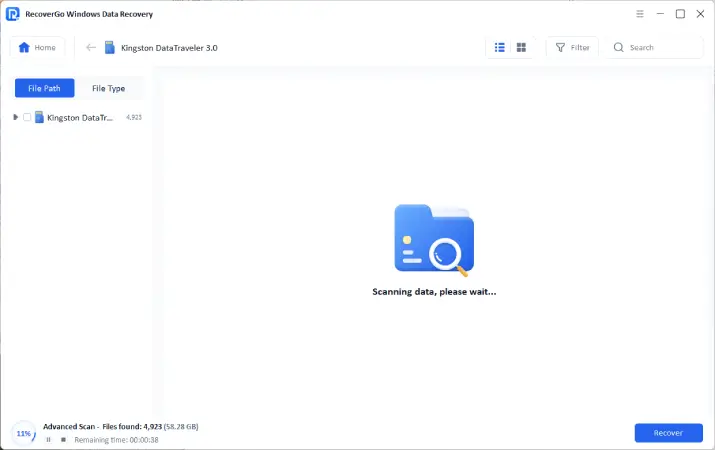
Step 3 Select the files you want and click “Recover.” Choose a location on your computer to save them.

Method 2: Recover Deleted GoPro Files Free
Recuva is a popular free option for basic data recovery. It’s quick to set up and guides you with a wizard. Here’s how to use it:
GoPro Recovery Steps:
- Go to Piriform’s website and download/install Recuva.
- Insert your GoPro SD card into your computer.
- Open Recuva, then choose file type you want to recover.
- Specify that you want to scan your SD card. Tick the box that says “Enable Deep Scan.”
- Click Start, then wait for Recuva to finish scanning.
- Go through the results (green = good condition, red = bad) and tick the boxes for the files you want.
- Click Recover, then select a location on your computer to save those files.

Pros
- Completely free.
- Quick to set up with wizard guide.
- Compatible with most versions of Windows.
Cons
- Deep scans take a long time.
- Not as effective on corrupted or badly formatted cards.
- Can’t preview files before recovering.
- Struggles with newer GoPro file formats.
You can try Recuva first if you need a free recovery option. But if it fails to recover your files or the recovered files are corrupted, RecoverGo will give you a much higher success rate.
Method 3: GoPro Recovery Service
If your SD card is cracked, burnt, or has sustained water damage, professional data recovery service may be your only option. GoPro themselves recommends third-party recovery services if their troubleshooter can’t fix your card.
Recommended Professional Services:
- DriveSavers: Reputation as one of the most dependable data recovery companies. No data, no charge.
- Ontrack Data Recovery: Deals with all kinds of storage media with cleanroom facilities.
- Secure Data Recovery: Free evaluations and experience with damaged SD cards from action cameras.
Pros
- Can recover files from physically damaged cards.
- Technicians do all the work.
- Higher success rate for severely damaged media.
Cons
- Expensive: $300-$1,500+.
- Could take days or weeks.
- File recovery is not guaranteed.
If your SD card isn’t physically damaged, there’s no need to spend money on repairs. RecoverGo can handle most deletion and formatting issues quickly and at a much lower cost.
Part 5: How to Prevent GoPro Files Loss in the Future?
Losing your files is traumatizing. Take these steps to prevent a repeat:
Always Back Up Your Footage
Dump your video to your computer or cloud storage after every shoot. This is the single most important habit to develop.
Invest in a Quality SD Card
Low-end cards are more prone to failure. Look for SanDisk or Lexar cards that are guaranteed to work with action cameras.
Format the SD Card in Your GoPro
Formatting on the camera keeps the file system uniform and prevents unnecessary issues. Always format in-camera, not on your computer.
Turn Off Your Camera Before Removing Card
Always power down your GoPro before taking the SD card or battery out. This prevents file corruption.
Bring a Second SD Card
If you switch out at the midpoint of your trip, you’ll avoid filling the card to capacity, which can cause SD card write errors.
Turn On Cloud Backup
With automatic backup turned on in GoPro’s Quik app, your video will instantly upload to your phone or cloud drive whenever you’re connected to Wi-Fi.
FAQs About GoPro Recovery
How to recover corrupted GoPro files?
Launch a GoPro file recovery tool that has a deep scan function (iToolab RecoverGo is one), then proceed with recovery. If you locate your video but it won’t play, you can try using a video repair afterwards.
Does GoPro have a recycle bin?
No. GoPro cameras aren’t equipped with a recycle bin. When you delete a file from your GoPro camera, it doesn’t send it to a temporary location. Instead, it’s tagged as deleted on your SD card immediately. That’s why it’s critical to use recovery software immediately after you delete something.
Can I recover GoPro files after formatting?
Yes, if you format your SD card accidentally, your files can likely be recovered. However, if you format your SD card multiple times, you will not have a high chance of recovery. Use recovery software like RecoverGo immediately after accidental formatting.
Conclusion
If you lose footage on your GoPro camera, don’t panic. Accidental deletion, corrupted SD cards, and botched formatting jobs can all be fixed with the right software.
For the best chance of success, start with iToolab RecoverGo Windows Data Recovery. It offers a 99% recovery rate. Try Recuva if you need a free tool. Contact a professional data recovery service as a last resort if your SD card is physically damaged.
Just remember to regularly back up your files, so you don’t ever have to worry about losing them again.