Samsung amazes users with improved smartphones filled with better features and power. This time, the Samsung S26 Ultra vs S25 Ultra comparison draws much attention everywhere. Both models look stylish and deliver outstanding camera results for daily needs. Many users wonder whether the upgrade is truly worth the money and effort.
The design, display, and internal improvements may seem small yet mean big performance changes. In this article, you will learn all the key differences between the two Samsung Ultra models. Apart from that, we will also guide you on transferring data to your new device.
Part 1. Samsung S26 Ultra VS S25 Ultra: Design & Display
Comparing Samsung Galaxy S25 Ultra vs S26 Ultra shows subtle yet important design changes. Next, we will explore each model’s design and display it in detail below:
Samsung S26 Ultra Design & Display
The new Galaxy S26 Ultra introduces refined craftsmanship that feels lighter yet sturdier overall. It replaces the titanium body with Armor Aluminum, reducing weight and enhancing everyday comfort. Alongside that, this slim 7.9 mm design at 214 g makes the phone easier to hold during long use. Plus, bright visuals come alive on its 6.9-inch Dynamic AMOLED 2X QHD+ display panel.
Moreover, the screen’s 1–120 Hz adaptive refresh rate ensures smoother scrolling and optimized battery efficiency. Samsung boosted peak brightness to nearly 2600 nits, improving outdoor visibility under strong sunlight. Besides, it introduces a built-in Privacy Display layer to easily protect users’ on-screen information. Compared to Samsung Galaxy S26 Ultra vs S25 Ultra, these updates enhance both style and usability.
Samsung S25 Ultra Design & Display
The Galaxy S25 Ultra set high design standards with its sleek titanium metal body. Its 8.2 mm frame and 218 g weight give it a premium, solid hand feel. Furthermore, Samsung used Gorilla Armor 2 ceramic glass for stronger drop and scratch protection benefits. This makes the device reliable for users seeking long-lasting toughness under daily handling conditions. The display also offers smooth 120 Hz visuals with DCI‑P3‑rich colors and adaptive LTPO technology.

With Vision Booster, brightness adapts intelligently to lighting conditions, keeping content vivid indoors or outdoors. In addition, its signature camera bump gives it a bold, distinctive look that many users admire. Both models share stunning AMOLED clarity, though improvements appear in the Samsung S25 Ultra vs S26 Ultra updates. Thus, the sharp resolution makes every tiny detail stand out on the large display.
Part 2. Samsung S25 Ultra VS S26 Ultra: Specifications
Exploring the Samsung Galaxy S26 Ultra vs Samsung Galaxy S25 Ultra also means checking their inside power and features closely. The following sections break down every technical detail to help you choose well:
1. How does the Galaxy S26 Ultra compare to previous models?
It offers better privacy features and gaming power than previous models, but lacks smoothness. You can check the following table to see the specific build and battery changes:
2. How has the design been upgraded on the Galaxy S26 series?
The S26 series rounds edges more for a comfortable grip during long sessions. This comparison table highlights the new materials and layouts for both flagship phones:
3. Which Galaxy smartphone camera offers the best experience?
The S26 Ultra uses a wider lens to capture sharper low-light shots. Both share a 200 MP sensor, but the S26 edges out in detail. Look at the camera specs below to understand the improvements in photography:
4. Which Galaxy smartphone provides an immersive gaming experience?
A stronger GPU in the S26 Ultra delivers much higher mobile frame rates. The device stays cooler for longer during your very heavy and long sessions. Review these gaming metrics to see which phone handles high-performance tasks better:
5. How does the Galaxy S26 series compare in display size to previous models?
Both big Ultra phones match at 6.9 inches for very vivid movie viewing. The data below explains the screen dimensions and the innovative new privacy technology:
6. What are the detailed features of the Galaxy S26 series display?
The S26 Ultra screen shines with smart adaptive brightness for all lighting conditions. Updated Gorilla Armor 2 resists scratches, keeping your visuals very crisp. This list compares the peak brightness and protection levels of these premium displays:
7. How long is the video playback time for the Galaxy S26 series?
The S26 Ultra lasts for 31 hours to beat the S25’s strong endurance. An efficient chipset helps both handle full-day streaming without any quick drain. So, check the battery performance and efficiency stats in the simple comparison table here:
8. How large is the memory and storage capacity of the Galaxy S26 series?
The S26 Ultra offers 16 GB of RAM for all your multitasking needs. Anyhow, see the memory and storage options for each model in the chart below:
Part 3. How to Choose the Samsung Series?
Choosing between models depends on your daily needs and your overall budget priorities. When comparing Samsung Galaxy S26 Ultra vs Samsung Galaxy S25 Ultra, focus on real benefits. You can pick the S26 Ultra if you want faster charging and better privacy features. Besides, it suits users needing smoother gaming and a lighter, more comfortable phone design.
However, the S25 Ultra remains a strong choice with similar display and camera quality. Therefore, it works well if you prefer saving money without missing essential flagship features. Both share big screens, top cameras, and an S Pen for creative work easily. Overall, choose based on the features you actually use instead of small technical differences.
Part 4. How to Transfer Data from iPhone to Samsung S26/S25
After comparing Samsung S25 Ultra vs Samsung S26 Ultra, your chats should transfer easily too. This is where iToolab WatsGo offers a simple and reliable WhatsApp transfer solution. Additionally, it works effortlessly with the latest Android 16 for both Ultra models without issues. You can even move WhatsApp Business data from your iPhone to your new Samsung phone.
While transferring, it also ensures that absolutely no data is left behind or lost. Along with that, WatsGo moves over 20 different data types, including messages and your private photos. Apart from that, users can even restore Google Drive backups to Samsung devices in minutes. Before migration, you do not need to factory reset your new Samsung device for the data transfer process.
Moves WhatsApp data from one operating system to another without restrictions.
- Move GBWhatsApp to regular WhatsApp easily without losing any important messages.
- Backup WhatsApp chats to PC or Mac for free protection anytime needed.
- Handles Android-to-Android or iPhone-to-iPhone transfers just as smoothly.
- Offers 3X faster speed for 1.5GB backups compared to other transfer tools.
- Achieves 90% success rate without factory resetting your Samsung or iPhone.
Detailed Guide to Use WatsGo to Transfer WhatsApp from iPhone to Android
Upon reviewing Samsung S26 Ultra specs vs S25 Ultra, moving your WhatsApp chats stays simple. Thus, take guidance from the guide below to move WhatsApp data safely without complications:
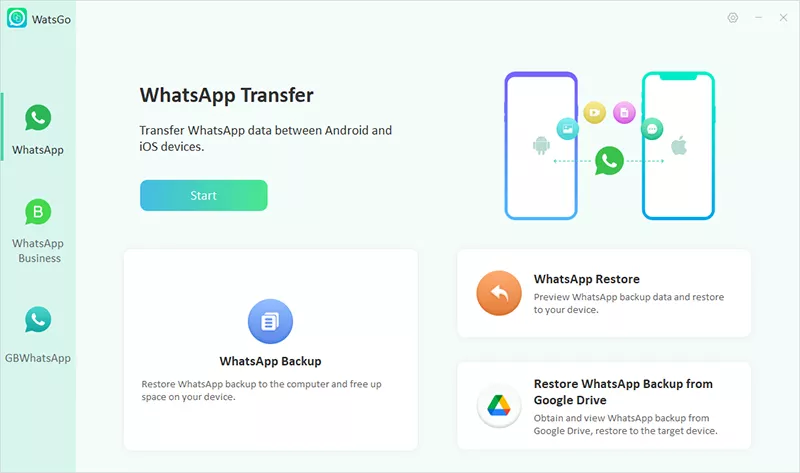
Step 1. Open the WhatsApp Transfer Feature
Initiate by accessing the “WhatsApp Transfer” feature on WatsGo and clicking the “Start” button.
Step 2. Connect Phones and Select WhatsApp Data
Next, connect both devices to your computer and ensure the correct phones are assigned as “Source” and “Destination.” Finally, click “Transfer” to choose the desired WhatsApp data and hit the “Continue” button.

Step 3. Create Backup and Verify Account
The software will then back up your WhatsApp data from the iPhone. After the backup is finished, enter your phone number along with the country code and press “Verify.”

Step 4. Transfer Data to Samsung S26 Ultra
Upon verification, you need to ensure that you turn off 2FA if it is enabled. The transfer process will begin automatically, and a success message will appear once everything is completed.

Conclusion
In summary, both the new Ultra models offer an amazing display and very powerful camera tools. Thus, choosing between the Samsung S26 Ultra vs S25 Ultra depends on your needs. You can pick S26 Ultra for faster charging, a privacy screen, and the better gaming power you need. When switching phones, use iToolab WatsGo to move WhatsApp chats and other data easily and safely.
iToolab WatsGo – Safely back up your WhatsApp data
389,390,209 people have downloaded it