

The loss of data from an external hard drive is one of the most frustrating issues users face. It can be accidental formatting, mistaken file deletion, or corruption after unsafe removal—but the outcome is always the same: important files are suddenly lost.
External drives can lose data in seconds, especially when used daily to store and transfer photos, work documents, videos, and backups. This is why selecting the right external hard drive recovery software is critical.
This guide evaluated and compared the top external hard drive recovery software based on practical testing, recovery rate, scanning speed, and user-friendliness. The goal: help you find lost files safely and confidently.
Part 1: Factors to Consider When Choosing the Best External Hard Drive Recovery Software
Choosing the right recovery tool isn’t just about popularity or price. The best software for recovering external hard drives combines performance, usability, and compatibility.
Part 2: 5 Best External Hard Drive Recovery Software In-Depth Reviews
The following tools were selected based on real testing and user experience. Each review focuses on performance, usability, and recovery reliability—not just feature lists.
- 1. iToolab RecoverGo Windows Data Recovery🔥
- 2. Tenorshare 4DDiG Data Recovery
- 3. R-Studio
- 4. Stellar Data Recovery
- 5. PhotoRec
1. iToolab RecoverGo Windows Data Recovery🔥
iToolab RecoverGo Windows Data Recovery is a professional-grade external hard drive recovery software that helps users recover lost or deleted data with up to a 99.7% success rate.
Its simple and intuitive interface makes recovery easy. Users can complete the process in just three steps, with no technical skills required.
Key Features:
- Supports 1,000+ file formats: Recovers photos, videos, documents, and more.
- Free preview: Scan and preview files before recovery.
- Three scan modes: Helps find more lost or deleted files from external drives.
- Ultra-fast scanning: Scan hundreds of GB in just minutes.
- Brand compatibility: Works with Seagate, Western Digital, Toshiba, Samsung, and more.
How to Recover Deleted Files from External Hard Drive:
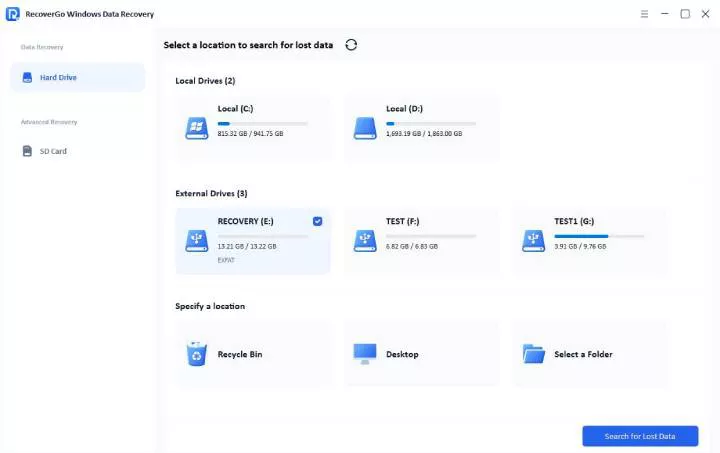
Step 1 Download and install RecoverGo. Connect your external hard drive to the computer, then click “Search for Lost Data.”
Step 2 The tool begins scanning your drive. Use filters to quickly locate specific files during the scan.
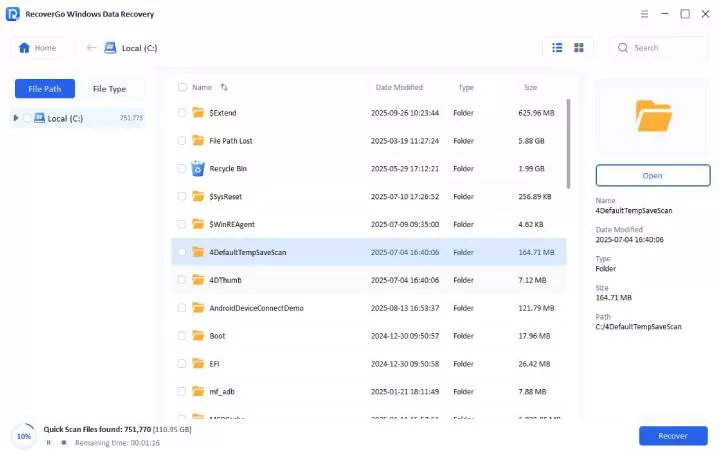
Step 3 Preview found files, select what you want, and click “Recover.” Choose a safe location to save your recovered data.

User Experience
In our real-world testing, RecoverGo consistently detected deleted, formatted, and RAW files while preserving original folder structures, making recovery significantly easier for beginners. Scan results were well organized, making it easy to locate specific files.
Tester’s Verdict
RecoverGo is an excellent choice for users who want their data back quickly in a few steps. It’s an excellent choice for most people trying to recover files from an external hard drive.
2. Tenorshare 4DDiG Data Recovery

4DDiG Data Recovery makes it easy to recover deleted files with a simple workflow. It supports hard drives, SSDs, USB drives, SD cards, and other external storage devices.
Pros and Cons:
User Experience
In testing, 4DDiG Data Recovery showed strong results when recovering files from an external hard drive. The software successfully detected large files that other tools missed during quick scans. Scanning speed was, however, slowed significantly when the drive had bad sectors,which required patience during deeper scans.
Tester’s Verdict
Tenorshare 4DDiG is a good alternative for users who need to recover deleted or formatted files without requiring command-line skills.
3. R-Studio

R-Studio is a feature-rich external hard drive recovery tool. It gives users full control over every recovery step.
Pros and Cons:
User Experience
R-Studio turned out to do a good job of recovering files and folders that had been deleted by accident. The fact that it has fine-tuning options really helped it pick up on files that other, more basic programs would have completely missed. But the R-studio interface ended up being a bit too complicated for beginners—and incorrect settings can easily ruin the whole process.
Tester’s Verdict
R-Studio is most appropriate for experienced users who require advanced recovery features and are comfortable with technical settings. It works well in complicated recovery environments but is not ideal for novices.
4. Stellar Data Recovery

Stellar Data Recovery is an all-in-one recovery software for external hard drives that combines stable scanning with structured data restoration.
Pros and Cons:
User Experience
Stellar Data Recovery stood out for its ability to preserve original folder organization after recovery. Even after formatting an external drive, recovered files were grouped correctly, which saved time during file review. Scan speed was slower at the beginning, but remained stable throughout the process.
Tester’s Verdict
Stellar Data Recovery is a good option for business users and professionals who value well-organized recovery results and consistent performance—particularly when working with structured data.
5. PhotoRec

PhotoRec is a globally recognized open-source data recovery software that specializes in raw file carving from external hard drives.
Pros and Cons:
User Experience
PhotoRec performed well in situations where file systems were too damaged for standard recovery tools to read. It successfully extracted raw files from heavily corrupted drives. However, the lack of previews and file names meant users had to manually sort recovered data, which can be time-consuming.
Tester’s Verdict
PhotoRec is best used as a last-resort recovery tool by technical users. It excels when other software fails, but requires patience and manual file management.
Part 3: Core Product Parameter Comparison Table
The table below summarizes key findings from hands-on testing, focusing on recovery success rate, scan speed, free recovery options, and each tool’s standout feature.

iToolab Special Coupon
20% OFF iToolab coupon code for data recovery tool
RecoverGo is a practical choice for everyday users, delivering strong recovery performance and a straightforward interface. It also comes at a more affordable price than other tools.
Conclusion
Losing files from an external hard drive can be stressful, especially when they seem to vanish without warning. But recovery is possible with the right tool.
After hands-on testing, the factors that matter most are: scanning reliability, preview capabilities, and ease of use. Out of all the tools reviewed, iToolab RecoverGo Windows Data Recovery stands out—it gets the job done without unnecessary complexity, making it the top pick for most users trying to recover files from an external hard drive.