

Sometimes, the worry about the safety of loved ones means the need to keep track of someone for personal reasons. For a child or partner, using WhatsApp can be one of the simplest ways to do this. Since the app is widely used for chatting and sharing locations, many people wonder how to track someone on WhatsApp without causing alarm or needing technical expertise.
This extensive guide will explore practical ways that are both easy and secure to achieve this goal. With the right approach, staying informed and bringing peace of mind without breaking trust is possible. Read on to learn the best way and discover a robust tool to secure your chats.
Part 1. Can I Track Someone on WhatsApp?
A question that arises first regarding this situation is whether tracking others on this platform is possible. WhatsApp is an instant communication app that is highly focused on user privacy, employing zero-access encryption. That guarantees that only the sender and recipient can read the messages. It means that monitoring someone’s activity on the app without them allowing or knowing is not straightforward.
Yet, certain features and scenarios where the answer to the “How can I track someone on WhatsApp” question is affirmative do exist. The simplest thing to keep track of is the location, as the app provides a dedicated feature to share live location. This function aids a lot in coordinating meetups or ensuring someone’s safety during travel.
While no native feature to monitor someone else’s chats or calls exists in this messaging platform, certain external apps and workarounds can be employed. These apps often require physical access to the target mobile and may involve ethical and legal implications. It’s crucial to respect privacy laws and obtain proper consent before considering such tools.
Part 2. How to Track Someone WhatsApp Chat/Messages?
Although no direct approach exists to keep an eye on someone’s conversations, it is still possible. Several methods do exist for this, but each comes with unique considerations and prerequisites. An important point to note is that tracking such activities of others without their consent can violate their privacy. As for learning how to spy on someone’s WhatsApp messages/chat, the following 2 approaches can help you:
Approach 1. WhatsApp Web
It is primarily used to access your chat and media on the platform via a browser for ease. While this function is intended for personal use, the targeted person’s account can be linked to your system to monitor their chats.
Step 1. Get to the targeted browser on your computer and access the web.whatsapp.com site to commence the task. Following that, move to the targeted person’s mobile to tap the “Three Dots” menu or Settings tab on WhatsApp.

Step 2. Here, opt for “Linked Devices” from the menu to hit “Link a device” and scan the QR code from the computer screen. Once linked, the WhatsApp account will be accessible from the computer browser to track chats.

Approach 2. Use a Monitor App
There are external applications designed to monitor WhatsApp chats. These often require installation on the target mobile and may offer features such as message monitoring and call logs. These apps are mainly used to monitor your child or partner. Often, they monitor the messages by keywords. Any messages with certain words will be marked.
Part 3. How to Track Someone’s Location on WhatsApp?
For those interested in keeping an eye on their loved ones traveling, the process is much easier. Both the platform itself and other apps offer the ability to find someone’s location on WhatsApp. The target has full control over the feature and can disable it at any time they wish to.
Approach 1. WhatsApp Live Location
As a native feature, it lets users share their current location in real time with individual contacts or groups. However, if you want to see someone’s location on WhatsApp, you need to require the other user to share the “Live Location” with you. You can’t see their location without their consent.

Approach 2. Using Google Maps
Google Maps makes it easy to share your location with your family members or friends. To track someone’s location with Google Maps, you need a physical access to another user’s cell phone. Here is how to operate:
- Open Google Maps app on another user’s cell phone.
- Tap on the profile icon.
- Navigate to Location sharing. Then tap on the Share location or New share button.
- Now, you can choose how long to share, from 15 minutes to one day.
- Tap on the More options. Then you can share the location via a link.
- Copy the link and paste it to your WhatsApp chat.
- Take your phone. Open WhatsApp. Tap on the chat. Now, you can see the live location of the other user.

Part 4. How to Track WhatsApp Calls?
Apart from location and chats, many users would also like to keep an eye on who their kids or loved ones are calling. For WhatsApp calls, it can be a bit hard, as many general methods do not work. One example can be the “WhatsApp Web,” which does not support call history despite being a good choice to monitor conversations.
For those seeking a more comprehensive approach to learning how to track WhatsApp calls, external apps like the AirDroid Parental Control app are available. Some of these applications can get you the call history, while others can provide logs of the call with timestamps. However, it’s crucial to emphasize that using such monitoring tools without the explicit consent can be illegal.
Part 5. How to Track Someone WhatsApp Last Seen🔥
Want to know the last time when your contact was active on WhatsApp? You can simply open the chat and check the last seen time under the user’s name. But, there are some specific reasons that you might want to see someone’s last seen without opening the chat. WhatsApp doesn’t offer a default way to check someone’s last seen time without opening the chat. In this case, a WhatsApp tracking app is helpful.
We highly recommend iToolab WaTracker. With this tool, you can add as many contacts as you want, and they won’t know their WhatsApp is being tracked.
Main Features of iToolab WaTracker:
- Check WhatsApp last seen without opening the chat.
- Get a timely and accurate notification when someone is online/offline on WhatsApp.
- Receive a detailed report to check how long your contact has been online.
- 100% data security. It won’t store or share your personal information.

How to Track Someone’s WhatsApp Last Seen with WaTracker?
Here is a step-by-step guide on how to use WaTracker.
Step 1 Launch WaTracker. Tap on the “Add Contact” button to monitor your WhatsApp contact. You need to enter the name, phone number, and region. Then tap on the “Start Tracking” button.

Step 2 In this step, you need to connect your WhatsApp account with WaTracker. It’s a easy process. The tool will generate a link code to help connect your WhatsApp account.

Step 3 Once done, go back to WaTracker. Tap on the “Activate” button, then you can see a detailed report of your contact’s activities.

Bonus Tip. Effectively Manage Your WhatsApp Data
Traditional methods like using Google Drive or iCloud backups often come with limitations, such as compatibility issues or incomplete data transfers. Hence, managing your WhatsApp content can be a hard task for many users, forcing them to look for reliable options. It is where specialized tools like iToolab WatsGo can offer more flexibility and control over your data management needs.
It is a dedicated WhatsApp data management solution designed to simplify the processes, ranging from transferring and backing up to restoring your app content. When moving from Android to iOS, vice versa, or even between devices of the same platform, WatsGo facilitates an effortless transfer. It ensures that even those without technical expertise can navigate the process with ease. Additionally, WatsGo supports selective data transfer and restore.
Moves WhatsApp data from one operating system to another without restrictions.
- Enables restoration of WhatsApp backups from Google Drive directly to an iPhone.
- Provides faster WhatsApp data transfer compared to many other tools.
- Allows saving conversations in readable HTML or CSV formats for documentation or printing purposes.
- Transfers WhatsApp data without needing to reset your iPhone, preserving existing settings.
- View, encrypt, or delete backups; supports iTunes backup viewing for quick access.
Quick Step-by-Step Tutorial on How to Backup WhatsApp Data to Your PC
It is a practical choice for users looking to maintain the integrity of their app content during device transitions. Adhere to the elaborate guide described below to safely save WhatsApp data directly to your computer, freeing up cloud storage space:
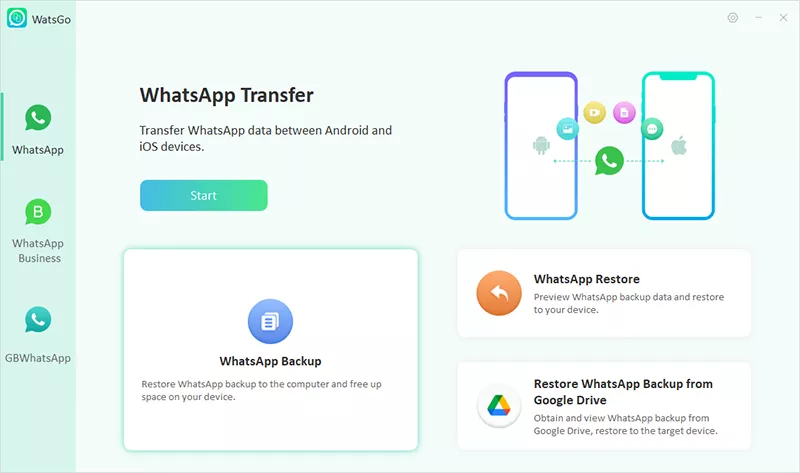
Step 1 Get and launch iToolab WatsGo on your computer and go straight to the home screen to choose “WhatsApp Backup.” Afterward, attach your phone to the computer with a USB cable, letting the tool recognize the connected device correctly.
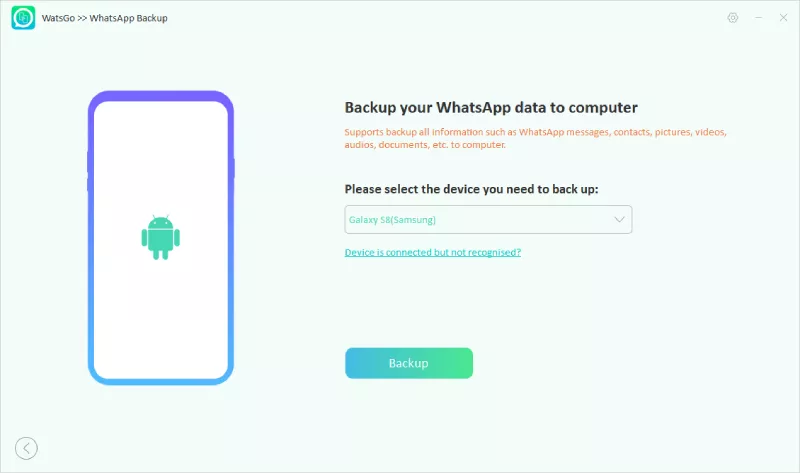
Step 2 Once the link is established, select the mobile model from the dropdown menu and click the “Backup” button. For iOS users, the step will result in the creation of their content backup.
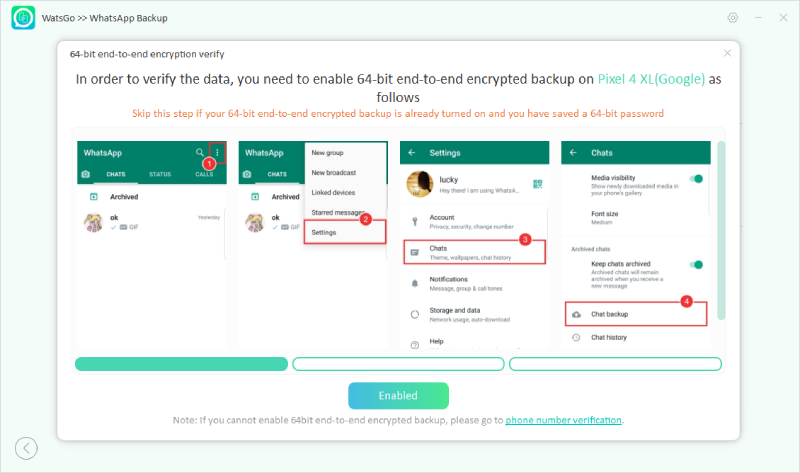
Step 3 Android users need to activate the encrypted backup feature by carefully following the instructions shown within the app. During this process, make sure to write down the 64-digit encryption key and keep it safe, for it will be essential later.
Step 4 As soon as encryption is enabled, WatsGo will begin collecting your WhatsApp messages and create a secure backup file for you. Finally, enter the encrypted password so the program can safely verify and decode the saved data when the backup completes.

Conclusion
In summary, knowing how to track someone on WhatsApp can involve various elements, from monitoring chats and calls to checking real-time locations. There are native choices like WhatsApp Web and Live Location, as well as external tools that offer deeper insight. If you want to track someone WhatsApp last seen, iToolab WaTracker is the best solution, as you can see someone’s last seen status without opening the chata and you can get a notification when someone comes online or goes offline.
Yet it’s always important to act responsibly and respect privacy boundaries. Most importantly, any tracking should be done with clear consent and legal awareness.
I need to track a number used in sextorting me on WhatsApp