

I’ve been shooting with this CF card for years, and today all my photos just disappeared.” No warning. No error message. The files were simply gone. Is there anything else I can try to help him recover his photos?
— From Reddit Community
A photographer recently posted this question on Reddit. Have you experienced this? You plug in your compact flash card and find nothing. That feeling of dread usually means one thing: all your files are lost forever.
But are they really? Luckily, compact flash recovery is possible in most cases. Whether you accidentally deleted files, formatted the wrong card, or encountered a corruption error, those files are likely still on the card. You just need to know how to get them back.
In this complete guide, we will explain why data loss happens on CF cards, what to do before attempting recovery, and walk you through two proven methods to recover your files.
Part 1: Common Causes of Compact Flash Card Data Loss
There are many reasons why data gets lost from a CF card. Understanding how it happened can help during the recovery process.
Accidental Deletion
Pressing “delete” instead of “select” is the most common cause. Quick review clips on a camera or browsing files on a computer can lead to accidental deletion. Unlike files deleted from your computer, files deleted from a CF card don’t go to the Recycle Bin.
Formatting the Wrong Card
We’ve all seen that pop-up asking if you want to format your card. One click of “yes” and everything disappears. Files are still recoverable after a format, but you need to act quickly.
File System Corruption
This usually results from:
- Removing the card while a photo is transferring.
- Camera dying in the middle of writing a photo.
- Not ejecting the card properly from your computer.
Cameras typically show “memory card error,” or the card appears empty when plugged into your computer.
Physical Damage
Damaged cards are difficult to recover from. Bent pins, water damage, and corrupted controller chips can prevent your computer from reading the card. However, software cannot help if the computer cannot detect the card.
Viruses and Malware
Computer viruses can interfere with your CF card. They may hide files or cause corruption errors if the card was connected during an infection.
General Wear and Tear
Compact Flash cards do not last forever. Flash storage has a limited number of write cycles, and older cards can fail unexpectedly.
Important:
No matter how your data was lost, STOP USING THE CARD immediately. Remove it from your camera and do not save any new files to it. Every new file can overwrite the files you want to recover.
Part 2: Key Things to Do Before Compact Flash Recovery
Many people make the problem worse by panicking. Before doing anything else, follow this checklist.
Do NOT Format the Card
If your camera asks you to format the CF card, say no. Formatting will not help recover your files. It will actually make recovery more difficult.
Do NOT Run Repair Tools
Windows users might instinctively run CHKDSK. Do not do this! These tools can destroy your ability to recover files by overwriting metadata. Your compact flash recovery software needs that metadata intact.
Use a Card Reader, Not Your Camera
Avoid connecting your camera to your computer via USB. Recovery tools need direct access to the card, and a card reader provides that. Connect the reader to your computer and recover files from the reader.
Do NOT Install Multiple Recovery Software
It can be tempting to download several recovery software. Don’t do it. Pick one, install it, and follow instructions carefully. Multiple installations can cause conflicts and reduce recovery success.
Make a Disk Image (Advanced)
Technical users may want to create a bit-by-bit clone of the CF card before recovery. Some programs allow this. The software works from the image, and your actual card is never touched. If something goes wrong, you can delete the image and make another.
Part 3: How to Recover Files from a Compact Flash Card?
You have two options: software or professional service. Choose the method that matches your situation.
- Method 1: Compact Flash Card Recovery Software (Recommended)🔥
- Method 2: Professional Data Recovery Services
Method 1: Compact Flash Card Recovery Software (Recommended)🔥
If your situation was caused by human error (deletion, formatting, corruption), try CF card recovery software first.
iToolab RecoverGo Windows Data Recovery is an excellent choice for Windows users. It is simple, effective, and reliable for compact flash card data recovery.
Why RecoverGo Works:
- 99% recovery rate: Advanced algorithms ensure a higher success rate.
- Wide compatibility: Works with all Windows versions(11/10/8/7).
- Simple step: Recover your data with a few steps.
- 1,000+ file types: Supports RAW, JPG, MP4, PDF, Word, and more.
- Universal device support: Works with almost any storage device.
How to Recover Files from CF Card with RecoverGo:
Step 1 Connect your CF card to your computer with a card reader. Open RecoverGo, then click the “Search for Lost Data”

Step 2 This tool starts the scanning process to locate deleted or lost files.
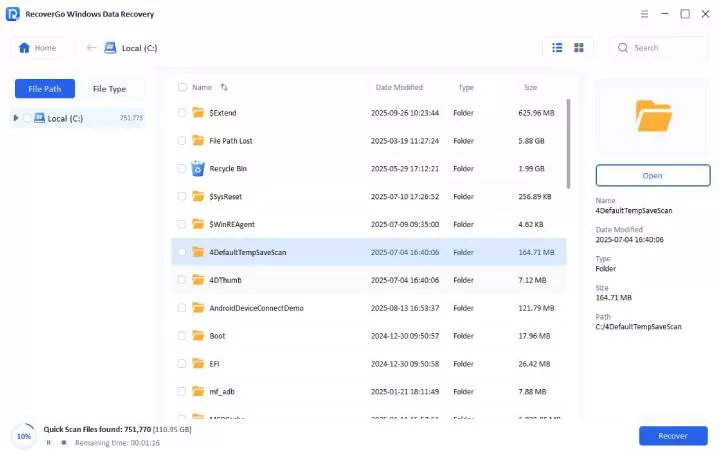
Step 3 Select the files you want recovered and click “Recover.” Choose a location that is NOT your CF card to save the recovered files..

Method 2: Professional Data Recovery Services
If your card has physical damage, the controller chip is dead, or your computer does not recognize the card at all you need a professional compact flash data recovery service.
These companies have tools to work on CF cards at a hardware level. Imaging machines allow technicians to access the NAND storage chip directly and extract files.
When to Consider Professional Service:
- The CF card was physically damaged or exposed to water.
- Your computer does not recognize the card.
- The card shows the wrong storage capacity.
- Software recovery attempts have failed.
Pros
- Works on physically damaged media.
- High success rate for severe cases.
- No charge if they cannot recover files.
- Files are kept confidential.
Cons
- Cost: Professional services are more expensive than software.
- Wait time: Recovery takes time (days to weeks).
- Shipping: You must send your card to the service.
How much does professional CF card recovery cost?
Professional data recovery services typically charge between $250 and $900 depending on the damage severity. Most services offer free evaluations and only charge if they successfully recover your data. Physical damage requiring cleanroom work costs more than logical recovery.
Most companies offer free evaluations and do not charge unless they recover your files.
Part 4: How to Prevent CF Card Data Loss?
Now that you know how to recover deleted files from a CF card, take these steps to prevent future data loss.
Best Practices for CF Card Safety:
- Backup files after every shoot: Don’t wait until the card is full. Transfer files to your computer or cloud storage regularly.
- Use 2 or more cards when shooting: Split important shoots across multiple cards to reduce risk.
- Always eject cards before removing them: Use the “Safely Remove Hardware” option on your computer.
- Bring extra batteries: A dead battery during recording can corrupt files.
- Keep cards in protective cases: Protect against physical damage, dust, and moisture.
- Replace old cards before they fail: Don’t wait for a card to stop working. Replace cards every 2-3 years with heavy use.
- Format cards in-camera, not on your computer: In-camera formatting is optimized for your specific camera model.
Conclusion
Compact flash cards are reliable, but data loss happens to even the most careful photographers. Luckily, your files are usually still on the card you just need the right approach to get them back.
If your data was lost due to human error like accidental deletion or formatting, software like iToolab RecoverGo Windows Data Recovery can recover your files quickly and affordably. Physical damage or serious hardware errors may require a professional service.
Regardless of the cause, always remember to stop using the card immediately after data loss. The longer you wait, the more likely you will overwrite those lost files. Act quickly, and your photos can be recovered.