In today’s modern world, data loss can feel like a sudden shock. It may stop your work and break your flow. This is where Disk Drill data recovery software comes into the picture.
It claims to meet these needs with a clean design and deep scan power, offering a way to bring lost files back with ease. But is it really the right choice for your data recovery needs?
In this complete Disk Drill review, we will walk you through its features, pricing, pros and cons, and real user feedback. We’ll also compare it with a powerful alternative to help you decide with full clarity.

Part 1: What Is Disk Drill Data Recovery Software?
Disk Drill data recovery software is a file recovery tool that helps users restore lost or deleted data from many types of storage. It works on hard drives, USB drives, memory cards, and more.
The goal of Disk Drill is simple. It aims to help users recover files with a few steps, while also offering deeper scan modes for complex cases. It uses a quick-scan tech that checks hidden data traces and rebuilds lost files.
Core Recovery Features
Multiple Scanning Modes
- Quick Scan: Works fast and checks recent changes in the file system, so it often brings back files with their original names and folders intact.
- Deep Scan: When files seem harder to find, the Deep Scan steps in. It rebuilds data from damaged or reset storage and supports a wide range of file types.
Broad Device Support
- The tool supports many devices, including hard drives, flash drives, memory cards, cameras, and even smartphones.
- The software supports hundreds of file types, ranging from common video and audio formats to professional image formats and office documents.
Data Protection and Management Tools
Recovery Vault
Good recovery starts with strong protection. The Recovery Vault acts like a safety net, so you can restore files in seconds without a full scan. This makes everyday mistakes far less stressful.
Byte to Byte Backup
When a drive shows signs of failure, the Byte to Byte Backup creates a full copy at the sector level, so you can work on a safe version without risking the original.
S.M.A.R.T Monitoring
The S.M.A.R.T system keeps an eye on drive health and temperature, so you receive early warnings before real damage takes place. This adds peace of mind and helps you act in time.
Part 2: Difference Between Disk Drill Free and Paid Versions
When users start with Disk Drill, they often ask about cost and limits. The tool offers both free and paid plans so users can test it before they buy.
Disk Drill Basic Plan:
The Basic plan is free and gives you access to the basic features. You can scan your drives and preview files, so you know they are safe to recover. However, this version does not allow full file recovery in most cases unless special protection tools like Recovery Vault were active before data loss.
Disk Drill PRO Plan:
The PRO plan unlocks the full power of Disk Drill and allows complete file recovery with no limits. It is designed for personal use and works on computers that you own. The PRO version comes with two options: a yearly plan or a lifetime license.
Disk Drill Enterprise:
The Enterprise plan is built for business and professional use. You can also use it to recover data for clients, which makes it ideal for service providers. Pricing depends on business needs and scale.
Note:
The Expert plan is no longer available for new users. If you already own this plan, you can upgrade to the Enterprise version at no extra cost by request.
Is Disk Drill Free?
The answer is yes. But the free version comes with very limited features that won’t be the best if you really need to recover data in large amounts.
Part 3: How to Use Disk Drill Data Recovery?
Disk Drill is friendly for new users. By following these steps, anyone can try it without stress.
Step-by-Step Guide:
- Download Disk Drill for Windows from the official website.
- Select the drive to scan and click “Search for Lost Data”.
- Preview files and click the “Recover” option.
![disk drill data recovery main]()
Warning:
Some users search for Disk Drill crack or free download from unknown sites. This choice can harm your system and your data. Cracked tools may carry malware or fail to recover files. Always use the official version with a real Disk Drill license.Is Disk Drill Safe to Use?
Disk Drill is safe when you download from the official website. It does not steal data, and it works in read-only mode during a scan. This means your original data stays safe.
Part 4: What Are Users Saying About Disk Drill?
User feedback gives real insight into how Disk Drill performs in real life. Many users share their views on forums and Reddit.
Pros from Users
- Easy interface that feels friendly
- Strong scan power for lost files
- Good preview feature before recovery
- Works on many devices
Cons from Users
- Free version limits feel strict
- Deep scan may take time
- The price feels high for some users
Some users praise Disk Drill as being good photo recovery software for its success with lost images. Others feel that scan speed could improve. Overall feedback shows a mix of trust and caution.
Part 5: Disk Drill Recovery Chances Low? A Better Alternative with 99% Here
In some cases, Disk Drill may not give full results. This can happen when data overwrite occurs or when drive damage is severe. In such cases, users look for Disk Drill alternatives.
One such option is iToolab RecoverGo Windows Data Recovery. This tool offers another path for data recovery with its own set of features.
Key Features of RecoverGo:
- 99% recovery rate: Aim for the highest success rate through three scan methods.
- Fast scans: Minimal memory usage, recovering files from exFAT drives in just minutes.
- Multiple scenarios: Handle many data loss cases, such as accidental deletion or system crash.
- 2,000+ devices: Recovery from hard drives, USB drives, SD cards, and more.
- 1,000+ file types: Restore deleted photos, documents, videos, and other file types.
- Simple process: Complete the recovery in a few easy steps.
How to Use iToolab RecoverGo:
Step 1 Select a Location: Choose the drive or folder where data loss took place, then click “Search for Lost Data” button.
![Search for loss data]()
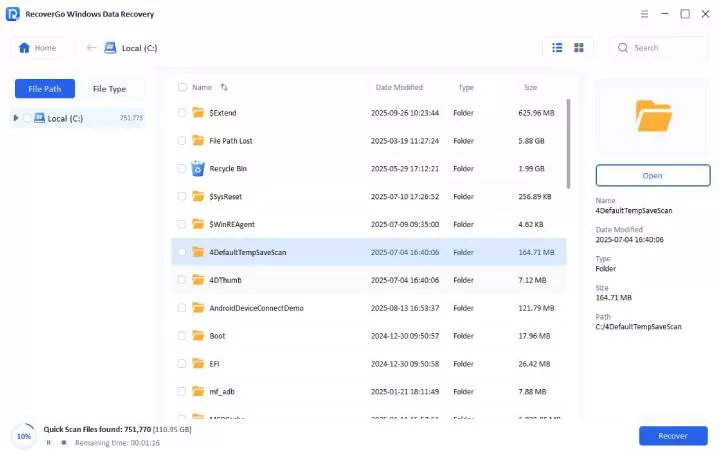
Step 2 Scan Your Device: Start the scan to locate deleted or lost files. Once it ends, you can browse results by file type or location. You may also search by file name.
![scan local disk]()
Step 3 Preview and Recover: Click “Preview” to review the found files, then click “Recover” to restore them to a safe location.
![external drive preview photo]()
FAQs About Disk Drill Data Recovery
Is Disk Drill Data Recovery a one-time purchase?
Yes, most personal plans offer a one-time purchase. Disk Drill Pro offers two purchase options: a one-time lifetime license and a one-year subscription. The Lifetime License doesn’t need to be renewed. Remember to cancel the subscription if you purchase the one-year subscription. After that, your program remains functional until the end of the current billing period.
How long does Disk Drill take to recover files?
Time depends on drive size and damage level. Quick scan takes minutes while a deep scan may take hours. For faster scanning, consider alternatives like RecoverGo.
Does Disk Drill steal your data?
No, Disk Drill does not steal data. It works in safe mode and keeps files secure. The software uses read-only mode during scanning to protect your original data.
Is Disk Drill better than other free recovery tools?
Disk Drill offers a good balance of features and ease of use. However, the free version’s 500MB limit is restrictive compared to some alternatives. For users who need more recovery capacity without high costs, RecoverGo offers better value with a 99% recovery rate.
Wrapping Up
Disk Drill data recovery software stands as a strong choice with its clean interface and powerful scanning features. While the free version limits may feel strict, the paid plan unlocks full value and gives users better control over recovery tasks.
However, if you’re looking for a more cost-effective tool with higher success rate, iToolab RecoverGo Windows Data Recovery is the better alternative. It offers a 99% recovery rate, quick scanning, and support for 2,000+ devices. All of these make it a more trusted choice for serious data recovery needs.