

I accidentally deleted some photos and even emptied the Recycle Bin. So, I decided to use the DMDE , but now I am completely lost on how to use it. The help manual includes a lot of stuff that I don’t understand. Is it the right choice for data recovery?
— From Pocketpcmag Community
That’s a common question associated with the DMDE. Many people turn to it as it is recommended by IT professionals and technicians. However, its steep learning curve and complex interface can quickly become a major obstacle, especially for beginners.
So, is DMDE truly worth using? Or does its complexity outweigh its benefits? In this review, we will look at the DMDE Data Recovery features, usability and real-world performance.

DMDE Data Recovery Review
DMDE is powerful data recovery software. The software uses advanced algorithms to recover lost files even in the most complex cases.
However, the DMDE’s interface is a little too technical. This makes it less suitable for beginners and non-technical users. Many new users are often confused while figuring out how to use the software. On the flip side, it does offer very advanced features like RAID tools, partition manager, disk cloning, and more.
Pros
- Strong recovery performance and powerful scan engine.
- The free version can recover 4000 files in one session.
- Offers a portable version.
- Advanced features such as disk cloning, RAID constructor, and partition manager.
Cons
- The user interface is very complex and outdated.
- Doesn’t support recovery during scanning.
- Steep learning curve for new users.
- Deep scans support fewer file signatures.
DMDE Data Recovery Features
DMDE is also known as DM Disk Editor and Data Recovery Software. It was launched in 2008 and has managed to make a name for itself as a feature-rich data recovery tool.
The software doesn’t look flashy, and it is not as mainstream as other tools. However, it does have a positive reputation for handling different data recovery tasks.
Here’s a quick list of the features you can expect from DMDE:
Operating System Support
DMDE Data Recovery supports both the modern and legacy Windows versions. You can use the DMDE on these Windows versions:
- Modern Windows – Windows 11/10/8/7/Vista
- Legacy Windows – Windows XP, 2000, 98/ME
The software also comes in a portable version. This means you can even use it without installation. This can be very useful in cases where you don’t want to install new software, as it could overwrite lost files.
Supported File Systems and File Format
The free and paid versions of DMDE Data Recovery support the major file systems. This includes the NTFS, exFAT, and FAT 12/16/32, which are commonly used in the Windows environment.
The software also supports a number of different storage devices. Some of the popular ones include SD card, external HDD/SSD, USB flash drive, and internal drives.
As for the file types, it covers the common ones such as JPG, MP4, DOCX, PDF, and more. The best thing about this software is that users can also add custom file signatures by adding sample files.
User Interface
The interface is one of the biggest drawbacks of DMDE! It looks outdated and a little too complex for normal users. However, it does load fast and has all the things needed for the data recovery.
The interface also lacks smart filters, dashboards, or any other visual flair. Instead, you get tabs and dropdown menus, which just feel a little too complicated.
If you have ever used any modern data recovery tool, then you will immediately notice that DMDE is not user-friendly at all!
Partition Manager
This tool can be used to find and restore lost/deleted partitions. It uses data from backup copies and boot sectors to restore the partitions.
This is very useful for users who want to work at the partition level instead of recovering individual files. However, the tool is already very technical, and using the partition manager requires knowledge of partition layouts and disk structures.
Extra Features
Some of the other features offered by the DMDE include:
- Disk Editor
- RAID Constructor
- Disk Cloning
- Cluster Map
DMDE Free vs Paid Version
The free version of DMDE Data Recovery allows users to recover a limited number of files. In a single session, a user can recover up to 4000 files. So the free version is more than enough if you have a small recovery task.
DMDE Data Recovery also offers paid plans, which unlock these features:
- Unlimited file recovery
- Bulk Folder Recovery
The DMDE Expression plan costs $20 (yearly). The standard plan costs $48 (lifetime) and offers free lifetime updates. The professional plan costs $95 and allows for commercial data recovery. It also unlocks a number of Pro features such as DMA mode, I/O handler script customization, and more.
How to Use DMDE Data Recovery?
DMDE is different from modern tools that offer a seamless recovery process. So, you should expect a more manual and technical process.
You can get the DMDE Data Recovery free download from the official website. You should avoid using the DMDE Data Recovery crack or any other altered version from a 3rd party site. Why? Because there’s a high chance that the cracked versions of DMDE will contain a virus or malware!
Here’s a list of steps to use DMDE file recovery tool:
- After downloading the zip file, you can extract it to a separate folder. Then launch the tool by opening the dmde.exe file.
- The DMDE will show a list of all the connected disk drives. You need to select the disk that contains the lost data and then click on “Open”.
- Select a drive and click on “Full Scan”. You must be patient at this step as the tool doesn’t show any time estimate or which files are found.
- Once it’s completed, You can double-click on files to “preview” it. To proceed, select the files and then click on the “Recover” button.

It appears that the entire process is not designed for the average user. You will not see any helpful tips, prompts, or a wizard-style recovery process. From selecting a file to scanning to recovery, there are just too many options. It’s almost like you open the tool and it says, “Good luck with recovery. You are on your own!”
How Good Is DMDE Data Recovery in Real Tests?
If you think about it, what really matters is the actual performance of the software. So, we took the DMDE for a spin to see how well it performs in different scenarios:
What We Tested
We used the DMDE Data Recovery for the following scenarios:
- Recently deleted files
- Mixed dataset (deep scan + signature recovery)
How Long Does DMDE Data Recovery Take?
DMDE took around 14 minutes in both tests for the scanning. One key downside we noticed was that it doesn’t show a progress bar or estimated time left during the scanning.
However, DMDE is moderately fast if we judge it based on speed. It is not the quickest tool available in the market, but it does get the job done without major delays.
In terms of scan performance, we can safely put the DMDE Data Recovery in the mid-range category.
Recovery Results
DMDE performed exceptionally well in the first scenario (recently deleted files). All the files were recovered without any missing data.
In the second scenario (requiring a deep scan), DMDE managed to recover 616 out of 700 files. This puts the recovery rate at nearly 88%.
It is worth mentioning that the results were very good for file types like PDF, DOC, and XLSX. However, the tool struggled with complex formats such as DCR, CR2, CRW, and R3D. In fact, some of these files were unreadable after recovery.
The custom file signature support also required manual setup and technical knowledge. Once again, that’s something which is not practical for most users.
Overall Performance Verdict
The tests clearly show DMDE can perform well in simple and complex data loss scenarios. The scan speed is also normal, which shows users can rely on this tool.
Overall, it is a capable recovery tool, but the UI clearly favors users who are comfortable with technical workflows. So, it is not a tool built for users looking for a simple 1-click solution.
What Real Users Say About DMDE Data Recovery?
In the end, what really matters is what users think about the DMDE. It has a 4.0/5.0 rating on Trustpilot but the average rating across different sites is 4.3/5.0.
What Users Like
Users have consistently praised the DMDE for its powerful recovery performance and advanced features. Many have also reported that the software managed to preserve the filenames and folder structure. The advanced features, such as RAID reconstruction and disk editing, were also found useful by professionals.
What Users Don’t Like
According to users, the biggest drawback is that it is not beginner-friendly. The interface looks outdated, and the workflow is confusing. Some reviews also mention that there is no detailed guidance or clear tooltips. In addition, the learning curve is too steep for the average user.
“The average computer user may need time to get to know it. The recovery process is not entirely easy. Some tooltip would be helpful.” – Daniel.
“I had to spend 20 minutes watching different tutorials on how to use it! The error messages are also not clear. But I did manage to recover my videos in the end.” – Kevin.
” DMDE met all my requirements. It recovered all lost photos.” – John
“It feels like it is made for the data recovery specialists. I was not able to figure out how to use it and had to use an alternative.” – Rachel.
Easier Alternative to DMDE Data Recovery
There is no doubt that DMDE is a little too complex for the average user. A more beginner-friendly alternative is iToolab RecoverGo Windows Data Recovery. The software is designed with simplicity in mind and allows users to recover files easily!
iToolab RecoverGo Windows Data Recovery is a Windows-based data recovery tool. The tool focuses on ease of use and offers a 99% recovery rate. This tool has simplified the recovery process into a clean and step by step workflow. It also supports multiple data loss scenarios like accidental deletion, formatted drives, and system crashes.
Main Features
- Simple 3 Step Recovery Process: It is built for everyday users and offers a 3-step recovery process. This approach makes it a lot easier than other options.
- User-Friendly Interface: The overall design of RecoverGo Windows Data Recovery is clean and modern. All of the features and options are available on the main screen. This makes it easy to access the different features without having to go through menus/tabs.
- High Recovery Rate: This software has a 99% recovery rate, which means it can recover 990 files out of 1000 test files! This makes it a highly reliable tool for recovery in different scenarios.
- Wide File and Device Support: The tool supports 1000+ file types and also supports 2000 different devices and can easily handle a number of data loss scenarios. This means there is no need to add any custom file signature or any other complicated steps.
How to Use iToolab RecoverGo Windows Data Recovery?
You can recover your important files with these simple steps:
Step 1 Install and launch the iToolab RecoverGo Windows Data Recovery on your system. After that, you can select a location from where you want to recover data and click on “Search for Lost Data”.

Step 2 This will start the scanning process. The scan time depends on the size of your drive and data.
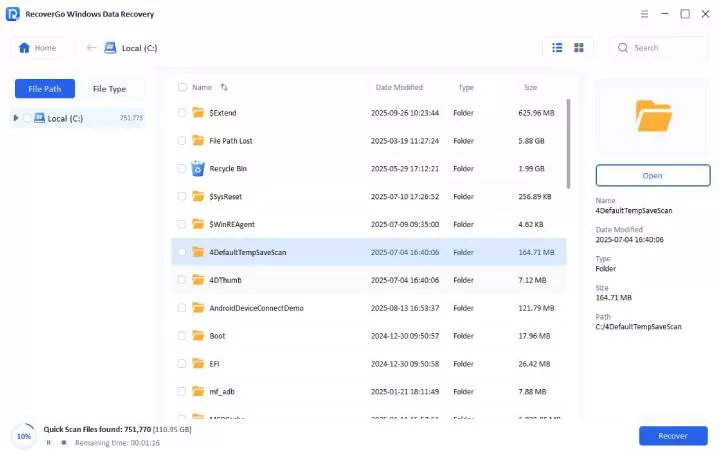
Step 3 Once the scan is complete, you can preview the files or press the “Recover” button to restore your lost files. Remember to select a different location to store the recovered files.

Conclusion
DMDE is a powerful data recovery tool and boasts a good recovery rate. It also does pretty well in complex data loss scenarios. However, it has an old-style interface and a steep learning curve. These drawbacks make it less ideal for users seeking a simple recovery solution.
In contrast, iToolab RecoverGo Windows Data Recovery is a solid option. It offers a simple and user-friendly experience while still offering strong recovery performance. So RecoverGo is the better choice for users who value speed.