

A single click can erase years of work or a lifetime of memories. In such situations, iCare Data Recovery is a trusted tool that helps recover lost partitions and damaged drives. However, the key question is whether its performance still lives up to its reputation or is just a claim. In this review, we explore what to expect after an iCare Data Recovery download and whether it is worth trying.

Part 1: What is iCare Data Recovery?
iCare Data Recovery is Windows-based software designed to recover lost, deleted, or formatted files from various storage devices. Additionally, the tool is free to use in Deleted File Recovery Mode. It also supports 800+ file types for recovery, including images, videos, audio, and emails.
Key Features of iCare Data Recovery
If you want to learn more about iCare Data Recovery Free, take a look at its key features below:
- Comprehensive Recovery Modes: The tool comes with Deleted File Recovery Mode, Deep Scan Mode and Raw Drive Mode. Users can use the free Deleted File Recovery Mode to recover deleted files, but it is limited to 1GB under the Pro Free plan.
- Deep Scan Technology: Scans storage devices sector-by-sector to find lost data, including files from deeply corrupted file systems. It allows users to scan approximately 500 files per day.
- User-Friendly Interface: At first, the interface looks traditional, but separate scan modes tabs make navigation seamless. Furthermore, the tool offers a simple wizard-style recovery guide that makes it the right choice for novices.
Part 2: Is iCare Data Recovery Free?
To evaluate the value of iCare Data Recovery’s free download full version, let’s look at the pricing details of its Free and Pro versions.
| Metrics | iCare Recovery Free | iCare Recovery Pro Free |
|---|---|---|
Price |
Free |
Home License – 1PC/Year: $69 .99 |
800+ File Types Supported |
Yes |
Yes |
Deleted File Recovery Mode |
Unlimited |
1GB free before purchase |
Deep Scan Recovery |
Free: 500 files/day (24-hour wait) |
Free: 1GB before purchase |
Bitlocker Repair |
Yes |
Yes |
Free Tech Support |
No |
Yes |
Windows 11/10/8.1/8/7/Vista/XP/2000 |
Yes |
Yes |
Windows Server 2022/2019/2016/2012/2008/2003 (R2) |
Yes |
Yes |
Do You Pay iCare Every Month?
No, iCare offers several options, including a limited Free and Paid version structured for “Annual” subscriptions or one-time purchases. In addition to annual “Pro” versions, a lifetime license option is available for $399.99, which allows unlimited use on computers with no further payments.
Is the Free Version Enough?
The availability of the iCare Data Recovery free download depends on the type of data loss scenario. This implies that iCare is an ideal choice for basic data deletion, but it is limited in more complex data loss scenarios, such as when drives are formatted or severely corrupted.
This option is suited for users who need to recover a few files, up to 500 files per 24 hours, in Deep Scan mode. You can also recover photos and documents from a card that is still recognized by your computer; otherwise, the Pro version is required.
Part 3: How to Use iCare Data Recovery Safely?
Using unofficial keys or cracked versions can carry risks, including virus or malware infection. In contrast, the official tool is designed to safely scan and read your data without harming the existing files. It also does not overwrite your original data during the recovery process, helping ensure your files remain intact while recovery is performed.
To understand how to use the iCare DataRecovery key safely, this section explains how to avoid cracked or unauthorized free key versions and use legitimate methods instead.
Prerequisites:
- Always install the recovery software from the official source.
- Ensure your laptop is plugged in during the scanning process.
- Do not save new files to the drive containing lost data.
Guide to Recover Data Using iCare Data Recovery
- Install and launch the software. Choose the scan modes from the main interface. Select partitions that you want to recover data from and click “Next”.
- The tool will begin scanning. After that, if your files are not found here, you can select “Advance File Recovery”.
- Once its completed, you can select the location where your files lost, then click “Next” to choose the path to save the files.


Is iCare Data Recovery Safe?
Yes. iCare Data Recovery is safe if you downloaded from the official website.
Part 4: Real User Experience About iCare Data Recovery
To know what users and review reports say about the iCare data recovery professional tool, this section has gathered some pros and cons:
Pros
- The free version allows unlimited recovery in Deleted File Recovery Mode.
- Supports multiple file systems like NTFS, FAT32, and exFAT.
- Recovers data from hard drives, USBs, and memory cards.
- Lightweight software that runs smoothly on low-end Windows systems.
Cons
- The software looks very old and is hard to use compared to modern software.
- If you have a high-resolution monitor, the text and buttons look blurry.
- The process takes longer, and you can’t run multiple scans at a time.
Part 5: iCare Data Recovery Not Working? Try This Cheaper and Easier Alternative
Based on the reviews and limited usage of the iCare data recovery, you can use iToolab RecoverGo Windows Data Recovery software as a better alternative. This innovative tool claims a 99% success rate and allows you to recover data from hard drives, SD cards, USB flash drives, and more. Users can retrieve videos, images, and files in multiple formats.
Unlike iCare, it can cater to multiple data loss scenarios, such as accidental deletion, physical damage, and extract data from 2000+ Devices. It comes with a simple filter option that lets you search for recoverable files instantly, rather than searching manually.
Key Features
- Affordable Pricing: iToolab RecoverGo Windows Data Recovery offers reasonable plans that are not just annual but also monthly, and are available for 2 PCs. They cost around $39.99 (1 Month Plan), $49.99 (1 Year Plan), and $69.99 (Lifetime Plan).
- Three Scanning Modes: The software has Quick, Deep, and Advanced Scan, which can help you to find more lost and deleted data quickly and easily.
- Ultra-Fast Speed and Safe: Engineered to be lightweight, it significantly outperforms iCare in scanning large TB-sized hard drives. Its read-only mode makes it the safe choice, as it doesn’t modify your existing data during the recovery process.
- User‑Friendly Interface and Guided Workflow: The software is easy to use, offering a simple three-step process: select location, scan, then preview and recover files. This makes it beginner-friendly and easier for Windows users.
Simplified Guide
Instead of being limited to the iCare Data Recovery free plan, let’s explore how the tool scans and extracts data in real time.
Step 1 Choose where you want to recover the files and press the “Search for Lost Data” button.

Step 2 The tool will start the scan. You can filter the file if you remember the file name by pressing the “Filter” button.
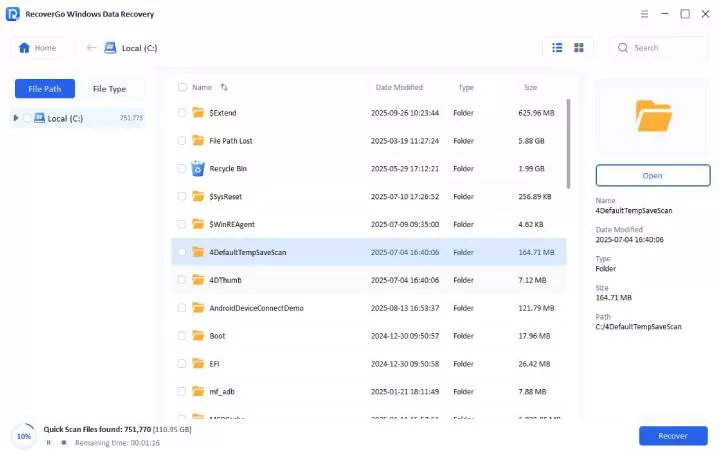
Step 3 Select the “Preview” button to review the file. And then click the “Recover” button to restore it.

Conclusion
To sum up, iCare Data Recovery is a free tool for basic scans, but its outdated interface and restrictive daily limits can hinder urgent recovery tasks. Therefore, for users who need a higher recovery success rate at a more affordable price, iToolab RecoverGo Windows Data Recovery may be a great option.