

Pandora Recovery was once a very popular tool for data recovery on Windows. However, things have changed significantly over the years with the introduction of new Windows versions and modern recovery tools.
The software was discontinued many years ago. Despite this, Pandora Recovery still appears on download sites and search results. This makes one wonder if Pandora is still worth it in 2026 or not.
In this Pandora Recovery review, we will take a closer look at its features, limitations, and real users’ feedback to determine whether it is still worth using for data recovery!

Part 1: Pandora Recovery Review
Pandora Recovery is a popular data recovery tool that offers a simple way to restore deleted files. It features an explorer-style layout and a simple recovery workflow. The software also supports the common storage devices such as HDD, USB drive, and memory card.
However, Pandora Recovery software has been discontinued and is no longer receiving any updates. It was acquired by CleverFiles and eventually evolved into Disk Drill. The software is no longer available as a standalone application, but can still be downloaded from 3rd party sites.
Key Features of Pandora Recovery
- Surface Scan (Deep Scan): It offers a special scanning mode for finding deleted files.
- Wizard Style Recovery: The tool offers a recovery wizard. This makes it easy for beginners to recover files easily step-by-step.
- Advanced Filters: It allows users to scan based on file name and creation date. This enables the users to search for specific lost/deleted files.
Limitations
There’s no doubt that Pandora Recovery was a very useful software in the past. But its limitations are way too significant based on today’s standards:
No Updates: Pandora was discontinued and rebranded as Disk Drill in 2017! So, even if you manage to download an old version, it would be outdated. This means it lacks the key updates required to operate efficiently on modern Windows 10 or 11.
Limited file system support: The software also only supports the NTFS and FAT file systems. So, if you are thinking about using it on exFAT or other file systems, then it won’t work.
Basic Recovery Capabilities: The lack of updates means the tool is no longer capable of handling complex scenarios. It can only be used in simple file recovery scenarios. It won’t work in situations such as lost partitions, formatted drives, or severely corrupted storage.
No Advanced Features: Don’t use this software if you are expecting advanced features. There’s no option to pause and resume the scan, and it also uses outdated scanning and recovery algorithms.
Is Pandora Recovery free?
Yes, the Pandora Recovery tool is available as a free solution for Windows users. It is lightweight and has no limitations (unlimited data can be recovered).
However, the software is not actively maintained anymore. So, it may be free, but it lacks the modern features needed to recover data efficiently.
Is Pandora Recovery safe?
The software is safe when downloaded from the official website. However, it is no longer available and was phased out in favor of a modern tool- Disk Drill.
There’s a safety concern today because of Pandora’s discontinued status. And with no official distribution, users who want to use Pandora Recovery will have to rely on 3rd party sites. These sources offer outdated or even modified versions, which can cause security risks.
Last but not least, there’s also the issue of no updates for years. This reduces its reliability on the systems running on Windows 10 and 11.
Part 2: Where to Download Pandora Recovery?
It is always recommended to download software from its official website. But in the case of this data recovery software, it has been discontinued and rebranded as Disk Drill.
So, the only option left is to download it from 3rd party software libraries. The Pandora Recovery software free download (old version) is available on these sites:
- Softonic
- Filerox
- Uptodown
However, be careful when downloading the tool from these sites. These websites also bundle other software into the setup file and you could end up installing unwanted software. Also, downloading from less reputable sites means you might install a malicious version of Pandora!
Part 3: How to Use Pandora Recovery?
The software has a wizard-style layout with a guided recovery process. The UI looks a little outdated, but it does make it easy for users to recover files.
Let’s look at how to use this tool for data recovery:
- Launch the tool, and you will see a pop-up for the recovery wizard. Click on “Next”.
- In this step, the software will ask you to check the Recycle Bin for your deleted files. If you have already checked there, click on “No, I did not find my files” and press “Next”.
- In this step, you need to choose a recovery method: Browse, Search, or Deep (Surface) Scan. For best results, select the “Deep Scan” and click on “Next”.
- Select the file types you want to search for and then click on Start Disk Surface Scan.
- Wait for the scan results to show up. Select one or multiple files and then right click on “Recover to” to restore them.

Part 4: Real User Feedback on Pandora Data Recovery
The overall feedback of the Pandora Recovery tool is mostly mixed. It has a 3.1/5.0 rating on LO4D.com and 4.0/5.0 on FileHippo. Based on these two sources, the aggregate rating of Pandora is 3.5/5.0.
Most users have highlighted that Pandora works best in simple data recovery tasks. They also mentioned that the software offers filters for searching specific file types. Another positive thing about the tool is that it’s free and very lightweight.
However, negative feedback reveals that Pandora’s scans only uncover a portion of the lost files. Also, the recovery rate drops when it comes to formatted or corrupted drives. Another downside of Pandora is that its speed (scanning and recovery) is slow, and the overall success rate is not on par with modern recovery tools.
Here’s a list of some user reviews of Pandora Data Recovery:
Daniel Said:
“I used Pandora to restore the deleted Word documents. It worked fine as it was a simple recovery task. But it struggled when I tried deep scan on an HDD and didn’t uncover all the lost files.”
Sarah Said:
“It seems the software is only good for basic recovery tasks. It could only find 40 image files out of 100 lost files on my SD card”
Emily Said:
“The software crashed during scanning on Windows 11. I had to launch it multiple times, and even then, the recovery result was not that good.”
Overall, Pandora is a good option if you have a basic recovery task. But the software will struggle when it comes to more complex recovery cases. It also lacks modern features and has an inconsistent recovery rate. Based on all of these, it is clear that users are better off with a modern recovery tool!
Part 5: Best Alternative to Pandora Recovery – 99% Successful Rate
One of the best alternatives to Pandora is iToolab RecoverGo Windows Data Recovery. It has everything that made Pandora so famous (simple UI, file previews, lightweight) and a high recovery rate, which is something Pandora struggles with!
RecoverGo is updated regularly and can be used on Windows 11/10/8/7. It also supports a lot of file types and can be used to recover data from 2000+ devices.
Key Features
- User-friendly and modern interface.
- Advanced algorithms ensure a 99% recovery rate.
- 3 scan modes (Quick, Deep and Advanced) help you find more lost data.
- Fast scans with minimal memory usage, recovering files from exFAT drives in just minutes.
- Supports many data loss cases, such as accidental deletion or system crash.
How to Use iToolab RecoverGo Windows Data Recovery
Step 1 Download and install RecoverGo on your computer. Select the location where data loss occurred. Once selected, click the “Search for Lost Data” button.

Step 2 The software begins scanning. Three scan modes can help you find more lost files.
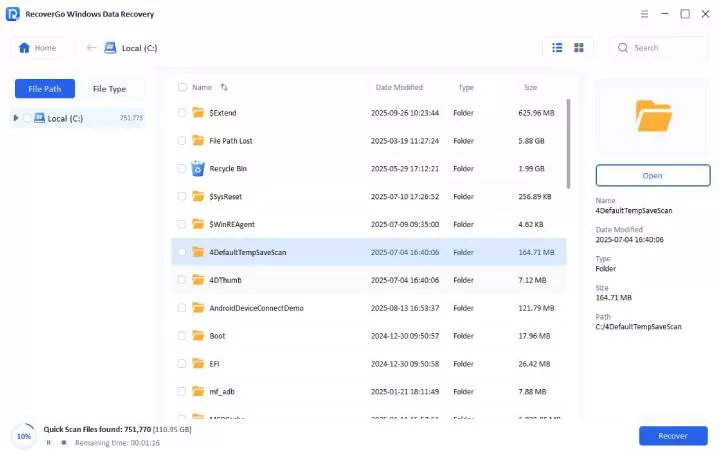
Step 3 Once it is complte, you can preview the files and then click on “Restore” to save them.

Bonus: Proven Tips to Prevent Data Loss on Windows
What if you never had to deal with data loss in the first place? That’s why your first priority should always be to prevent data loss from happening!
We have shared ten easy and simple tips to help you reduce the risks of data loss:
- Follow the 3-2-1 backup rule: Keep 3 copies of your data on 2 different storage devices. Also, keep 1 copy on a cloud backup service.
- Turn on Windows backup tools: You can enable File History to save versions of your files automatically.
- Make local and cloud backups: This little step allows you to have redundancy if one method fails.
- Regularly test the backups: It ensures that the files are in working condition.
- Check the Recycle Bin’s content: This way, you can ensure that you don’t accidentally delete important files.
- Use antivirus software: This protects you from viruses and malware threats.
- Don’t trust every website: Avoid downloading files and software from untrusted sources.
Final Thoughts
Pandora Recovery is a useful free tool that can easily handle basic file recovery. However, it is discontinued and is no longer ideal for modern Windows systems. It uses outdated technology and has a very limited recovery performance. All of these things make it unreliable for data loss recovery.
A more dependable option is iToolab RecoverGo Windows Data Recovery. It offers a higher recovery rate (99%) and uses advanced scanning algorithms for scanning and recovery. This makes it the ideal option for both simple and complex data loss situations.