

I was watching an old Linus Tech Tips video on some company that did data recovery, and he mentioned rstudio for fixing drives with a similar problem to mine. Is rstudio data recovery still good? Its about $50 dollars, are there any decent alternatives?
— From Reddit Community
The question “Is R-Studio still a good choice for data recovery?” was raised on Reddit. Some consider it a powerful professional tool, while others find it too complex for daily use.
In this article, we offer a comprehensive review of R-Studio Data Recovery to help you decide whether it is worth using.

Part 1: R-Studio Data Recovery Review
What Is R-Studio Data Recovery?
R-Studio is data recovery software created by R-Tools Technology Inc. This software is targeted at a professional level. Its advanced features, large file system support, and RAID capabilities make it a great choice for dealing with complex recovery situations. However, it may be challenging for beginners who only need to recover simple files.
Here are the main features of R-Studio Data Recovery:
- Supports a wide range of file systems, such as NTFS, FAT, exFAT, HFS+, APFS, Ext2/3/4, UFS, etc.
- Provides advanced RAID recovery for failed or damaged arrays.
- Enables remote data recovery over a network or the internet.
- Uses file signature analysis to recover data from reformatted or damaged drives.
- Allows creation of disk images to safely recover data without affecting the original drive.
Is R-Studio Free?
R-Studio isn’t free. The demo allows you to scan and preview recoverable files. However, if you want to save them, you need to purchase a paid license. R-Tools Technology provides freeware (such as R-Undelete Home and R-Linux), but they are not as powerful as R-Studio.
Is R-Studio Good?
For technical users, it is powerful. It provides in-depth scanning, RAID recovery, and cross-platform compatibility. However, it may be confusing to beginners or non-technical users, as its interface can be daunting to use in some cases.
Part 2: How to Use R-Studio Data Recovery?
Before using R-Studio, you need to know:
Do not use cracked versions or download R-Studio data recovery full version from third-party. These may pose serious security risks and could lead to further data loss.
After installing the program, you can recover the data using R-Studio as follows:
- Open R-Studio. All drives and storage devices will be shown in the main panel. Locate the drive on which you have lost files.
- Right-click on the drive or partition you want to recover files from and click “Scan”. After that, a scan settings dialog will pop up on your screen. It includes the options for the file system and scan area. Click “Scan” to start.
- As R-Studio scans your drive, a progress bar appears at the top, while a sector map on the right visualizes the disk in real time. Different colors indicate scanned areas, pending sectors, unused space, and detected file types.
- Once the scan is complete, R-Studio shows all detected partitions and files. However, its complex interface make it difficult for beginners to identify the correct partition or find specific files.
- You can double-click a file to preview it. Then select the boxes of the files or folders that you wish to restore. Right-click and then choose “Recover Marked”.


As you may have noticed, the process isn’t user-friendly. Its interface is more suitable for professional users rather than beginners.
Part 3: Is R-Studio Data Recovery Worth It?
Here’s a summary of R-Studio Data Recovery based on real user reviews, which from trusted platforms like Capterra.
Pros
- Powerful recovery algorithms that perform well in complex scenarios.
- Recreate failed RAID arrays in a virtual manner, which is vital to IT professionals.
- Large file system compatibility is managed with almost all OS and storage setups.
- Supports network-based data recovery, a feature rarely found in consumer-level tools.
Cons
- Steep learning curve compared to consumer-oriented tools.
- Outdated and technical interface.
- The speed of recovery may not be as fast as tools designed for the simple deletion of lightweight files.
- The advanced feature set can be overwhelming for users who only need to recover a few deleted files.
- Some users have reported issues with customer support, particularly slow responses to non-technical inquiries.
Verdict
R-Studio is a worthwhile purchase for IT professionals, data recovery experts, and technically competent end-users for severe data loss problems, such as RAID failure, formatted drives, or corrupt partitions. For average users who have lost a file by mistake or emptied the Recycle Bin, a simpler tool with a high recovery rate will work better.
Part 4: R-Studio Data Recovery Alternative
If you’re looking for a more user-friendly option with professional-level recovery features, iToolab RecoverGo Windows Data Recovery is worth considering.
What is iToolab RecoverGo Windows Data Recovery?
iToolab RecoverGo Windows Data Recovery is windows-based recovery software. It aims to recover files from different storage devices with 99% success rate. Unlike R-Studio’s complex interface, RecoverGo provides a simple, guided workflow that beginners can follow without technical knowledge, which greatly helps users to recover lost or deleted files more easily.
Main Features of iToolab RecoverGo Windows Data Recovery
- Simple beginner-friendly interface.
- Complete the recovery process in a few easy steps.
- Users can select specific partitions or folders, or scan the entire disk.
- Provides Quick Scan, Deep Scan and Advanced Scan for finding more deleted data.
- Quickly locate lost files with built-in search and filtering tools.
- Fast scans with minimal memory usage, recovering files from exFAT drives in just minutes.
How to Use iToolab RecoverGo Windows Data Recovery?
Step 1 Choose the location where you lost files and then click on “Search for Lost Data”.

Step 2The software starts scanning. Three scan modes maximize the recovery rate.
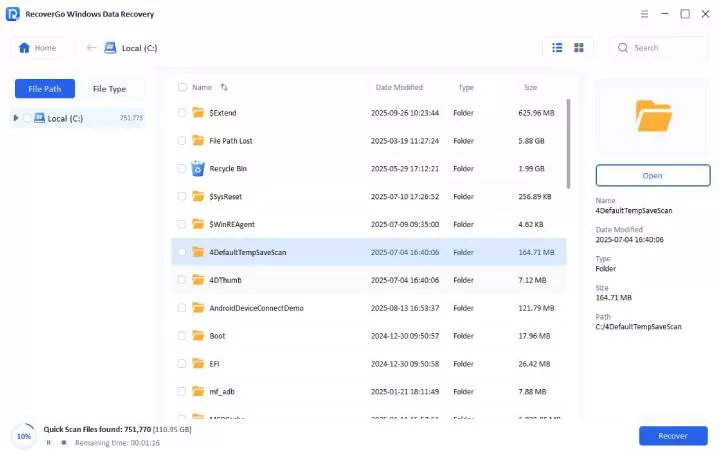
Step 3 Click the “Preview”button to check the files and then click on “Recover” to restore it.

FAQ About R-Studio Data Recovery
Is data recovered at R-Studio?
Yes. R-Studio (by R-TT) is comprehensive, professional-grade data recovery software. However, its complex interface makes it less suitable for beginners.
Is R-Studio actually working?
Yes. It is widely used by IT professionals for recovering data from RAID failures, corrupted or formatted drives, and deleted partitions. However, the recovery results vary depending on the time and the state of the device.
In Conclusion
R-Studio is a powerful and reliable data recovery tool. But its advanced functions are suitable for technical users for dealing with complex data loss. However, for regular users who just seek a fast, easy data recovery solution, iToolab RecoverGo Windows Data Recovery is the best alternative. It provides a beginner-friendly interface and a higher recovery rate of up to 99%, which can help users recover precious data easily and effectively.