

I had around 20 videos on my SanDisk pen drive but I accidentally deleted them. Is there any SanDisk flash drive recovery tool which can help me get those videos back?
— From Reddit Community
This question was posted by a Reddit user who lost important videos from his pen drive. A quick search on Reddit and tech forums shows similar cases happen every day.
The good news is that deleted files are recoverable. But with so many data recovery tools on the market, choosing the right one can be overwhelming.
In this complete guide, we tested and ranked the 10 best SanDisk flash drive recovery tools in 2026. We’ll explain what causes data loss, how we tested each tool, and help you find the best solution for your situation.
Part 1: What Causes Data Loss on SanDisk Flash Drive?
Before we look at recovery solutions, let’s understand why data loss happens. The exact cause varies from case to case, but these are the most common reasons:
Accidental Deletion
You might accidentally delete important files from your SanDisk pen drive. Unlike files deleted from your computer, files deleted from external storage devices do not go to the Recycle Bin. They are permanently deleted.
Improper Ejection
Do you often unplug your flash drive without using “Safely Remove Hardware”? This habit can damage the file system. Removing the drive while data is being written can corrupt files. Sudden power failures during file transfers cause similar issues.
Physical Damage
SanDisk flash drives are known for reliability. But they are not fail-proof. Physical damage can result from:
- Broken USB connectors
- Worn-out memory cells over time
- Exposure to water, heat, or impact
Understanding the cause helps you choose the right recovery approach.
Part 2: How We Tested SanDisk Flash Drive Recovery Tools?
To provide fair and accurate rankings, we tested each software in real-world data loss scenarios. Our tests included formatted drives, corrupted USB drives, and simple file deletions.
We evaluated each tool based on three key factors:
Usability:
- Is the interface beginner-friendly?
- How easy is it to install and use?
Recovery Ability:
- What is the scanning speed??
- What is the success rate?
- Does it support common file types?
Pricing:
- Is the price reasonable for the features offered?
By combining these factors, we ranked the top SanDisk pen drive data recovery tools available today.
Part 3: Top 10 Free and Paid SanDisk Flash Drive Recovery Tools
Here are our top picks for SanDisk flash drive recovery, ranked by performance and ease of use:
- iToolab RecoverGo Windows Data Recovery🔥
- PhotoRec
- Data Rescue
- RescuePRO
- AnyRecover
- Recuva
- Disk Drill
- iCare Recovery Free
- Stellar Data Recovery
- Wondershare Recoverit
iToolab RecoverGo Windows Data Recovery🔥
iToolab RecoverGo Windows Data Recovery ranks NO.1 on our list for one reason: reliability. It offers a 99% recovery rate and allows even beginners to recover data in just a few clicks.
RecoverGo features three scan modes: Quick Scan, Deep Scan, and Advanced Scan. Its advanced algorithms locate lost files efficiently.
SanDisk storage devices typically use exFAT or FAT32 file systems. RecoverGo supports both out of the box, making it ideal for SanDisk USB data recovery.
Key Features:
- 1,000+ file types: Supports photos, videos, documents, and more.
- Beginner-friendly: 3-step recovery process with intuitive interface.
- File system support: Works with exFAT, FAT32, NTFS formats.
- Preview feature: Free scan and preview before recovery.
How to Recover Deleted Files from SanDisk USB Drive with RecoverGo:
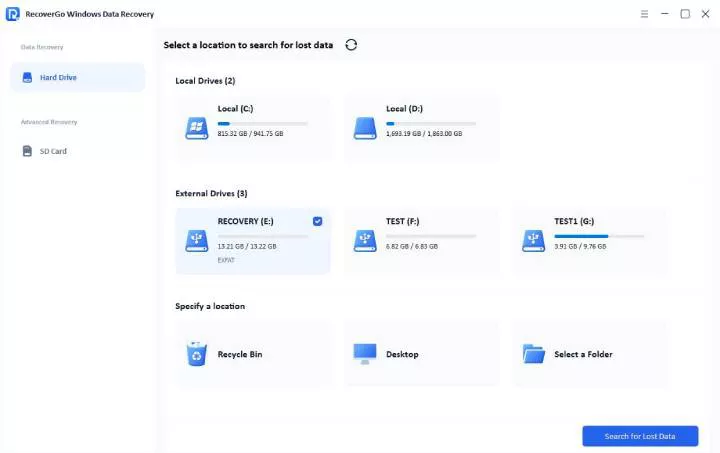
Step 1 Launch the RecoverGo and select your SanDisk drive from the list. Click “Search for lost data” to start the scan.
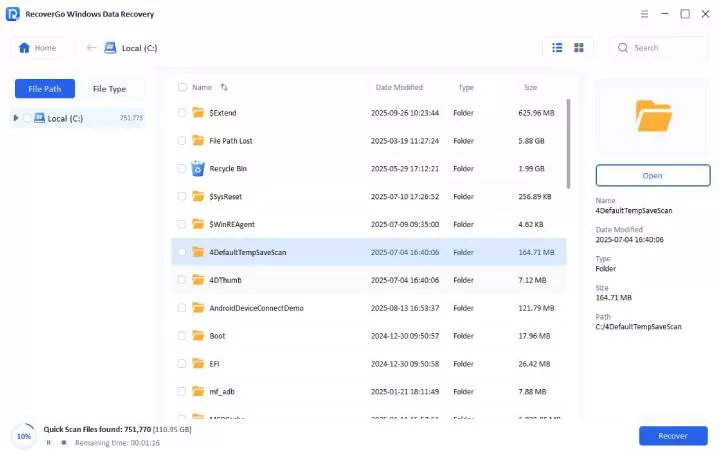
Step 2 The software begins scanning. It offers three scan modes to increase the recovery rate.
Step 3 Wait for the scan to complete. After that, you can preview the found files and click “Recover” to save them to a safe location.

Testing Experience:
RecoverGo maintained a 99% recovery rate across all test scenarios. It recovered 575 out of 580 files. Most files retained their original names and folder structure. The scan speed was fast, and the preview feature worked smoothly.
PhotoRec
PhotoRec is a free, open-source tool that supports all major file systems. It uses signature-based file extraction, which means it does not rely on the file system structure. Despite the name “PhotoRec,” this tool handles many file types beyond photos.

Pros
- Completely free
- Unlimited data recovery
- Supports multiple file formats
Cons
- Command-line interface (difficult for beginners)
- Wrong commands can cause further data loss
- Original file names are often lost
Testing Experience:
PhotoRec is powerful for a free tool. It achieved an 85% recovery rate in our tests, recovering 540 out of 600 files. However, the scanning process took 45 minutes longer than paid alternatives. Most files lost their original names, requiring manual identification.
Data Rescue
Data Rescue is a professional-grade recovery tool developed by Prosoft Engineering. It offers both quick and deep scan options for SanDisk flash drives.
The tool includes a clone feature that creates a byte-by-byte copy of your drive before recovery. This protects your data from further damage during the recovery process.

Pros
- Professional-grade recovery
- Clone feature for data protection
Cons
- Interface can be overwhelming for beginners
- Deep scans are time-consuming
Testing Experience:
Data Rescue achieved an 80% recovery rate. The clone feature is useful for heavily damaged drives. However, the interface feels dated, and the pricing is steep compared to competitors with similar performance.
RescuePRO
RescuePRO is the official recovery software developed by LC Technology, SanDisk’s partner company. It’s specifically designed for SanDisk storage devices.
The tool excels at recovering media files and photos, videos, and audio. It can also reconstruct fragmented video files, which is useful for dashcam and GoPro recordings.

Pros
- Official SanDisk partner software
- Excellent for media file recovery
- Can reconstruct fragmented videos
Cons
- Only works with SanDisk and select brands
- Limited document recovery capabilities
- No free version available
Testing Experience:
RescuePRO achieved an 81% recovery rate. It performed exceptionally well with video files, recovering 90% of test videos. However, it struggled with documents, recovering only 60%.
AnyRecover
AnyRecover is a user-friendly tool that supports over 1000 file formats. It offers a clean interface and straightforward recovery process.
The software supports various data loss scenarios including accidental deletion, formatting, virus attacks, and system crashes.

Pros
- Clean, modern interface
- Supports 1000+ file formats
Cons
- Slower scanning compared to competitors
- Expensive for full version ($79.99/Year)
- Recovery rate could be improved
Testing Experience:
AnyRecover achieved a 75% recovery rate. The interface is intuitive, but the scan took 35 minutes for a 16GB drive. Recovered files sometimes lost their original names.
Recuva
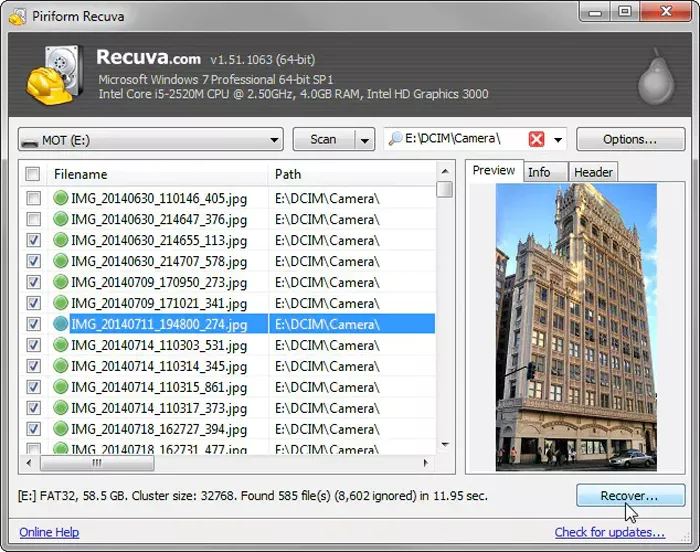
Recuva is a popular free tool from Piriform (makers of CCleaner). It offers a simple wizard for basic recovery and an advanced mode for experienced users.
The tool is lightweight and doesn’t require installation you can run it from a USB drive.
Pros
- Completely free (Pro version: $24.95/Year)
- Lightweight and portable
- Simple wizard for beginners
Cons
- Recovery rate is lower than paid tools
- Not updated frequently
- Struggles with severely corrupted drives
Testing Experience:
Recuva achieved a 70% recovery rate, recovering 350 out of 500 files. It works well for recently deleted files but struggles with formatted or corrupted drives. The deep scan took 25 minutes.
Disk Drill
Disk Drill by CleverFiles is a powerful recovery tool with a modern interface. It supports over 400 file formats and offers multiple scan methods.
The free version allows up to 500MB of recovery, making it suitable for smaller data loss situations.

Pros
- Modern, intuitive interface
- Free recovery up to 500MB
- Multiple scan algorithms
- Recovery vault feature for future protection
Cons
- Full version costs $89/Year
- Large installation size
- Some advanced features require learning
Testing Experience:
Disk Drill achieved a 90% recovery rate in our tests. The Recovery Vault feature, which monitors file deletions, proved valuable for future protection. Scan speed was fast at 12 minutes for a 32GB drive.
iCare Recovery Free
iCare Recovery Free is a no-cost solution for basic data recovery needs. It supports common file system formats exFAT, FAT32, and NTFS for SanDisk pen drives.
The workflow is simple, but performance drops in complex scenarios with severely corrupted data.

Pros
- User-friendly interface
- Lightweight (runs well on older PCs)
- Unlimited free recovery
Cons
- Free version has only basic features
- Not effective for complex recovery scenarios
- Original folder structure not preserved
Testing Experience:
iCare Recovery Free is suitable for simple tasks. It achieved a 70% recovery rate, restoring 350 out of 500 files. The quick scan took 8 minutes; the deep scan took 14 minutes.
Stellar Data Recovery
Stellar Data Recovery supports both internal and external storage devices. It offers RAW file recovery through file signature recognition technology.
The interface is modern and easy to navigate. However, deep scans can be slow.

Pros
- Free version allows up to 1 GB recovery
- Supports RAW drive data recovery
Cons
- Deep scans are slow
- Recovery rate drops in complex situations
Testing Experience:
Stellar achieved an 80% average recovery rate. Deep scans took longer than most competitors. The pricing is higher than average, which affected its ranking.
Wondershare Recoverit
Recoverit is beginner-friendly and allows SanDisk flash drive recovery in a few steps. However, the software feels overpriced given its overall performance.

Pros
- Easy to use
- Supports multiple file types
- File preview before recovery
Cons
- Slow deep scans
- Average recovery performance
- Customer support could be improved
Testing Experience:
Recoverit achieved a 72% recovery rate. Most recovered files lost their original names, making it time-consuming to locate specific files. Given its performance, the price seems high.
Part 4: How to Choose the Best SanDisk USB Recovery Tool?
Not sure which tool is right for you? Here’s a quick comparison to help you decide.
Comparison Table: Top 10 SanDisk Data Recovery Tools
Which Tool Should You Choose?
- For beginners: iToolab RecoverGo, Recuva, or Disk Drill offer the easiest interfaces.
- For budget users: PhotoRec and Recuva provide solid free options.
- For best results: iToolab RecoverGo offers the highest recovery rate at a reasonable price.
- For video recovery: RescuePRO specializes in fragmented video files.
iToolab Special Coupon
20% OFF iToolab coupon code for data recovery tool
Part 5: FAQs About SanDisk Flash Drive Recovery
Does SanDisk have data recovery?
SanDisk does not include a built-in data recovery feature in its flash drives. However, SanDisk partners with LC Technology to offer RescuePRO. You can also use third-party recovery tools like iToolab RecoverGo Windows Data Recovery.
Is there a way to retrieve files from a corrupted SanDisk flash drive?
Yes. You can recover files from a corrupted SanDisk flash drive using data recovery software. Tools like RecoverGo can scan the drive and retrieve lost files even if the file system is damaged.
How do I restore my SanDisk flash drive?
The exact steps vary by software, but the general process is:
- Connect the flash drive to your computer.
- Download and launch a data recovery tool.
- Scan the drive for lost files.
- Preview and select the files you want to recover.
- Save the recovered files to a different location.
Conclusion
We ranked these SanDisk flash drive recovery tools based on performance, ease of use, and value. Free tools like PhotoRec and Recuva work well for basic recovery tasks. However, they may struggle with complex scenarios that require deep scanning and file reconstruction.
Based on our testing, iToolab RecoverGo Windows Data Recovery stands out as the best overall choice. It is beginner-friendly, offers fast scanning speeds, and achieves a 99% recovery rate. At $49.99/Year, it provides excellent value for anyone who needs reliable SanDisk pen drive recovery.
Remember to stop using your SanDisk drive immediately after data loss to prevent overwriting. The sooner you attempt recovery, the higher your chances of success.