

Recently, a post on Reddit caught my attention. A cameraman named Mike had just finished a three-week wedding season. He stored everything on his Seagate external drive. One morning, he plugged it in and got nothing. No light, no sound—just a dead drive with thousands of irreplaceable wedding photos inside. The comments flooded in with advice, but most people agreed he needed reliable Seagate recovery software as soon as possible.
This happens more often than you might think. Seagate drives are reliable, but they can fail. Files get deleted by accident. Drives get formatted. When it happens, panic sets in. But here’s the reality: most data isn’t truly gone. It just needs the right tool to bring it back.
This guide walks you through four recovery software that actually work. Each has been tested in real scenarios. By the end, you’ll know which Seagate recovery software fits your situation best.
Part 1: What Are Seagate Data Recovery Services?
Seagate runs official in-lab and remote recovery centres where professionals handle failed drives. You send your drive in, they work on it in specialised clean rooms, and retrieve your data. These technicians deal with mechanical failures, broken read heads, burnt circuit boards, and various hardware problems.
The process is straightforward. You contact them, describe what happened, and ship your drive to their facility. They examine it and provide a quote. If you agree, they begin the recovery work. For physically damaged drives, this may be the only viable option.
Part 2: Why Choose Third-Party Seagate Recovery Software?
Third-party tools put you in control immediately. You download the tool, install it, and start scanning within minutes. Compare that to waiting weeks for a recovery service. The cost difference is significant too. Quality software costs under $100, while professional services charge hundreds or thousands.
These tools excel at logical problems—accidental deletion, formatted drives, corrupted partitions, and damaged file systems. Modern tools use advanced scanning that finds files even when your drive appears empty. You can preview everything before recovering. Plus, your drive stays with you throughout the process.
Seagate’s own Premium Recovery Suite sounds good on paper but falls short in practice. It only works with certain drive models—older drives might not work, and newer ones face similar compatibility issues. The scanning isn’t deep enough to catch everything. If your partition table is damaged or Windows can’t detect the drive, the official tool often fails. And obviously, if your drive has physical damage like a broken head or bad sectors, no software can fix that—you’d need expensive cleanroom services.
That’s where third-party Seagate recovery software makes sense. These tools bridge the gap. They scan deeper, support more scenarios, and work on drives that official software ignores. Most offer free trials, so you can see if they find your files before spending anything.
Part 3: How to Select the Best Seagate Data Recovery Software?
Not all recovery tools perform equally. Some only offer surface-level scanning, while others can dig deep into lost partitions and raw data. Your choice should match what actually happened to your drive.
Scan Depth
Deep scan capability determines success. A strong tool reads lost file traces beyond surface data. This matters after a format or partition loss. They rebuild files from raw data patterns, catching what surface scans miss entirely. Good Seagate disk recovery software offers both options. Advanced software recognizes hundreds of file types by their unique signatures instead of relying on file system data that may be corrupted.
File System Compatibility
The software should support multiple file systems, including FAT32, NTFS, and exFAT. Recovery rate largely depends on usage history and whether new data has overwritten the formatted partitions. Windows typically uses NTFS, while external drives favour exFAT for cross-platform compatibility. A quality tool must handle all of them. Furthermore, support for RAW or damaged partitions is crucial, as severe corruption often renders the original file system unreadable.
Recovery Rate and Security
Success rate is what actually counts. Can the tool recover your files in usable condition? The best software restore files with correct names and folder structures intact. Security means the software won’t make things worse. It should save recovered files to a different drive, never back to the damaged one. Preview features let you verify files are intact before committing to recovery.
Part 4: Top 4 Seagate File Recovery Software
Let’s examine the top 4 Seagate file recovery software options. We’ve analysed different tools to identify those with strong performance for recovering your data.
- 1. iToolab RecoverGo Windows Data Recovery👍
- 2. Tenorshare 4DDiG
- 3. TestDisk
- 4. Stellar Data Recovery
1. iToolab RecoverGo Windows Data Recovery👍

iToolab RecoverGo Windows Data Recovery has a simple, user-friendly interface, making it accessible even for beginners. Unlike complex recovery tools that require command-line knowledge, it guides users through a 3-step process from scanning to recovery. What’s more, it supports recovering data from common data loss scenarios, including accidental deletion, formatting, RAW drives, and inaccessible Seagate external drives.
Key Features
- Recover permanently deleted and lost files from Seagate external drives up to 99% success rate.
- Ultra-fast scanning speed allows you to scan hundreds of GB of data in just a few minutes.
- Preview recoverable files before recovery to ensure you’re restoring the correct data.
- Supports over 1,000 file types—photos, videos, archives, and specialised formats.
- Works with 2,000+ storage devices, including Seagate drives.
- Quick Scan, Deep Scan and Advanced Scan modes help you find more lost data.
How to Recover Deleted Files from Seagate Drive
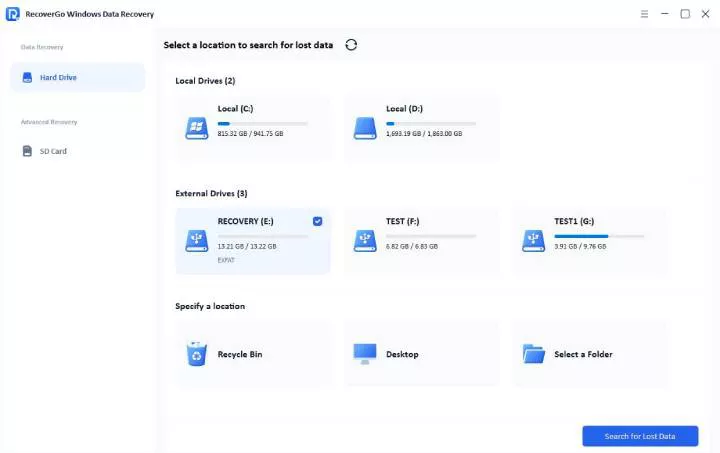
Step 1 Download and install RecoverGo. Connect your Seagate drive to the computer using a USB port. Then click on “Search for Lost Data”.
Step 2 The tool will begin scanning your Seagate drive. During the scan, you can use filters to quickly locate specific files.
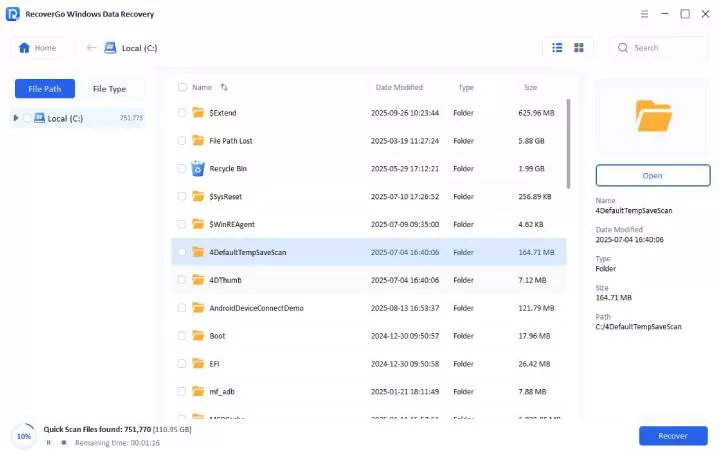
Step 3 Browse the found files and preview them to confirm they’re intact. Select the files you want to recover and click “Recover.” Choose a safe location (not the source drive) to save your recovered data.

Testing Results:
Testing involved a 2TB Seagate external drive under various scenarios. Files were deleted, a partition was formatted, and RecoverGo was run through all three situations. The quick scan recovered 95% of deleted files. The deep scan and advanced scan found data from the formatted partition that other software missed. The entire process remained straightforward even with complex data loss scenarios.
Verdict:
RecoverGo works for everyone. It’s ideal for Seagate hard drive recovery, whether you’re running a business or saving family photos.
2. Tenorshare 4DDiG

This software uses advanced scanning technology to enhance file detection and recovery performance. It works on both Windows and Mac, which helps if you switch between systems. The interface looks modern and clean. Different recovery modes target specific problems—accidental deletions, system crashes, and virus damage each have dedicated modes. Scans run at decent speeds, and you can pause them if needed.
Pros
- Intelligent scanning helps finding more corrupted or partially lost files.
- Special modes for specific problems like lost partitions.
Cons
- Support can be slow to respond.
- Recovery rate is limited for heavily damaged or formatted drives.
- The free version has strict recovery limitations.
- Scan speed may be slow when handling large drives.
Testing Results:
During testing, 4DDiG’s interface appeared modern but felt busy with all recovery mode options presented upfront. It helped recover some corrupted JPEGs that other tools marked as damaged beyond repair. The pause and resume functionality worked without issues. However, navigating between different recovery modes required more clicks than necessary. The software performed well overall, but the interface could be streamlined to match competitors at this price point.
Verdict:
This option is ideal if you need cross-platform support to recover your lost files.
3. TestDisk

TestDisk is the best option if you need free, open-source software. This tool has existed for years, and tech professionals rely on it. Instead of a graphical interface, it runs in a text window with commands. TestDisk excels at fixing partition problems that make drives appear empty.
It comes with PhotoRec, which is focused purely on file recovery. Together, they handle virtually anything without costing a penny. They work on Windows, Mac, Linux, and even DOS systems. For experienced users, it provides precise control over the entire recovery process.
Pros
- Completely free with no limits.
- Partition recovery abilities that paid tools can’t match.
- Runs on virtually any operating system.
Cons
- Command-line interface challenges non-technical users.
- No preview feature.
- A wrong click can cause data loss.
Testing Results:
TestDisk’s command-line interface initially proved challenging despite years of technical experience. The text-based menus require careful reading—one wrong selection can send you down the wrong recovery path. A deleted partition was successfully recovered after consulting the documentation twice, which felt like an achievement in itself.
Verdict:
Use this only if you’re comfortable with command-line tools. For Seagate backup recovery and complex partition repairs, it’s incredibly powerful. But it’s not for everyone.
4. Stellar Data Recovery

Stellar positions itself as a complete recovery solution. It features a clean interface, step-by-step guidance that goes beyond basic data recovery. It also offers different versions for home users, professionals, and IT departments.
The drive monitoring feature is especially useful, as it tracks disk health and detects potential failures before data loss occurs. Stellar also supports data recovery from CDs and DVDs, not just hard drives. It includes disk imaging capabilities, allowing recovery to be performed on a copy of the drive to prevent further damage to the original media.
Pros
- Monitors drive health to catch problems early.
- Disk imaging protects badly damaged drives during recovery.
- Professional versions include cloning and repair tools.
Cons
- Priced higher than many other data recovery tools.
- Free and entry-level plans offer only basic features.
- Some UI scaling issues may affect user experience.
- File signature support is more limited compared to advanced tools.
Testing Results:
In testing, Stellar showed a feature-rich interface, which introduces a noticeable learning curve for new users. The drive monitoring dashboard provides useful health statistics, while basic recovery functions are less immediately accessible and require navigating through multiple menus.
However, despite these advanced features, they may not justify the higher pricing for most everyday users.
Verdict:
It is best suited for recovering basic file formats from external drives after permanent deletion.
Which One Should You Pick?
Here’s how they compare:
iToolab Special Coupon
20% OFF iToolab coupon code for data recovery tool
For most users, RecoverGo is the most practical choice. It combines strong performance with an intuitive interface, making it easy to handle common data recovery scenarios. It is also more affordable compared to other tools.
Part 5: Final Thoughts
Losing files from your Seagate drive doesn’t mean they’re gone forever. The right Seagate recovery software can retrieve them quickly without expensive recovery services. You now understand what recovery services exist and why software often outperforms professional services for logical failures. Choosing the right tool based on scan depth, compatibility, and recovery performance ensures better results.
iToolab RecoverGo Windows Data Recovery stands out as the best all-around choice. With a 99% success rate and reasonable pricing, RecoverGo has everything you need to recover Seagate hard drive data successfully. Try RecoverGo for free today