
Does your iPhone 8 or 8 Plus show an iCloud Activation Lock? This often happens when you buy a used device that is still linked to the previous owner’s Apple ID. Another common situation is that you’ve simply forgotten your own login info.
Activation Lock is a great security feature. But it can also lock out legitimate users from their own device.
So, is it possible to unlock an iCloud locked iPhone 8 Plus? Yes. You can do it with or without a computer. You can also try Apple account recovery, reset your password, or contact the previous owner. There are also alternative tools to remove the lock.
In this guide, we’ll walk you through 6 quick and easy methods. Start with the first one and work your way down until your iPhone is unlocked.
Part 1: Things to Know Before Unlocking iCloud Locked iPhone 8/8 Plus
Find My service automatically enables the Activation Lock on the iPhone 8/8 Plus. So, when the phone is erased/reset, the Activation Lock will appear on the screen. A user is required to enter the correct Apple ID and password to regain access to the device.
Many people rush to try different online services and third-party tools to remove Activation Lock. However, most of the online services and tools are not safe or effective.
📌This is what you need to know before you try to unlock the device:
- Don’t trust free online services. There are many scam websites that offer “iPhone 8 Activation Lock removal free”. The only aim of these services is to collect your device data or personal information. It is simply not possible to unlock a device via these online services.
- You can’t unlock iCloud via IMEI number. Any service that claims to unlock an iPhone 8 or 8 Plus with an IMEI number is a scam!
- Avoid old methods. Any old bypassing methods before the release year of iPhone 8/8 Plus are already patched and will only waste your time!
Part 2: How to Unlock iCloud Locked iPhone 8/8 Plus without Computer?
There are multiple ways to unlock an iPhone 8 or iPhone 8 Plus without a computer. These methods mainly rely on the built-in recovery options from Apple or contacting the previous owner. Generally, these are the safest starting points before moving to more advanced solutions.
- Option 1. Apple Account Recovery
- Option 2. Reset Apple ID Password
- Option 3. Contact Apple Support
- Option 4. Ask the Previous Owner to Remove This Device Remotely
Option 1. Apple Account Recovery
This method is for original iPhone owners who have several email accounts and have forgotten which one is the Apple ID. In most cases, it is all about finding the correct email that was used to make the Apple ID.
Search Your Email Inbox
- Open all of your email accounts one by one.
- Use the search feature and look for Apple related emails. You can search using keywords like Apple, iCloud, and App Store.
- The email that contains these official messages is the one that’s tied to your iCloud account.
Check Other Devices
Do you have more than one Apple device? In that case, there’s a chance that both devices are using the same Apple ID. In cases like these, the Apple ID email is just hiding in plain sight.
Follow these steps to find the Apple ID via other devices:
- On an iPhone/iPad, open Settings. You will see your name and a profile picture at the top. Tap on it to see the associated Apple ID.
Note:
Are you a part of an Apple Family Sharing group? If yes, then a family member can also help you out. Ask them to open their Apple ID settings > Family Sharing. From there, they can look at your profile and find the exact Apple ID email address.
Once you have found the Apple ID, you can use it to sign in and unlock iCloud locked iPhone 8 Plus or iPhone 8. But if you also no longer remember the password, then try the next method below.
Option 2. Reset Apple ID Password
Some iPhone owners do have access to their Apple ID email or a trusted phone number. However, they no longer remember the password.
The good news is that it is possible to reset the Apple ID password. You can follow these steps to fix the iPhone 8 Plus iCloud locked issue:
- Get a phone from a friend or family member.
- Open https://iforgot.apple.com on a browser.
- Click on the Reset password button.
- Enter your Apple ID. Click on Continue.
- Select a verification method. You can choose email or trusted phone number.
- Enter the verification code sent to your phone or email.
- Create a new password.

Option 3. Contact Apple Support
Are you the original owner of the device? Then you can also contact the Apply support for the removal of the Activation Lock. This option only works if you can provide proof of ownership.
- Visit this link. Select the “for a personally owned device” option. If it is owned by a school or business, select the 2nd option.
- Enter the email address and serial Number/IMEI of your iPhone 8/8 Plus.
- Click on the link sent to your email. After that, click on Continue to proceed.
- Enter the date of purchase and shop details.
- In the last step, you have to provide proof of purchase. It can be the original sales receipt. It must include the serial number and device’s IMEI.

It can take anywhere from a few days to a week to unlock the device. But if Apple requires additional verification, it could take longer.
Option 4. Ask the Previous Owner to Remove This Device Remotely
If you bought a second-hand device that is still linked to the original owner’s account, this method is your best bet.
To get started, make sure the device is connected to the internet. After that, ask the previous owner to follow these steps:
- Visit icloud.com. Sign in with the Apple ID and password.
- Select the Find My iPhone or Find Devices option.
- Select the iPhone 8 Plus or iPhone 8 iCloud locked device from the list.
- Click on Erase.
- Click on Remove.

Part 3: How to Unlock iCloud Locked iPhone 8/8 Plus without Password?
The official recovery methods won’t work in most cases. Contacting the first owner is also not possible if the device has changed hands too many times.
So, without the password, how can you get rid of iCloud lock? Below are two working solutions. Both require a computer.
Option 1. Bypass iPhone 8/8 Plus Activation Lock with Lockra1n
Lockra1n is a free tool that modifies activation files on your iPhone. It loads a custom ramdisk into the device’s memory, giving read and write access to the root file system. It then modifies the Activation Lock files.

Note: This tool can potentially damage your iOS system. Your iPhone may become unresponsive. And it can only be installed on macOS running 10.14 or newer.
According to the developers, it supports all the models from iPhone 6s to iPhone 8 and 8 Plus. It does offer limited support for iPhone X, and you can expect some bugs in the process.
Follow these steps to bypass iPhone 8 Plus activation lock:
- Restore your iPhone using Finder (Mac) or Apple Devices app (PC).
- Visit the official website to download the latest Lockra1n.zip file. After that, unzip it and open the app.
- You will see a disclaimer on the screen. Accept it and then connect the iPhone to your Mac.
- Click on the “Bypass iCloud Lock (iOS 15-18)” option.
- Choose the “Prepare Lockra1n” option. Click on OK. This will install the scripts needed to unlock the device.
- Now click on “Bypass Device! (Normal mode)” and then choose Continue.
- Choose “Visit Registration Page”. A page will open in the browser. You need to enter the serial number to register your iPhone with Lockra1n. You can tap on the i on the bottom of the iPhone’s screen to see your SN.
- Enter your iPhone’s serial number and click on Register Device. You will see a message: “Your device was successfully registered”. After that, you can close the browser.
- Click on Bypass Device! (Normal Mode) again. If this option is greyed out, restart the app and click on Bypass iCloud Lock (iOS 15 – 18, Untethered). After that, the option will be available again.
- Now you have to enable DFU mode. Your iPhone 8 must be connected to Mac via Apple lightning cable. Otherwise, you can’t proceed ahead.
- Once done, go back to the Lockra1n tool. Select the “I’ve Entered DFU Mode” option.
- Your iPhone 8 Plus will boot and show some text.
- You will see a message to unplug the device. So, disconnect the cable plugged into the Mac. Then plug it back again. Remember not to remove the cable plugged into the iPhone. In the end, click on Done.
- You will see the “Jailbreak completed” message in the tool. Wait until the iPhone 8 Plus has booted and then click on OK.
- The activation lock will be bypassed. Your iPhone will appear as activated. If it still appears as locked, then connect it to the internet, and the device will skip the activation.
Note: Do not set a passcode on iPhone 8 and 8 Plus after the iCloud activation bypass. Doing so could re-lock the device!
Option 2. Unlock iCloud Locked iPhone 8/8 Plus in 5 Steps
It can be quite consuming to use the Lockra1n tool. Also, it is a little too complex, and any wrong steps could “soft brick” your device.
A much easier and safer option is iToolab UnlockGo. This tool can unlock iCloud locked iPhone 8 Plus or iPhone 8 in few easy steps. It has been tested by users all over the world.

Why choose iToolab UnlockGo?
- Bypass iCloud Activation Lock with 99% success rate.
- It’s easy to use. No technical skill needed.
- It supports iPhone 5s to iPhone 17 Pro Max running iOS 12-26.
- Works on Windows and Mac systems.
How to unlock iCloud locked iPhone 8/8 Plus with UnlockGo?
Step 1 Free download and install UnlockGo on your computer. Select “Unlock iCloud Activation Lock” on the interface.

Step 2 Connect your iCloud locked iPhone 8/8 Plus to the computer with a lightning to USB cable. Then click “Start”. UnlockGo will start downloading a firmware package. It will take a few minutes.

Step 3 Once finished, click on the “Remove Now” button. It will put your iPhone 8/8 Plus into Recovery Mode automatically. Then you need to put the device into DFU mode.

Step 4 The jailbreak starts as soon as your device enter the DFU mode successfully.

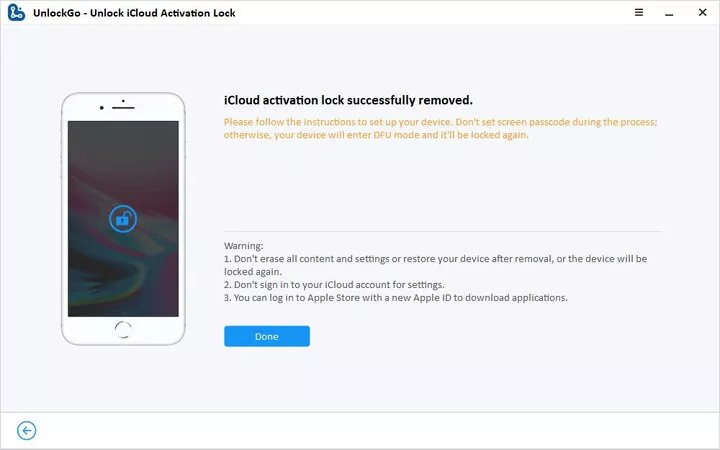
Step 5 After the jailbreak process, you need to put your device into DFU mode again. Once done, UnlockGo starts the activation lock removal process. It will only take 1 – 2 minutes.
Conclusion
It doesn’t feel good to see your iPhone is locked. But you don’t have to worry anymore, as we have shared 6 easy ways to unlock an iCloud locked iPhone 8 Plus/8.
If you are the first owner, then you can recover your Apple ID or reset the password. Another option is to contact Apple Support. If you bought a used phone, ask the previous owner to remove the device from their account.
For a fast, safe, and beginner-friendly solution, go with iToolab UnlockGo. With its advanced technology, your iPhone won’t become a paperweight.
UnlockGo – Best Activation Lock Removal Tool
389,390,209 people have downloaded it