


Factory Reset Protection (FRP) is an important security feature and has been a part of Android OS for more than a decade! However, as Android evolves, so do the methods to bypass Factory Reset Protection. With the release of Android 16, it becomes harder to bypass FRP on Android devices.
Is it still possible to bypass FRP on Android 16? The answer is YES. But before we move forward to the solutions, you need to know how FRP lock works. It helps you evaluate whether a FRP bypass tool’s claims are realistic. You’ll be better equipped to choose a reliable tool and avoid fake solutions. Now, let’s dive in.
Part 1: What’s the Meaning of FRP Bypass?
Factory Reset Protection (FRP) was first introduced on devices running on Android OS 5.1 (Lollipop). Since then, the FRP has become an important part of the overall Android operating system.
The FRP lock is enabled automatically when a Google account is added to an Android device. Once it is activated, it will prevent the use of the device after an untrusted factory reset. The only way to regain access is to login with the Google account associated with the device.
However, many users forgot the Google account they added to their Android device, or purchased a second-hand device that’s locked to the previous owner’s Google account. In such cases, a FRP bypass method is necessary. It can help unlock Android devices without the original Google account credentials.
Part 2: FRP Bypass Methods That No Longer Work on Android 16
With Android 15, Google introduced significant improvements to Factory Reset Protection, making it more difficult to bypass. And Android 16 has further strengthened these security measures. Many popular bypass methods that worked on older Android versions are now completely ineffective.
Let’s explore the methods that can’t bypass Google lock on Android 16.
Talkback Feature Exploit
Talkback was designed to help people with vision impairment to manage their devices. Users could activate Talkback during setup, then use voice commands to open the Settings menu or browser. From there, users can disable Google Play services to skip the Google account verification or bypass verify PIN after factory reset.
But Android 15 has closed those loopholes. And Android 16 enhances the Factory Reset Protection. Its gestures and interactions are limited to the setup interface itself, preventing any navigation to system settings or external applications.
Free FRP Tools
There are also many free FRP tools that allow users to unlock old Android devices. These are PC based software and rely on the weakness in the old Android versions to bypass the factory reset protection.
Depending on the software, they can unlock the device through these methods:
- ADB Commands – The device is connected to the PC, and then instructions are sent via USB to remove the Google lock.
- System Loopholes – The bugs in the setup wizard are exploited to gain access to the settings and unlock the device.
- Flashing – Some tools also use fastboot or download modes to modify the system files or skip verification steps.
The free FRP tools used these methods to communicate with the system or access the system settings. However, these tools fail on Android 16 because Google has fixed most of the loopholes. Android 16 also blocks OEM unlocking and prevents any system-level changes while the FRP is active. In a nutshell, using the freely available FRP tools will not allow you to unlock a device running on a newer Android OS.
FRP Bypass APK Files
Another popular method, which no longer works on Android 16, is the FRP bypass APK files. Such APK files usually provide a shortcut to the system settings or disable certain Android services during the setup.
Users normally install such APK files via browser or file-sharing options. Once the apps are installed, it allows the user to access hidden settings, add new accounts, or disable certain FRP services.
This method only worked on older Android devices because the OS allowed app installation during the FRP. But on Android 16, this will not work because the system doesn’t allow app installation during the setup process.
A user also cannot download files or launch any APK files until the FRP verification is complete. So, if you were thinking of using APK files for FRP bypass Android 16, then it will not work.
Using PIN Locked SIM Card & Keyboard
In this method, a locked SIM card is used to access the settings or interrupt the setup process. However, the pin-locked SIM card also doesn’t work when it comes to bypassing the Android 16 FRP.
Why? This method fails because the SIM-related prompts and the keyboard interactions are isolated within the setup environment. The system doesn’t allow users to access the settings or any other apps.
Part 3: FRP Bypass Methods That Still Work on Android 16
Despite Google’s enhances security, there are still legitimate methods to remove FRP lock on Android 16. These approaches focus on lawful access and respect device ownership.
- #1. Recover Google Account Password
- #2. Contact the Previous Owner
- #3. Free Download Android 16 FRP Tool
- #4. Visit Official Support Center
#1. Recover Google Account Password
The most straightforward way to bypass FRP on Android 16 is to login with the Google account. If your Google account was added to the Android device and you forget the password, then you can easily recover it!
You can follow these steps to recover the Google account’s password and bypass FRP:
- Open the Google account recovery page on another device.
- Enter your email address and click Next.
- On the next page, you will be asked to enter your password. Click on Try another way.
- Follow the verification steps (Backup email, OTP, or security questions).
- Reset your password.
- It will take 24-72 hours for the new password to sync with all registered devices. After this period, turn on the FRP-locked phone and connect to WiFi.
- On the FRP lock screen, login with your Google account.
- Complete the setup to remove the FRP lock.

#2. Contact the Previous Owner
Are you not the first owner of the device? In that case, another way to bypass Android 16 FRP is to contact the previous owner. Since the device is linked to the last synced Google account, only the previous owner can verify ownership and unlock the device.
Most sellers, when they understand the issue, are willing to help. But some are unwilling to share the Google account credentials with you. They are concerned about privacy breaches. Thus, you may need a working FRP bypass tool.
#3. Free Download Android 16 FRP Tool
There are currently very few tools on the market that can remove Google FRP lock on Android 16. But iToolab UnlockGo Android is the exception. It’s designed to bypass FRP on most Android devices, including those running the latest Android 16.
Main Features of iToolab UnlockGo Android
- Wide Compatibility: It can bypass Google lock on Samsung, Xiaomi, Redmi, vivo, OPPO, Motorola, and more devices running Android 5-16.
- High Success Rate: Equipped with advanced technology, UnlockGo Android guarantees a 99% unlocking rate.
- Easy to Use: The tool doesn’t require any technical knowledge. You can bypass FRP with a few clicks.
- Multi-functional: Additionally, UnlockGo Android can help you unlock Android phone without password and factory reset Samsung in 1 click.
It’s a popular tool around Android users all over the world. Whether you’re an individual user, or you own a mobile phone repair shop, you need to install it on your computer.
Now, let’s look at the steps to bypass Samsung FRP on Android 16:
Step 1 Install UnlockGo Android on your computer. After that, launch the tool and choose “Bypass Samsung FRP (Google Lock).” Next, press the “Start” button to continue.
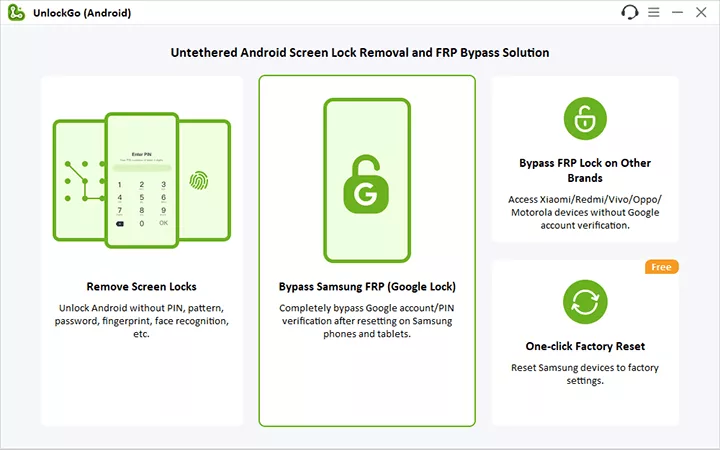
Step 2 Now select “Snapdragon Device” from the list and press the Next button. This option works for all the Samsung devices running on Qualcomm Snapdragon processors.

Step 3 Choose your device model from the list. If you don’t see the exact model, just select a similar model and press the Next button.

Step 4 Get an EDL cable and follow the on-screen instructions to connect and setup the device. If you don’t have an EDL cable, you can get one from a nearby store or online (Amazon & eBay).

Step 5 Once the device is connected, UnlockGo Android will automatically remove the FRP lock from the device.

As you can see, it is very straightforward to use the UnlockGo Android 16 FRP tool to unlock a device! It only takes a few minutes at best and has a very high success rate (99.99%) of removing the FRP lock.
#4. Visit Official Support Center
Another way to regain access to a FRP-locked Android 16 device is to visit an official support center. These are the steps you can follow to get your Android device unlocked:
- Visit an authorized service center of your device brand (Samsung, Oppo, etc.).
- Bring the locked phone along with your proof of purchase.
- Explain the situation (2nd-hand purchase or forgotten account).
- The staff will verify the ownership and help you unlock the device.
Summary
It becomes harder to perform FRP bypass on Android 16. Almost all manual methods don’t work on Android 16. Given this situation, it’s urgent to find a practical solution. After checking the above 4 working methods, iToolab UnlockGo Android is the best option for every Android users. It’s reliable and easy to use. Free download the tool to unlock your Android device today!