

Many users reset their Android devices to fix software problems or remove screen lock. But after a reset via Recovery Mode, you’re probably required to enter the information of the previously synced Google account. This is called Factory Reset Protection (FRP).

You can’t access the device without the correct Google account username and password. What if you forgot the Google account credentials and can’t recover the account? Or you purchased a second-hand device and can’t reach the seller? In that case, you need an FRP bypass method. addROM FRP bypass method is widely discussed across major forums. Does it still work on modern Android devices? How to use it? You’ll find the answers in this post.
Part 1: What Is addROM?
For readers who don’t know, addROM is a website that offers firmwares and guides to help Android users unlock the full potential of their devices. It offers quick shortcuts and APK files to help bypass FRP lock on some Android devices. If you’re looking for a free method and don’t have a computer, you can visit addROM website to unlock your device. But you need to prepare another Android device and 2 SIM cards.

Supported Android Versions:
- Android Lollipop 5.1
- Android Marshmallow 6.0
- Android Nougat 7.0
- Android Oreo 8.0
- Android Pie 9.0
- Android 10
Supported Android Models
- Samsung
- Xiaomi/Redmi
- vivo
- OPPO
- Infinix
- Motorola
- Tecno
- Realme
addROM can’t bypass FRP on Android 11/12/13/14/15/16. If you need to bypass FRP on these Android versions or other Android brands, you can check the best addROM alternative in the Part 4.
Part 2: How to Download and Use addROM FRP Bypass APK?
So, how to remove Google lock using addROM FRP bypass APK? Keep in mind that since your primary device is locked and you won’t be able to download the APK directly, you’ll need another Android phone for the job. Let’s quickly walk you through the step-by-step procedure to bypass FRP lock on an Android device using addROM APK. This method only works on Android 5.1-10. So, please remember to check your Android version before you start.
Here, we’ll take Samsung device as an example.
Step 1: First, enter a working SIM card into your primary Samsung device and boot up the device. Follow the on-screen instructions and get to the FRP lock screen. Leave the device aside and get your secondary Android phone.
Step 2: On this phone, open the browser and go to “addrom.com/bypass”. Scroll down and tap the “HushSMS.apk” option. Go ahead and install this application. It will send an addROM link to your Samsung device.

Step 3: Once the application is installed, open it and tap the “Send WAP Push SL”. Enter the phone number of the FRP-locked Samsung device. Inside the message text field, type “www.youtube.com/c/iToolab”, then tap on “Send WAP Push SL” again.
Step 4: Now, wait for 1-2 seconds and YouTube will automatically open up on your Samsung phone. You’ll see the iToolab YouTube channel on your screen. Don’t worry we are not here to watch any videos though. Simply tap the “Menu” icon at the top-right corner and select “Terms & Privacy Policies”.
Step 5: Use the browser to open the terms and policies page. At this point, tap the search bar at the top of the screen and type “addrom.com/bypass”. Based on your phone’s Android version, download the right Google Account Manager (GAM) apk. While you’re at it, also download the “FRP Bypass” file. Now, install both the files one by one. After the installation completes, open “FRP Bypass” and tap the menu icon at the top-right corner. Then, click on “Browser Sign-in”.
Step 6: Now, sign in with any Google account you want and simply restart your phone. Once your device restarts, you won’t have to deal with the FRP lock screen anymore.
So, that’s how you can use the addROM FRP bypass APK to bypass Google account protection on your Samsung phone.
If you want to download safe and reliable APK files to bypass FRP lock on OnePlus/Motorola for free, you can also download from iToolab website.
Part 3: Pros & Cons of addrom FRP Bypass
Every tool has its own advantages and disadvantages. So does addROM FRP bypass method.
Pros
- All addROM bypass APK files are free to use.
- You can bypass FRP without computer.
Cons
- You have to prepare another Android device and two working SIM cards.
- It can’t bypass FRP on Android 11/12/13/14/15/16.
- It’s complicated from beginners.
Part 4: addROM Not Working? Best addROM Alternative Here [Android 5-16]
If you’re running Android 10 or earlier, the steps above should work for you.
But what if your phone runs Android 11, 12, 13, 14, 15, or 16? Or what if you have a device brand that addROM doesn’t support. That’s where a modern FRP bypass tool like iToolab UnlockGo (Android) comes in handy. iToolab team has years of experience in unlocking Android and iOS devices. It has received many positive reviews from its satisfied users. Apart from that, it’s the cheapest FRP bypass tool in the market.

UnlockGo Android – Best FRP Bypass Tool
- Unlock Google lock on Samsung, Xiaomi, Redmi, vivo, OPPO, Motorola, Realme and more devices.
- No need to install any APK files.
- It offers different solutions to guarantee a high success rate up to 99%.
- Support Android 5-16.
- It’s easy to use. No technical skill required.
Here is how to bypass FRP lock on Samsung devices. If you want to learn how to bypass FRP on other Android brands, you can check the detailed guide.
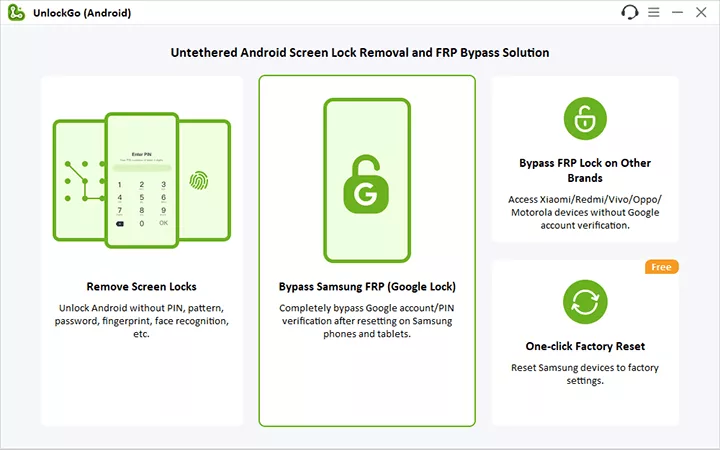
Step 1 After installing UnlockGo Android on your computer, connect your Samsung device using a USB cable and launch the software to get started. Select “Bypass Samsung FRP” on the home screen to proceed further.
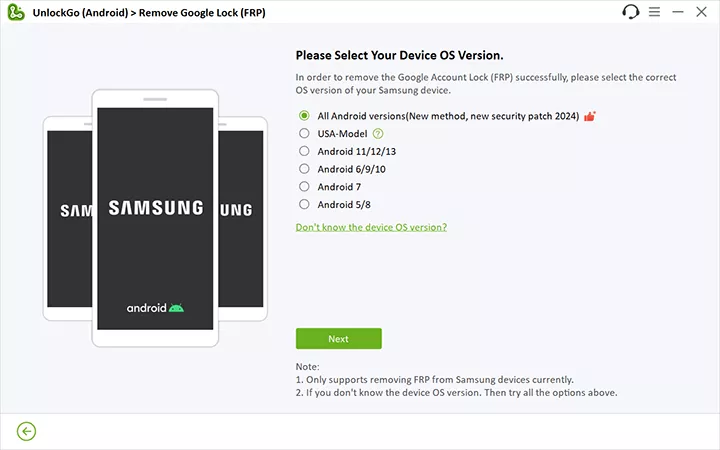
Step 2 On the next screen, choose one solution and click the “Next” button. The tool offers several options to bypass Samsung FRP. The first option supports all Android versions. It’s recommended to choose this option.
Step 3 You will see the steps guiding you enable USB debugging on your locked Samsung. Just give the permission to your computer. Make sure that the phone stays connected throughout the process.

Step 4 Later, your Samsung device will reboot. Finally, your Google lock will be removed and you’ll be able to access the phone without getting interrupted whatsoever.

Conclusion
So, that’s everything you need to know about bypassing FRP on an Android phone using the addROM FRP bypass method. We understand that getting stuck with the FRP lock screen is pretty annoying, but with the right approach, you can easily bypass the FRP lock and regain access to your phone easily. Of course, a tool like addROM is suitable to get the job done on old Android versions, but if you’re running the latest Android version on your device, you can use iToolab UnlockGo (Android) to bypass the FRP lock. It saves your time.
Vivo 15yc lock screen Android phone
You’re the best man!!…. I really appreciate FRP Bypass keepup unlock android mobile phone
unlock passwad
Hi Zeshanfarooq, what can we do for you?
when try to unlock my tcl I got stuck , please help me find out