

I factory reset a phone and sold it a while back. My buyer contacts me to tell me they’re going through set up and the phone is asking for the last used password. I don’t know what that was anymore! Why would a factory reset phone ask for a last used pin??? I assumed when I sold the phone they’d need to set up a new one. Can they bypass this?
— From Reddit Community
It’s a scenario that plays out thousands of times in second-hand device transactions. You might be wondering the same thing: “Why is the phone still asking for the old PIN/pattern after a factory reset?”
It’s not a glitch. It’s FRP (Factory Reset Protection), a security feature introduced by Google to prevent unauthorized use after an untrusted factory reset. The good news is that it’s possible to bypass this screen. Whether you’re the original owner who can’t remember the old PIN/pattern, or the buyer stuck on the verification screen, you can bypass verify PIN after factory reset using the methods in this post. Keep reading.
Why Does My Phone Ask for Verify PIN After Factory Reset?
When you sign into a Google account on your device, that account gets linked to the hardware. If you factory reset without removing that account first, FRP triggers and asks for either the last Google account credentials or the previous lock screen PIN/pattern to verify ownership.
This applies to all Android brands – Samsung, Motorola, Xiaomi, Redmi, Vivo, OnePlus, and others – running Android 5.1 or later. On older Android versions (such as 5.1 to 12), FRP had more loopholes, and users could often bypass the verification screen with simple tricks found on YouTube. However, starting from Android 15, Google has significantly strengthened FRP security, making most of those manual workarounds obsolete. If you’re on Android 15 or later, you need a reliable FRP unlock tool to bypass verify PIN screen successfully.
How to Bypass Verify PIN After Factory Reset Samsung/Motorola?
In this section, you’ll learn 4 working ways to bypass verify PIN after factory reset. Keep reading.
- Way 1. Use Google Account to Bypass Verify PIN After Factory Reset
- Way 2. Bypass Verify PIN After Factory Reset with PC [Android 16 Supported]
- Way 3. Bypass Verify PIN After Factory Reset without PC
- Way 4. Visit the Service Center
Way 1. Use Google Account to Bypass Verify PIN After Factory Reset
If you still remember the information of the previously synced Google account, this is the simplest and most official way to bypass the verification screen. All you need is the correct email and password.
- Tap “Use my Google account instead” on the screen.
- Enter the correct email address and password. Then tap “Next”.

If the credentials are correct, the verification will pass immediately. And you can finish setting up the phone.
What if you forgot the password? You can visit the Google account recovery website to create a new password. After resetting the password, it will take 24 to 72 hours for the new password to sync on all your devices.
Way 2. Bypass Verify PIN After Factory Reset with PC [Android 16 Supported]
If you don’t have the Google account information or you bought a second-hand device, here is an alternative solution. You’ll need a Windows or Mac computer, but it doesn’t require any Google account information. And you can regain full access to your device within several minutes.
The tool we want to recommend is iToolab UnlockGo Android. It can bypass FRP on Samsung, Xiaomi, Redmi, vivo, OPPO, Motorola, and more devices. It’s a reliable FRP bypass tool that has been trusted and reviewed by many popular media sites and users all over the world.

Why Should You Use UnlockGo Android?
- It can bypass FRP on Android phones and tablets running Android 5-16.
- The tool is user friendly. No technical skill needed.
- Powered by the advanced technology, it guarantees a 99% success rate.
- No FRP bypass APK needed.
Here is how to bypass verify PIN after factory reset with UnlockGo Android. The tool can bypass Google lock on different Android brands. Here, we’ll take Samsung as an example.
Step 1 Download and install UnlockGo Android on your computer. Then open it and choose “Bypass Samsung FRP”.
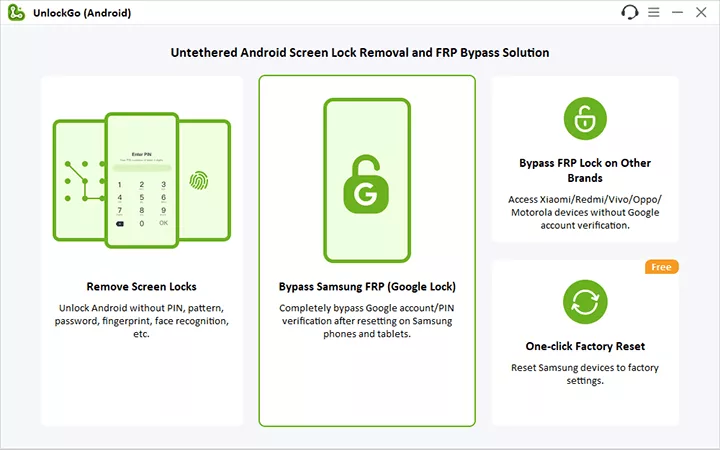
Step 2 Connect your Google-locked Samsung device to the computer with a USB cable. You’ll see several options on this screen. Choose one based on your model and Android version. We’ll choose USA-Model today.

Step 3 UnlockGo Android will start the removal process immediately. You don’t need to do anything during this process. Just wait.

Step 4 A few seconds later, your Samsung device will be fully unlocked. Then you can set it up and enjoy full functions.

Way 3. Bypass Verify PIN After Factory Reset without PC
If you do not have access to your computer now, then this section helps you a lot. This method allows you to bypass verify PIN/pattern after factory reset for free. Let’s check how it works. The process is a little bit complicated, please follow each step carefully.
💡 Important note: This method works good on Android 5-12. If your device is running Android 13 or later, this method may fail.
1. Simultaneously press Volume Up and Down keys to turn on Talkback feature.
2. Draw an L from the opposite direction.
3. Double tap on the “Use voice commands” button.
4. Say “open Google Assistant”.
5. Tap on the keyboard icon. Type Settings in the box.
6. Double click on the “Open Settings” button.

7. Now, you can turn off Talkback feature by pressing Volume Up and Down keys together.
8. Navigate to System management – Backup & Reset – Reset all settings. Then your mobile phone will restart automatically.
9. Set up your phone, and connect your device to an available network.
10. Repeat the step 1-3. This time you need to say “open Google Chrome”.
11. Tap on the Google icon to open Chrome. Once done, you can turn off Talkback feature.
12. Visit itoolab.com/frp-bypass-apk/ website. It offers some quick shortcuts to access system settings.
13. Choose “Open Set Screen Lock” and click on it.

14. Follow the instructions to set a new lock screen password. Once completed, you can bypass the verify PIN with the new password.
Way 4. Visit the Service Center
If you are the owner of the device and are afraid to try method 2 and 3, then visit the nearest service center will be another good choice. But they may also use any third-party FRP bypass tools like iToolab UnlockGo (Android). By the way, please remember to show your purchase proof so the service center can offer further help.
FAQs About Verify PIN After Factory Reset Android
Does factory reset remove the PIN?
Normally, if you factory reset the Android device via the Settings menu and you have signed out of your Google account, a factory reset will remove the PIN. Otherwise, the PIN won’t be removed.
Is removing FRP illegal?
No, removing FRP from a device you own is perfectly legal. FRP bypass tools and methods are legitimate solutions for regaining access to your own property when you’ve forgotten your credentials.
How to prevent FRP lock on Android devices?
The easiest way is to remove your Google account before performing a factory reset. Go to Settings > Accounts > Google > Remove account. Once that’s done, you can safely reset the device without triggering FRP.
Conclusion
So this is how you can bypass verify PIN after factory reset Samsung/Motorola/Xiaomi/Redmi/Vivo devices. Following the above steps can bypass the PIN when asked after the reset. Though there are different methods to bypass it, we highly recommend using UnlockGo (Android) to avoid future issues.
Get the latest FRP bypass method from our TG channel.
hi I have a Samsung sm-a136w and I had factory reset and now when I try to put my info on it it’s saying that I need a vacation pin for it and I don’t know it so how do I bypass it or can I
Hi, do you know the previous Google account? If not, you need to bypass FRP lock.
Help me bypass verifypin of my Samsung A51,please.
My password still appears after hard reset
I tried hard reset wiping data and factory reset but still the password appears
You need to bypass FRP lock
after a hard reset my Samsung tabs6 still asking for password or email my granddaughter forgotten both how do I buy pass both
i tried this method but when i connect the cable it is just charging and Android go isn’t showing the device in my pc
I think you need to install the driver on your computer. If you still have any confusion and need some help, kindly reach us at [email protected].
hi, after factory resetting my phone I forgot my Google account info and my TalkBack won’t bring up my voice commands so I can bypass this, any ideas that can help me?
Hello Ricketta, what’s your phone brand? iToolab UnlockGo (Android) can bypass Google FRP lock on Samsung, Xiaomi, Redmi, vivo, and OPPO devices.
I need ur help. can we have a private chat. please
Hello Sanayah, you can send an email to our support center. Then you can have a private chat with our professional customer service.
Help me your previous pin
Hello Waliwdeen, what’s your phone brand?
I get the how do I get my phone back back in the screen I’ll try everything man I try everything y’all and I don’t know what to do I need somebody to tell me how to unlock the phone
Hello Rocky, would you like to describe your problem in detail?
how do I bypass the “enter your Gmail or phone number” if I don’t know which of the 20 Gmail accounts I used or phone number I used when I got my galaxy 8.
I do not have a desktop only an android I could use to bypass the Gmail/phone number issue I’m having. is there something I can do besides enter my Gmail or phone number and do it on my spare android being I have no desk top??? help!!!
Hi Nikki, we have introduced some methods to bypass verify PIN without computer in this article – How to Bypass Google Account Verification After Reset 2023
Calypso 2 verify. pin
Hi Sandra, iToolab UnlockGo (Android) only supports to bypass FRP on Samsung, Xiaomi, Redmi, vivo and OPPO devices right now.
it’s not working
Hi RAMSING, can you please describe your problem in detail?
none of these methods work anymore what can I do now?
Hi Caleb, what’s your phone brand and model?
How to bypass verify pattern after factory reset..
Hi Nikes, iToolab UnlockGo (Android) can bypass verify pattern after factory reset on Samsung, Xiaomi, Redmi, vivo, OPPO and Motorola devices.
Please I need help on my vivo y02s please
Hi Nikes, what can we do for you?
hi I have done a forced factory reset on samsung a34 and usb debugging prompt does not appear when i run FRP unlock program through my PC can u help?
Hi john, did you try our program iToolab UnlockGo Android? I didn’t find any order under your email address. If our program failed to help you bypass FRP, you can send an email to our support center.
hi I have a moto e7 frp lock is on and do not have Google pin or Google login please help
Hi Jay, UnlockGo (Android) can bypass FRP on Motorola devices. You can free download the tool to try it.
the second option on how to bypass pin after reset isn’t working and I don’t have a computer. how do I bypass pin???
Hi Alicia, bypass verify PIN after reset with a PC is the easiest method. And it has the highest success rate. You can try to borrow one computer.
what do I do when I fatesr rest my phone and I forgot the pattern and my Google account
Hi Diane, what’s your Android brand?
I need to bypass screen lock after factory reset
Hi Brandy, what’s your phone brand?
I have a pritom android tablet that my younger daughter put a pin on and didn’t mean to and she dont now what it is or how she done it.. but I done a hard factory reset on it but it’s still asking for the pin and its not taking my email address. what can I do