

You pop your last incense during a live event, and suddenly Pokémon GO incense not working ruins the moment. Nothing spawns. Not one Pokémon. That frustration is usually quick to fix.
This article explains every real reason why incense stops working in Pokémon GO, then gives you 8 fixes that actually do something.

Why Is My Pokémon GO Incense Not Working?
If you’re facing incense not working in Pokémon GO, the first step is understanding which incense you’re using.
Pokémon GO has two main types of incense. The regular green one lasts 60 minutes and attracts Pokémon to your location, even while standing still (though much slower than while moving). The Daily Adventure Incense is different and has stricter rules.
The Daily Adventure Incense lasts 15 minutes and resets every midnight. The catch: it only spawns Pokémon while you are physically moving. Stop walking, spawns stop. When you move consistently, it can spawn a new Pokémon roughly every 30 seconds.
Regular green incense, by comparison, spawns one Pokémon about every 5 minutes while stationary, or every 60 seconds while walking.
The Most Common Causes of Incense Not Working
The culprit is usually one of these five:
- Not moving: especially with Daily Adventure Incense, zero movement means zero spawns.
- Using it in the 11:45 PM to midnight window: the game blocks activation of Daily Adventure Incense in the final 15 minutes before midnight.
- Wrong date and time settings: if your phone clock isn’t set to automatic, Pokémon GO’s spawn logic breaks.
- Weak GPS or indoors: the game needs a live GPS lock. Being inside a building or near tall structures kills it.
- App glitches, outdated version, or full cache: these cause silent bugs where incense appears active but triggers nothing.
8 Quick Fixes for Incense Not Working in Pokémon GO💡
When Pokémon GO incense stops working, try these 8 fixes in order.
1. Walk, Don’t Stand Still
Activating Daily Adventure Incense and staying home is exactly why nothing appeared.
Get outside and walk a straight path. Walking in circles or doubling back doesn’t count. A straight line or a one-direction loop works far better.
2. Avoid the 11:45 PM to 12:00 AM Window
Activating Daily Adventure Incense at or after 11:45 PM will either fail to activate or produce zero spawns. Niantic blocks usage here to avoid overlap with the midnight reset. Just wait until the clock flips.
3. Fix Your Device’s Date and Time Settings
Pokémon GO ties spawn logic to your device’s real-time data. If that’s off, even by a few minutes, the game acts as though your incense period has expired.
On iPhone: Settings > General > Date & Time > toggle on Set Automatically.
On Android: Settings > General Management > Date & Time > toggle on Automatic date and time.
4. Restart the Pokémon GO App
Force-close the app from your recent apps screen, then relaunch. This clears most in-session glitches that stop spawns.
5. Clear Cache (Android)
On Android, go to Settings > Apps > Pokémon GO > Storage > Clear Cache. This doesn’t delete your game data but wipes temporary files that cause silent bugs. iOS users can’t clear cache the same way, but a reinstall achieves the same result.
6. Update the Game
Fixes for incense issues often require the latest version. Check your App Store or Google Play for pending updates.
7. Improve GPS Accuracy
Go outside, away from buildings. On Android, enable high-accuracy location mode (Settings > Location > Mode > High Accuracy). Indoors, weak GPS kills incense spawns.
8. Check Your Network Connection
A weak signal can make the incense timer run without pulling spawn data. Switch to mobile data if your Wi-Fi is unreliable, or move to better coverage.
The Best Way to Get Daily Incense Spawns Without Moving🔥
You’ve tried all 8 fixes above, yet your Pokémon GO incense is still not working. Here’s the real reason: Daily Adventure Incense is designed around movement, but not everyone can walk 15 minutes every day. That’s exactly what iToolab AnyGo solves.
iToolab AnyGo is a GPS location changer that runs smoothly on iOS, Android, Windows PC and Mac. It simulates movement by altering your GPS coordinates in real time. Pokémon GO reads this as actual walking, which means your Daily Adventure Incense will spawn Pokémon every 30 seconds, just as if you were moving outdoors.

- Trigger constant incense spawns without real walking.
- Jump straight to busy zones with plenty of wild Pokémon spawns.
- Set natural walking speed to activate steady incense spawns.
- No Failed to Detect Location Error 12.
- Work seamlessly on Windows, Mac, iOS, and Android devices.
- Fully support the latest iOS 26/Android 16.
Key Features of AnyGo for Daily Incense Spawns
- 1. Teleport to a Spawn-Friendly Area Instantly
Type in any address, and AnyGo instantly moves your GPS there. For incense, teleporting gets you to a spawn-friendly area before you start moving. - 2. Simulate Realistic Walking
Set a flexible movement speed from 3.6 km/h to 100 km/h. For incense, stick to 4-6 km/h, the sweet spot where Daily Adventure Incense spawns a new Pokémon every 30 seconds, exactly like real walking. - 3. Run Hands-Free Incense Sessions with GPX Routes
Import a pre‑built walking path and let AnyGo follow it automatically. Load a proven route, set the right speed, activate your Daily Adventure Incense, and get 15 minutes of hands‑free spawns — no need to actually move. - 4. Avoid Soft Bans with the Cooldown Timer
Teleporting too fast can trigger a soft ban, which makes incense spawn nothing. AnyGo’s cooldown timer shows the safe waiting period after each jump. Use it before activating incense to stay undetected.
How to Use AnyGo to Make Incense Work Perfectly
Follow these three steps to get your Daily Adventure Incense working again:
Step 1 Download and install iToolab AnyGo on your Windows or Mac computer.

Step 2 Connect your iPhone or Android phone to your computer with a USB cable.
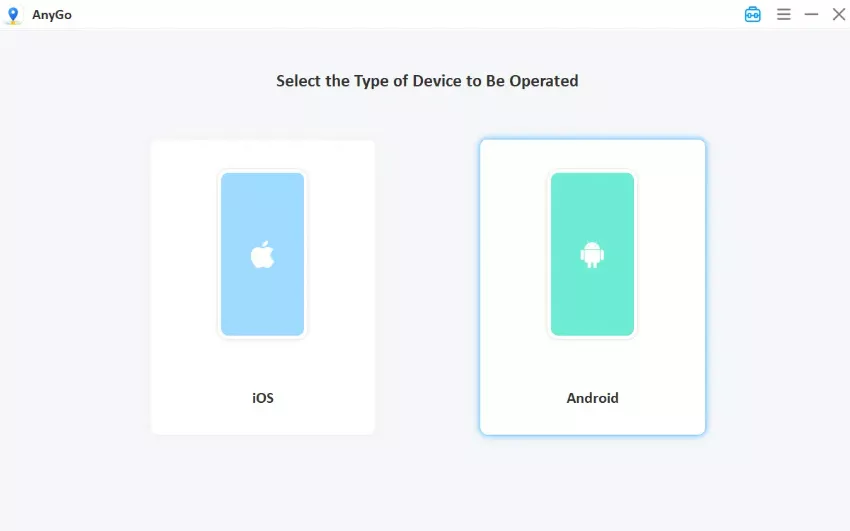
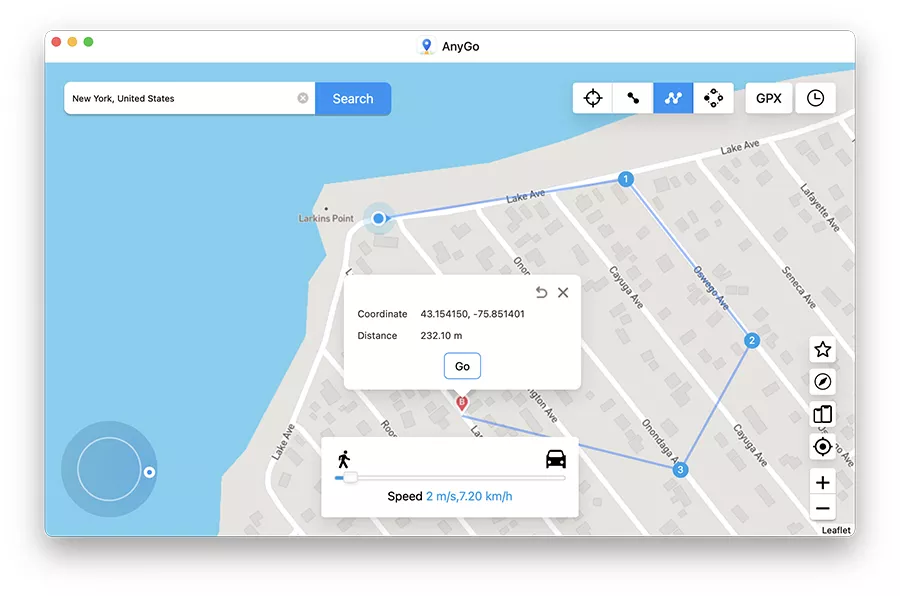
Step 3 Open Multi-spot or Two-spot mode, plot a route, and set your speed to 4-6 km/h. Click Go to start the simulated movement. (Your GPS will now move at walking speed.) Activate your Daily Adventure Incense in Pokémon GO and collect spawns every 30 seconds.
Get More Out of Every Incense You Use
Most Pokémon GO incense not working problems are quick to solve. For Daily Adventure Incense specifically, distance covered is everything. Straight-line walking beats circling the same block every time.
When you’re facing Pokémon GO incense not working and want consistent spawns without actually moving, AnyGo Pokémon GO Spoofer gives you exactly that. It replaces physical walking with reliable virtual movement, so your Daily Adventure Incense triggers spawns every 30 seconds, no matter where you are.
Try AnyGo with a free trial and never waste another incense.