

iFlowGo is a tool that changes your iPhone’s location for Pokémon GO over Bluetooth, with no jailbreak. That sounds simple, but players keep asking the same things. Is it safe? Is it free? Why does the Bluetooth link keep dropping? This review answers all three using the official iFlowGo pages and other sources we could check. We also compare it with AnyGo, a location changer that works on more devices, so you can choose before you download anything.

Part 1. What Is iFlowGo?
iFlowGo is a GPS location changer built mainly for iPhone players. It does not edit the game. Instead, it sends a new location to your iPhone over Bluetooth, and Pokémon GO reads that location like any other. The official site, iflowgo.com, says it works with the normal App Store version of the game. It also says there is no jailbreak and no code injection.

If you search for iFlowGo Pokemon GO, these are the main features the site describes:
- Bluetooth control: You install iFlowGo on a Windows PC, a Mac, or an Android phone. That device acts as a remote and connects to your iPhone by Bluetooth.
- Official game client: You keep the regular Pokémon GO app. No modded version is needed.
- Map-based moves: You pick a spot on the map, then switch back to the game.
- Sensor simulation: The site claims it also fakes motion sensor data, such as the gyroscope and barometer, to help avoid “Error 12.” That is the vendor’s own claim.
- Joystick and routes: The site lists a virtual joystick with full 360° control, one-click teleport, and custom routes with GPX import and adjustable speeds.
- Virtual GO Plus: An auto-catch and auto-spin mode that keeps working while you are away from the phone, and the demo pages show it running on three iPhones at once.
- Up to 3 iPhones: One membership can cover three phones at once, according to the site.
- Extra tools: The site links a hotspot map, a cooldown chart, and event guides. It also mentions Monster Hunter Now.
Supported platforms: iOS is the primary target. The control app has Windows, Mac, and Android versions. At the time of writing, the download page lists Windows V3.2.5, Mac V3.1.8, and Android V2.4.8.
Part 2. iFlowGo Review: Pros, Cons, and Who It’s For
iFlowGo has a clear appeal for iPhone players, but it is not perfect. Here is a quick look at what it does well, where it falls short, and who gets the most out of it.

Pros
- No jailbreak, and the game app stays untouched.
- An Android phone can be the controller, so a computer is optional.
- One plan can cover up to 3 iPhones.
- The site publishes a cooldown guide and event guides, which helps beginners.
- New users can get free VIP days to try it.
Cons
- Prices and refund rules are not shown on the main pages we read.
- Bluetooth links can drop. A drop during play can trigger Pokémon GO’s “failed to detect location” message.
- It only spoofs iPhones. It cannot change an Android phone’s location.
- The official pages do not list supported iOS versions or Bluetooth requirements.
- Most “100% safe” claims come from iFlowGo’s own pages. We found no independent test.
- It still breaks the game’s rules, which we cover next.
Who It’s For
iFlowGo suits iPhone players who dislike jailbreaking and don’t mind a Bluetooth setup. It also fits people who want an Android phone as a remote. It is a weaker fit if you use an Android phone, want one tool for many apps, or can’t risk your game account.
Part 3. Is iFlowGo Safe?
“Safe” means two different things here: your phone, and your game account.
Your phone
iFlowGo does not need a jailbreak, which removes one big risk. The downloads are .zip files for Windows and Mac and an .apk file for Android. An .apk installs outside the Play Store, so get it only from the official site. Scan every file with antivirus software first. We found no independent security audit of the app.
Your game account
This is the bigger risk. Pokémon GO’s rules ban faking your location. In 2018, Niantic described a three-strike system, as reported by 9to5Mac:
- Strike one: a warning and a 7-day downgrade, which hides rare Pokémon.
- Strike two: a 30-day suspension.
- Strike three: a permanent ban. The policy also notes that not every offender is offered all three strikes, and that few bans are overturned on appeal.
That policy is years old, so read the current Trainer Guidelines before you play.
iFlowGo argues that most bans come from modded game clients, not from spoofing itself. That may be true for some cases. But it is the vendor’s view, and no tool can promise zero risk. Only the game’s publisher decides who gets banned.
What Reddit Users Actually Say About iFlowGo
Reddit is where many players share ban stories, so it is worth checking. Search “iFlowGo reddit” or just “iFlowGo” there, then sort by newest. Judge each thread with three questions.
First, how old is the post? An iOS update can change how Bluetooth tools behave. Second, did the player follow cooldowns? A ban story from someone who skipped them says little about the tool. Third, does the praise sound like an ad? The loudest “safe” claims we found came from iFlowGo’s own site and Patreon page, so independent posts count for more.
One ban report does not prove a tool is unsafe. One happy post does not prove it is safe. Look for the same story told by several people.
Part 4. Is iFlowGo Free? Trial, Pricing & Download
Many players want to know the cost before they install anything. The short answer is that you can try it first, but full use needs a paid plan. Here is how the trial, the pricing, and the download work.
Trial
The length is inconsistent across iFlowGo’s own pages. The buy page on the official wiki offers new users a 5-day VIP trial through Discord, while the homepage advertises a 3-day free trial with no credit card. Both come from iFlowGo’s own pages, so check which one is live when you join. Either way, use it before you pay.
Pricing & Refunds
iFlowGo sells access through Patreon. At the time of writing, the official buy page lists one monthly tier at $10 and a lifetime licence at $120, which the site itself describes as roughly twelve months of VIP. If you expect to use it longer than a year, the lifetime works out cheaper. Some earlier listings showed a lower pound figure, and prices can display in your local currency, so confirm the current number on the buy page before you pay.
The plan page lists these features:
- Location changing anywhere in the world
- Joystick, teleport, and GPX route import
- Support for Pokémon GO and Monster Hunter Now
- iOS, Windows, and macOS support
- VIP Discord support
Refunds are vague by design. The buy page’s FAQ says the refund policy depends on Patreon, and asks users to message support about special cases. That is not a published window, so treat every case as discretionary.
How to Download & Install
If you want the iflowgo download, use these steps:
- Open iflowgo.com. Avoid links from random videos or forums.
- Go to the Quick Start page and pick the Windows, Mac, or Android version.
- Unzip the file on a computer, or install the .apk on Android.
- Install the official Pokémon GO app from the App Store on your iPhone.
- Open iFlowGo and pair it with your iPhone over Bluetooth.
So, is iFlowGo free? You can start free, but full use needs VIP.
Part 5. iFlowGo on iOS: Setup and Connection Fixes
Most problems with iFlowGo happen at the Bluetooth step. Knowing what the setup needs makes it much easier to fix when the link fails. Start with the basics, then move on to the fixes.
An iPhone with the App Store version of Pokemon GO
Bluetooth switched on for both devices, kept close together
There is no cable, unlike many USB-based tools. The official pages don’t list a minimum iOS or Bluetooth version, so check the Quick Start page before you update your iPhone. Avoid updating on the day of a big event.
Pairing order can matter. One guide suggests turning Bluetooth off on both devices, turning it on for the computer first, then turning it on for the iPhone and pairing by hand.
iFlowGo Bluetooth Not Connecting? Fixes That Work
If iFlowGo bluetooth not connecting is your problem, go through these in order:
- Switch Bluetooth off and on for both devices.
- Forget the pairing: On the iPhone, open Settings, then Bluetooth. Tap the info icon next to the device and choose Forget This Device. Pair again.
- Move closer: Turn off other Bluetooth gadgets nearby, such as headphones or a watch.
- Restart both devices.
- Turn off Low Power Mode on the iPhone, since it can limit background activity.
- Update iFlowGo to the newest build from the official site.
- Try another controller. If a PC fails, test an Android phone. Some computer Bluetooth adapters are weak.
- Ask for help in the iFlowGo Discord, which the site links.
If the link drops mid-session, stop playing. Reconnect before you catch or spin anything. Frequent drops are a known cause of Error 12, so a stable link matters.
Part 6. iFlowGo vs AnyGo: Which Should You Use in 2026?
iFlowGo focuses on spoofing iPhones, and that focus is its defining limit. iToolab AnyGo is a location changer for Pokémon GO that covers both phone platforms, and it is one of the spoofers many players trust for the job. Both tools change the location your device reports.

- Change GPS location without jailbreaking iPhone or rooting Android.
- Simulate GPS movement along any custom path with joystick.
- Newly released Native Mode: spoof iOS location without modded apps for all LBS apps safely.
- Auto catch Pokémon and spin PokéStops using GO Catcher.
- Support Monster Hunter Now, Pikmin Bloom and other location-based apps.
- No Failed to Detect Location Error 12.
- Run seamlessly on Windows, Mac, iOS, and Android devices.
- Fully support the latest iOS 27/Android 17.
Where AnyGo Wins
- Spoofs Android phones too: iFlowGo can only change an iPhone’s location. AnyGo covers Android devices as well, which matters if you play on both.
- Shows what is around a spot before you go: Scan Nearby lists the Pokémon and raids near a location. iFlowGo runs a separate coordinates site instead, which points you at a place but does not read the game for you.
- Adds catching help, with one extra step: POGO Assistant brings IV preview, quick catch, and auto-raid. It runs inside a game build that iToolab installs during its own setup, so treat it as optional.
- Counts the cooldown down for you: iFlowGo publishes a chart you check yourself. AnyGo runs the countdown on screen after a teleport, so you are not switching to a table mid-session.
How to Use AnyGo as an iFlowGo Alternative
Step 1 Download and launch the AnyGo app on your iPhone or Android, then select General Mode from the bottom of the screen.
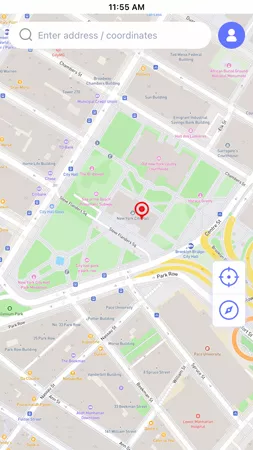
Step 2 Enter your target city or coordinates in the search bar, or tap any desired spot on the map. Tap Teleport.
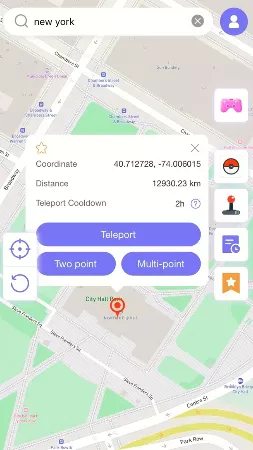
Step 3 Your phone GPS will update to the target location immediately. The spoofed location remains active even after you fully close the AnyGo app.

Part 7. FAQs About iFlowGo
Here are quick answers to the questions players ask most before they try iFlowGo.
Q1. Is iFlowGo a virus?
We found no evidence that it is. But we also found no independent security test. Download only from iflowgo.com, and scan the file before you open it.
Q2. Does iFlowGo work on Android?
Partly. An Android phone can run iFlowGo as the controller. But the phone being spoofed must be an iPhone. If you play on Android, AnyGo is the better fit.
Q3. Is iFlowGo still working after the 2026 Pokemon GO updates?
The site was still posting new guides in mid-2026, and it lists current builds for Windows, Mac, and Android. That is a good sign, not a guarantee. A game or iOS update can break any tool, so check the Quick Start page or Discord first.
Q4. Does iFlowGo offer refunds?
We found no clear refund policy on its pages. Payment goes through Patreon, so contact support before you buy. Try the free VIP days first.
Final Thoughts
iFlowGo is a fair option for iPhone players who want a Bluetooth setup without jailbreaking. But it is iPhone-only, its refund terms are loose, and Bluetooth drops can cause trouble. If you want Android support, more devices on one licence, a built-in cooldown timer, and published refund terms, AnyGo Location Changer is the stronger pick. Its free trial lets you test a jump before you commit to anything.