

Modern dating apps rely on real-time GPS to match you with nearby users—but this also limits flexibility and raises privacy concerns. Many users want to change location on dating apps to explore matches in other cities or protect their personal data.
However, strict monitoring means sudden location changes can trigger detection, reduce visibility, or even lead to bans. So, how can you fake GPS location safely without getting caught?
In this guide, we’ll cover effective ways to use a dating app location changer to switch regions smoothly and securely.

Part 1: Can I Change My Location on Dating Apps?
Today’s most popular platforms like Tinder, Bumble, and Grindr are all location-based dating apps. They rely on your device’s GPS to show nearby matches, making your location a key factor that directly determines how the app matches and connects you with others. But this convenience comes with limitations. Many users report common issues such as:
- Being stuck seeing matches from the wrong city
- Limited access to people outside their region
- Privacy concerns due to constant location tracking
- Fear of getting flagged or banned when trying to fake GPS for dating apps
What Real Users Are Saying
On Reddit, users have openly discussed how difficult it has become to spoof location on dating apps:
It changes for a few seconds… then snaps back.
— From Reddit
This reflects a common issue. While fake GPS tools may appear to work temporarily, apps often detect and override them, reverting back to your real location.
Part 2: Highly Recommended: Change GPS Location with AnyGo
If you’re looking for a safe, reliable, and beginner-friendly way to change location on dating apps, one of the most recommended tools is iToolab AnyGo .
Unlike risky hacks or unreliable free apps, AnyGo is designed specifically to fake GPS location on both iOS and Android devices without triggering detection systems used by modern dating platforms.
- Change GPS location on iPhone/iPad in clicks (No Jailbreak).
- Fake Pokemon Go GPS on Android and iOS devices.
- Simulate GPS movement along any custom path with joystick.
- Collect and import popular GPX route files for next use.
- Works well with location-based social apps and AR games.
- Fully support the latest iOS 26/Android 16.
Why Choose AnyGo as a Dating App Location Changer?
Here’s what makes AnyGo stand out from other tools:
1. Change GPS Location Anywhere in One Click
With AnyGo, you can instantly teleport your GPS location to any city or country worldwide. There’s no need for jailbreak (iPhone) or root (Android), making it accessible and safe for most users.
2. Works on All Popular Dating Apps
Whether you’re using Tinder , Bumble, or other location-based platforms, AnyGo allows you to spoof your location seamlessly across dating apps. It works with a wide range of social and GPS-based applications.
3. Realistic GPS Movement to Avoid Detection
AnyGo doesn’t just change your location instantly——it also lets you simulate natural movement patterns. You can use joystick control or route modes to move gradually between locations, making your activity look real instead of suspicious. This significantly reduces the risk of being flagged or banned by dating apps.
4. Supports Both iOS and Android Devices
AnyGo is fully compatible with both iPhone and Android devices, and it works without requiring jailbreak or root access. This means you can safely change your location on dating apps regardless of your device, with a smooth and hassle-free setup process.
How to Change GPS on Dating Apps with AnyGo (Take Tinder as an example)
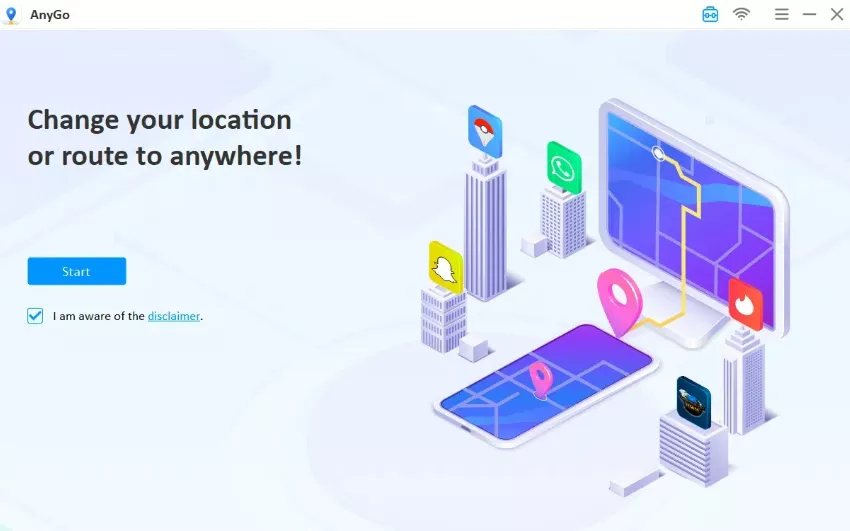
Step 1 Connect your phone to computer and launch AnyGo. Click “Start” to see your current location.
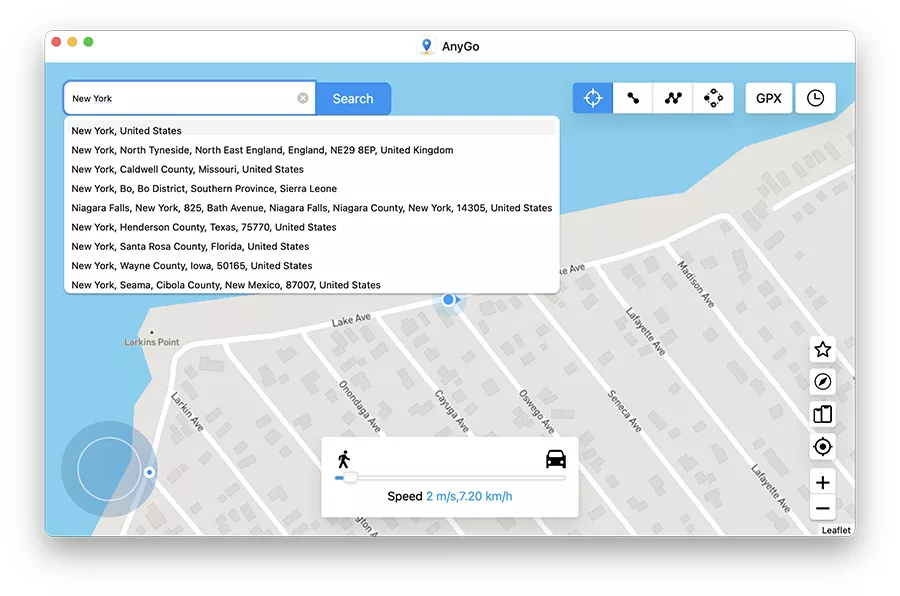
Step 2 Click the “Teleport” icon, search for any location, and click “Search.”
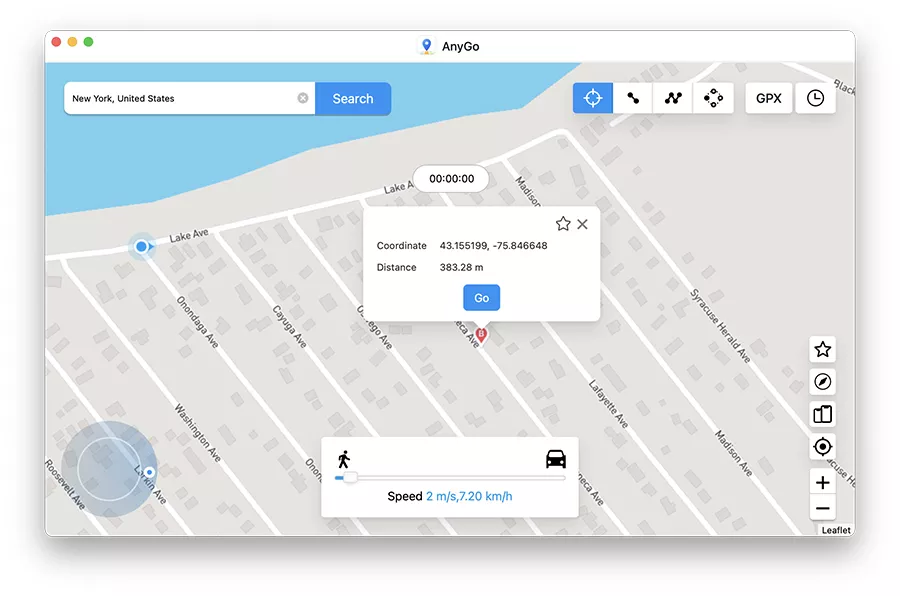
Step 3 Click “Go” to change your GPS to that location.
Step 4 Open Tinder and your location is now updated.
Part 3: Change Location for Dating Apps with a VPN
Using a VPN is one of the most common methods people try to change location on dating apps. A VPN (Virtual Private Network) works by masking your IP address and routing your internet connection through a server in another location.
Steps to Use a VPN for Dating Apps
1. Download and install a trusted VPN app on your device
2. Open the VPN and connect to a server in your desired location
3. Clear cache or restart your dating app
4. Open the app and check if your location has updated
Limitations of Using a VPN
Most dating apps rely on GPS, not just IP
Location may not update or may revert quickly
High risk of detection due to inconsistent data
Limited effectiveness for precise location spoofing
Part 4. Change Your IP Address Manually via Phone Settings for Dating Apps
Another method users try is manually changing network settings to alter their IP address. This includes switching networks or modifying DNS settings.
Steps to Change IP Address Manually
1. Turn on Airplane mode and then turn it off (to refresh IP)
2. Switch between Wi-Fi and mobile data
3. Connect to a different Wi-Fi network
4. Change DNS settings in your phone’s network configuration

Limitations of This Method
Very limited in effectiveness for dating apps.
Only changes IP address, not GPS location
Works only within your local region
No control over specific city or country selection
Dating apps will still detect your real GPS location
Part 5. Using Tinder Passport to Change Your Location
Tinder offers an official feature called Tinder Passport, which allows users to change their location within the app itself. It’s a safe and legitimate option provided by the platform.
Steps to Use Tinder Passport
1. Open Tinder and go to your profile settings
2. Tap on “Location”
3. Select “Add a new location”
4. Enter the city you want to explore
5. Start swiping in the new location

Limitations of Tinder Passport
Available only with Tinder Plus, Gold, or Platinum subscriptions
Works only within Tinder (not other dating apps)
Does not simulate real movement (location jumps instantly)
Limited flexibility compared to advanced tools
Conclusion
Changing your location on dating apps helps you explore matches beyond your area and protect your privacy. While methods like VPNs or Tinder Passport exist, they often have limitations such as inaccuracy or restricted features.
For a reliable solution, iToolab AnyGo is the best choice. It lets you change location on dating apps safely, simulate real movement, and avoid detection, without jailbreak or root.
Download AnyGo to enjoy flexible and secure location control on your favorite dating apps.