

Getting flagged mid-raid or waking up to a soft ban. Watching your Pokemon Go account get slapped with Strike 1 because the game caught a location jump that looked nothing like human movement. It happens more than people talk about.
GPS spoofing detection has gotten sharper in 2026. But smarter detection also means there are smarter ways to stay under the radar —if you know what you are doing.

Part 1. What GPS Spoofing is and How Detection Actually Works
GPS spoofing feeds your device a fake location instead of its real one. Software tools intercept or override the coordinates your phone reports to apps. Common uses include privacy protection, accessing geo-restricted content, and location-based gaming—specially Pokemon Go, where your position determines what you can catch and access.
How GPS Spoofing Detection Works in 2026
Apps layer multiple detection methods simultaneously. Even one inconsistency triggers an alert. It is not a fringe activity. Spoofing isn’t what it used to be —today’s methods are far more advanced than they were just two years ago. Here’s the detection stack:
- Mock location flags:
On Android, enabling an app as the mock location provider in Developer Options sets a system flag that apps can read directly. This is the most basic detection method.
- Play Integrity API:
Google’s Play Integrity API replaced SafetyNet in January 2025. Games like Pokemon Go use it to verify device authenticity before trusting location data.
- Cross-signal corroboration:
Apps compare GPS coordinates against IP-based location, Wi-Fi networks, cell towers, and Bluetooth signals. GPS says Tokyo, but IP says Ohio? That’s an instant flag.
- Behavioral analysis:
Niantic monitors for impossible travel patterns. Jumping from New York to Sydney in two minutes is physically impossible and triggers automatic detection.
- Sensor mismatch:
Advanced detection checks accelerometer and gyroscope data against reported movement. A device claiming “walking at 5 km/h” with no sensor activity gets flagged. Tools that can detect fake GPS location at this layer are the hardest to fool, and this technique is increasingly common in 2026.
Is GPS Spoofing Legal?
In the U.S., GPS spoofing is regulated under the FCC when it interferes with navigation or infrastructure. Personal device spoofing for gaming exists in a legal gray zone —no Pokemon Go player has been prosecuted. The real risk is account-level: Niantic enforces a three-strike policy ending in permanent termination.
Most spoofers get caught not because detection systems are perfect, but because their tools are not built to handle all the signals being checked. iToolab AnyGo is one of the few tools in 2026 designed specifically around this —handling device integrity, behavioral simulation, and Bluetooth-level spoofing in a single package, so the gaps that catch most people simply do not exist.
Part 2. 5 Common Ways to Prevent GPS Spoofing Detection
Here is what actually keeps accounts safe.
- Respect cooldown times:
After interacting with any in-game element (catching, spinning, raiding), wait before teleporting to a distant location. The rule of thumb: short hops under 10 km need at least 15 minutes. Cross-country jumps need 2 hours minimum. Cross-continent? Wait the full 2 hours and err on the side of longer.
- Move like a human:
Teleporting is the single biggest red flag for location spoofing-detected events. Instead of jumping coordinates, use route simulation at realistic speeds —3 to 6 km/h for walking, up to 20 km/h for cycling. This is the difference between an account that lasts years and one that gets banned in a week.
- Align your IP with your GPS:
This is something casual spoofers overlook entirely. If your GPS says Paris but your ISP routes you through Dallas, apps cross-referencing both signals will detect GPS spoofing immediately. A VPN server in the same region as your spoofed location is one of the simplest fake GPS anti-detect measures you can add.
- Keep apps updated:
Both Pokemon Go and any spoofing tool you use need to stay current. Niantic pushes anti-cheat patches regularly. An outdated spoofing app that has not kept pace becomes detectable within days of a new patch drop.
- Avoid rooting or jailbreaking if possible:
Rooted devices fail Google’s Play Integrity API hardware attestation checks. From the moment an app detects a rooted device, every location report from that device is treated with heightened suspicion. Since May 2025, hardware-backed integrity checks have made rooted bypasses considerably harder.
Why Manual Methods Still Get You Caught
Free fake GPS apps and basic mock location setups have real limits. They handle the coordinate injection but do nothing about sensor data, Wi-Fi cross-referencing, or integrity checks. A free app that sets your GPS to another city does nothing to stop an app from noticing that your accelerometer is still dead, your IP is unmatched, and your device is running developer mode with an obvious mock location provider active. That combination is the easiest catch for a fake GPS detector.
Manual methods are also brittle —one app update from Niantic and they stop working entirely, sometimes silently, which is worse. Real fake GPS anti-detect capability requires tools that are actively maintained and updated in response to anti-cheat patches.
Part 3. The Advanced Solution: iToolab AnyGo
iToolab AnyGo is a versatile GPS location changer available on Windows, Mac, iOS, and Android. Whether you prefer using a computer or your phone, AnyGo lets you spoof your GPS location without jailbreak or root. That matters more than ever, as apps now actively detect and penalize modified devices using Play Integrity API checks.

- Change GPS location on iPhone/iPad in clicks (No Jailbreak).
- Fake Pokemon Go GPS on Android and iOS devices.
- Simulate GPS movement along any custom path with joystick.
- Collect and import popular GPX route files for next use.
- Works well with location-based social apps and AR games.
- Fully support the latest iOS 26/Android 16.
Why AnyGo Stands Out for Avoiding Detection
- Bluetooth Spoofing — What Most Tools Still Can’t Do: This is the biggest practical differentiator. Unlike most competing tools, AnyGo lets you spoof your location without a cracked or modified Pokemon Go version. It bypasses official anti-cheat detection using Bluetooth-level spoofing, a method that very few providers can offer.
- No jailbreak or root required: This is not just a convenience feature. It is a direct response to how GPS spoofing detection works in 2026. Keeping your device’s integrity status clean means Play Integrity API checks pass, Niantic’s device attestation layer does not raise red flags, and your account behaves as if it belongs to a legitimate device.
- Realistic movement simulation: AnyGo includes joystick control, custom route planning, and speed adjustment. You can walk a natural path through a city at 4 km/h, make a turn, pause at a PokeStop, and continue, all without touching your phone. The movement data this generates looks nothing like the static teleport signatures that trigger fake GPS detector systems.
- Built-in anti-detection mechanisms: AnyGo is designed with detection avoidance as a core feature, not an afterthought. The tool is updated to stay ahead of Niantic’s patches, which is the real test of any spoofing solution. Compatibility with iOS 26 and Android 16 as of 2026 is confirmed.
- Multi-device support: AnyGo can manage location spoofing across up to 15 devices simultaneously. For coordinated raid groups or players managing multiple accounts, this is a serious operational advantage.
How to Use AnyGo for Pokemon GO: Step-by-Step
Getting set up takes roughly five minutes.
Step 1 Download AnyGo and install it on your Windows or Mac computer.

Step 2 Connect your iPhone or Android device to the computer via USB. If you are on iOS, trust the computer when prompted.
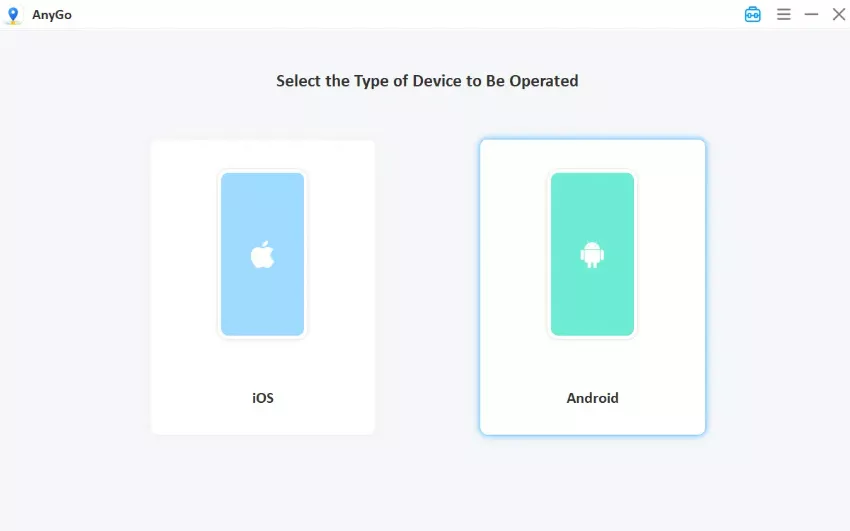
Step 3 Use the search bar to enter your target location – somewhere with active Pokemon GO spawns, an ongoing raid, or a regional exclusive you want to catch.

Step 4 Click “Go” to apply the location change. Your device’s GPS now reads the new coordinates. Open Pokemon GO, and you will see yourself at the target location.

For avoiding fake GPS-detected flags during play: After interacting with any PokeStop or catching a Pokemon, do not immediately teleport. Observe cooldown. For jumps over 1,000 km, wait the full 2 hours. For jumps under 100 km, 30 minutes is usually safe. Stay consistent —erratic behavior across sessions compounds risk even with a clean tool.
For location jumps: If you need to move to a different city, use AnyGo’s route simulation feature to “travel” gradually rather than teleporting instantly. The behavioral log your account builds over time is what Niantic’s anomaly detection systems actually evaluate —a pattern of gradual movement reads as legitimate far more reliably than sudden coordinate jumps, no matter how clean the underlying tool is.
Stay Undetected, Stay Playing
GPS spoofing detection in 2026 is genuinely sophisticated, multi-signal, behavior-aware, and continuously updated. But detection systems are built to catch sloppy behavior, not to catch every spoofer. The gap between getting banned and staying clean is almost entirely about how you behave, not just what tool you use.
The tool matters too, though. iToolab AnyGo addresses the detection vectors that actually matter: device integrity, behavioral realism, Bluetooth-level spoofing that bypasses anti-cheat without a modified client, and compatibility that keeps pace with app updates. For Pokemon GO players, that combination is the closest thing to a reliable long-term setup that currently exists.
Download AnyGo’s free trial from itoolab.com, test the basic location change on your device, and run through the steps above before your next raid window. Getting the setup right once means not having to think about GPS spoofing detection again —and it is the most practical path to consistent fake GPS no detect performance.