

An old school friend pops up in a mutual friend’s story. You smile, then wonder where life has taken them. Instagram makes it possible to catch up without direct messages.
People search for how to track someone on Instagram for many reasons. Some want to reconnect. Others simply want to stay updated on distant family. By understanding how public profiles, posts, stories, and tags work, you can discover publicly shared information effectively and respectfully.

Part 1. How to Track Someone Down on Instagram
Finding the exact profile among millions of users can feel like searching for a needle in a haystack. Instagram’s search works well once you try a few smart angles. People may use nicknames, shortened names, or usernames that differ from their real names. These steps help you learn how to track someone on Instagram more efficiently.
1. Search by username or real name
Start in the Instagram search bar. Type the full name, nickname, or username. Try common spellings and add a city or school name for better results. Public profiles usually appear quickly. Some users include their real name, workplace, school, or interests in their bio. This method works best for active accounts.

2. Find someone through mutual friends
Mutual friends offer one of the simplest ways to narrow a search. Visit a mutual contact’s profile and review their connections. People often appear in similar networks, especially when their usernames are hard to guess.
3. Locate users via tagged posts and location tags
Browse posts where friends tag others. Search hashtags related to their interests or past events. Location tags in older posts reveal cities or spots they visit. Click on those tags to see everyone who posted there. This may help you discover public accounts connected to the same event, place, or community.
4. Use contact sync and Facebook connections
Turn on contact sync or link your Facebook account. That way, Instagram may surface matching profiles from your contacts or Facebook friends, giving you more ways to track down their Instagram profile.
Part 2. How to Track Someone’s Activity on Instagram
Once you find the profile, staying in the loop becomes easier. Public accounts show recent posts, stories, and reels openly. You notice patterns in their life updates. Regular checks reveal how often they share and what they engage with most. That’s the core of how to track someone on Instagram, observing visible behavior.
To put it into practice, here’s how to track someone’s Instagram activity step by step.
1. Monitor new posts, stories, and reels updates
Stay updated by following their public account. Turn on notifications for posts, stories, and reels in their profile settings. Check their Highlights for saved stories that last longer. Their reels often show up in your feed when you engage regularly.

2. Spot account bio changes and profile updates
Small profile changes can say a lot. A new bio, photo, website link, or username often signals a recent update. These details don’t reveal everything, but they can help you notice when someone has refreshed their account.
3. Observe public daily active behaviors
You can notice public active behavior by checking when someone posts, comments, or shares stories. These patterns often show routines and engagement habits. They don’t confirm private activity, but they help you monitor someone’s Instagram activity over time.
Part 3. How to Track Someone’s Comments, Followers, and Likes
Posts tell part of the story, but comments, follows, and likes reveal who they interact with and what catches their eye. These interactions expose interests and relationships better than posts alone. You gain deeper insight into their online world. That’s another key aspect of how to track someone on Instagram, beyond just posts and stories.
Here are practical ways to track someone’s comments, followers, and likes on Instagram.

1. Track someone’s comments on Instagram
Public comments give useful clues about someone’s engagement style. If they often comment on the same pages or reply to the same people, you can better understand who they engage with and what content matters to them.
2. Monitor follower and following changes
Changes in followers or following lists can show how an account is evolving. A sudden rise in followers or new accounts in the following list may suggest a recent shift in interests, connections, or online activity.
3. View likes on public content
When likes are public, you can notice what types of posts attract someone’s attention. Repeated activity across similar content often reveals preferences and gives you a better sense of how they use Instagram.
Part 4. How to Track Someone’s Location on Instagram
Knowing what someone likes and comments on is one thing. But where they’ve been? That can tell a whole different story. Instagram can reveal more than people expect, through tags, stories, and shared posts. That’s one reason people search for how to track someone on Instagram, to see where someone has been.
Here are two easy ways to track someone’s location on Instagram and when to be cautious.
1. Check the Instagram location map for shared locations
Open the location map via Instagram search. Mutual followers who enable location sharing appear here. It shows recent activity spots for connected accounts. This real-time view works only with permission. Many friends use it for easy meetups.

2. Find location clues in posts, stories, and reels
A story sticker, reel background, or post caption may mention a place directly. Buildings, signs, or landmarks in the frame can also point to the same area. You don’t always need a geotag, sometimes the content itself gives it away.
While tracking someone’s location can be useful, the same tags, map views, and shared posts that reveal someone else’s spot can expose yours too. So think twice before posting.
Part 5. How to Hide Your Location on Instagram from Being Tracked
If you’ve been learning how to track someone on Instagram, you now understand why protecting your own location is just as important. A solid GPS location changer can spoof your position across apps without anyone noticing. That’s where iToolab AnyGo shines.
With this professional GPS location changer, you’ll hide your location on Instagram from being tracked, safely and without hassle. What’s more, AnyGo blocks unwanted tracking via tags or map shares, and keeps you active online. You enjoy peace of mind while using social platforms freely.
- Teleport instantly to any global city or region.
- Protect your real address while staying visible to friends.
- Block Instagram and Location Tracking Easily.
- Work well with location-based social apps and AR games.
- Run seamlessly on Windows, Mac, iOS, and Android devices.
- Fully support the latest iOS 26/Android 16.
What AnyGo Can Do for You:
- Change your GPS location to anywhere in the world
Switch your GPS to any city or country in seconds. Instagram users can view content from another place, explore profiles, or test location-based features, no travel required. - Stop Instagram from tracking your location
Your real location stays hidden. AnyGo replaces your actual GPS with a fake one you choose, so you can post stories and use maps freely while your true whereabouts stay completely private. - No jailbreak or root required, safe and user-friendly
The setup is simple and you do not need to change your device system. It’s a practical choice for beginners who want control without technical risks. - Compatible with Instagram, Snapchat, WhatsApp, Life360, and more
Once you set a new location, it takes effect everywhere—across Instagram, Snapchat, WhatsApp, life360, and many others. You stay active online while hiding your real movements with ease.
How to Fake Location on Instagram with AnyGo
Getting started with AnyGo is simple. If you want to know how to fake location on Instagram quickly, follow these steps:
Step 1 Download and install iToolab AnyGo app on your iPhone or Android.
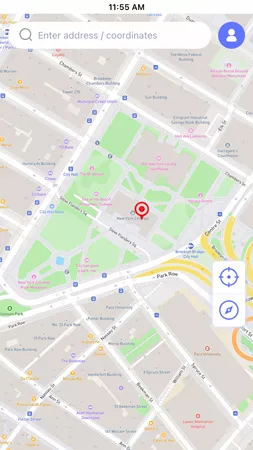
Step 2 Open the map interface, select the place that you would like to set and hit “Teleport”.
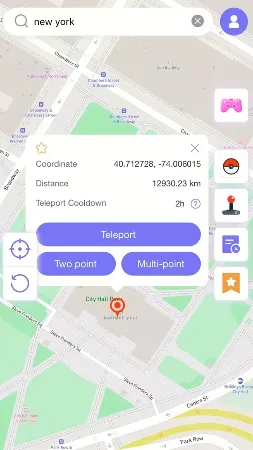
Step 3 In seconds, the GPS of your device will be updated. Open Instagram and use it with your new location in place.

Conclusion
Instagram gives you several simple ways to find old friends and follow their public updates. You can locate profiles, watch recent activity, check comments and likes, and even spot location clues through tags and stories.
However, tracking goes both ways. If you’ve learned how to track someone’s location on Instagram, you should also know how to prevent others from doing the same to you. That’s why learning how to hide your location on Instagram is just as important. AnyGo Location Changer changes your GPS location across Instagram and other apps in seconds. You stay active online while keeping your real location private.
Try AnyGo and enjoy worry-free scrolling with your real location hidden.