

Changing your GPS location should feel quick and stress-free, yet the wrong tool can turn it into a daily headache that has you hunting for LocaChange alternatives. Maybe the joystick lags mid-route, or a sudden iOS update breaks compatibility. If you use LocaChange and keep hitting these limits, you’re probably ready for something better.
Here’s what LocaChange does well, where it falls short, and the five alternatives worth testing.

Part 1: What Is LocaChange?
LocaChange is a GPS location changer for iOS, Android, Windows, and Mac. It adjusts the location your phone reports to other apps and games, so your avatar, your dating-app radius, and your search results all reflect a spot you choose instead of where you really are.

Some of the main features offered by LocaChange include:
- Teleport mode: You can choose any destination on the map and move your virtual location there quickly.
- Joystick mode: You can simulate movement by navigating through a virtual map using an interactive joystick.
- Cooldown timer: You can monitor time gaps between location changes for smoother location switching.
Part 2: LocaChange Pros and Cons
Before you settle on LocaChange as your location changer, it helps to know what it does well and where the trade-offs can bite. Here is what its current feature set actually covers.
👍 LocaChange Pros
LocaChange brings several helpful features for beginners and casual users:
🟢Supports virtual location changes on both iOS and Android devices.
🟢Five movement modes in one tool (Teleport, Jump Teleport, 360-degree Joystick, Two-spot, and Multi-spot) cover instant jumps, slow walks, and freeform in-game navigation.
🟢No jailbreak or root required: All modes work on stock iOS and Android, so your device stays eligible for normal system updates and warranty service.
🟢Provides a cooldown timer to plan location changes during gameplay.
🟢A dedicated Game Mode for AR titles: Auto-walking, a Pokémon search tool, and a live atlas for nearby Pokémon, raids, and PokéStops sit alongside the standard movement modes for Pokémon GO and Monster Hunter Now.
👎 LocaChange Cons
LocaChange has limitations that may matter for advanced workflows or specific apps:
🔴iOS workflows usually need a computer: While the Android app runs fully on the phone, most iOS workflows rely on the desktop client and a USB or Wi-Fi connection to apply changes.
🔴Ten devices per license: One plan tops out at 10 phones, which is lower than tools that support 15.
🔴Connection drops and intermittent changes: Recurring user complaints point to spots that fail to apply or randomly snap back, especially on busy Wi-Fi networks.
🔴The free trial is too thin to evaluate: Each movement mode is capped at a single use, with only 15 minutes of Joystick mode total, so routes and longer sessions cannot be properly tested before paying.
Is LocaChange Safe to Use?
For your device, LocaChange is safe to install and run. The app works without jailbreaking or rooting, so iOS and Android stay on stock firmware that still receives normal security updates. Independent review sites rate the desktop and mobile downloads as malware-free, and the publisher distributes the software through its own site.
For your game accounts, the picture is more nuanced. Spoofing GPS violates the terms of service of Pokémon GO and most AR titles, and their developers actively look for location mismatches, unrealistic travel speeds, and other spoofing patterns. A cooldown timer reduces the chance of detection, but it cannot eliminate it. Treat your main account as off-limits and test any new setup on a secondary one.
Part 3: Top 5 LocaChange Alternatives
If LocaChange feels limited, a different tool might fit your needs better. Below, you’ll find five reliable alternatives, each suited to different apps, games, and location-changing requirements.
1. iToolab AnyGo: Best LocaChange Alternative
iToolab AnyGo is a GPS location changer that targets the same use cases as LocaChange but pushes further on the parts that frustrate LocaChange users. It runs on Windows, Mac, iOS, and Android. Native Mode goes a step further on iOS and keeps the new spot active inside official apps. Where LocaChange tops out at 10 devices, AnyGo scales to 15, and its game-focused toolkit covers more Pokémon GO workflows than the standard movement modes.
- Change GPS location on iPhone/iPad in clicks (No Jailbreak).
- Simulate GPS movement along any custom path with joystick.
- Collect and import popular GPX route files for future use.
- Change iPhone location in official apps with Native Mode.
- Work well with location-based social apps and AR games.
- Run seamlessly on Windows, Mac, iOS, and Android devices.
- Fully support the latest iOS 27/Android 17.
Key Features of AnyGo
✨Teleport Anywhere From the Built-In Map: Search any city or address in the bar, drop a pin, or type coordinates, and your phone jumps there in one click without jailbreak or root.
✨Plan Routes Between Two Spots or Across Many: Two-spot mode walks your avatar from a start point to a destination at a chosen speed. Multi-spot mode strings several waypoints into a longer route for sustained play sessions.
✨Go Catcher for Hands-Free Pokémon and PokéStops: Works like a virtual Pokémon GO Plus+. It auto-catches wild Pokémon and auto-spins PokéStops while your route is running, so progress keeps moving when your hands are busy.
✨POGO Assistant: Provides IV previews, quick catch, auto-raid, auto-spin, Pokémon searches, and nearby raid or resource discovery.
How to Use AnyGo as Your LocaChange Alternative
Follow these four steps to start changing your GPS location with AnyGo:
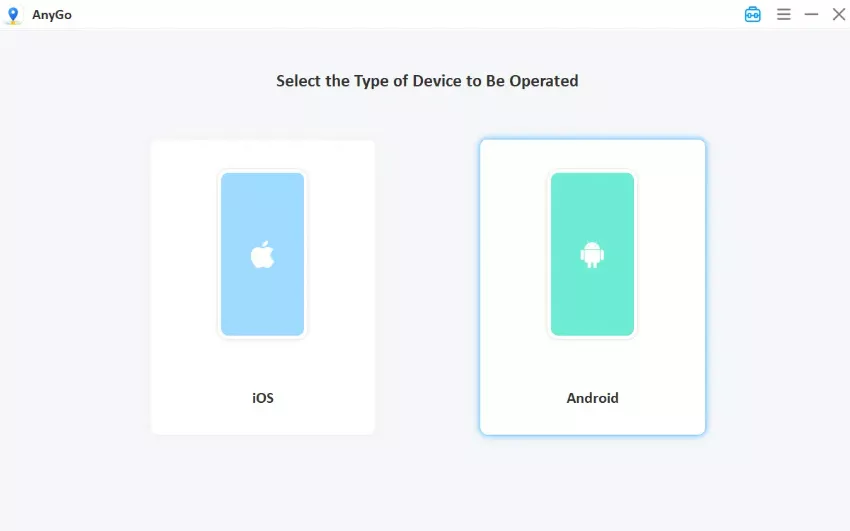
Step 1 Download and install iToolab AnyGo on your Windows or Mac computer. Launch AnyGo and select General Mode.

Step 2 Connect your iPhone or Android phone to your computer with a USB cable.
Step 3 Search your target location on the built-in map, or import a GPX file for a saved route. Click Go to apply the new spot, then switch to Teleport, Two-spot, Multi-spot, or Joystick mode as needed.

Step 4 Open Pokémon GO or your target app and confirm the new location appears.
2. MocPOGO
MocPOGO is built for players who live inside Pokémon GO. Teleporting, joystick movement, custom routes, and GPX imports are all here for iOS and Android, but so are the extra layers, like Pokémon and raid lookups, that dedicated players actually use.

🟢 MocPOGO Pros
What dedicated players get:
- Three core movement modes (Teleport, Two-spot, and Multi-spot) cover the common play patterns, from quick jumps to sustained walks.
- Joystick and keyboard controls: Map-based joystick plus keyboard movement for desktop workflows.
- Pokémon GO Resources: Nearby Pokémon and raid searches help with target planning before a teleport.
- Cross-app compatibility: Social, dating, tracking, and navigation apps work alongside Pokémon GO.
- Free tier option: A free version is available, which most competitors do not offer.
- Native iOS app support: Works inside official iOS apps through supported modes.
🔴 MocPOGO Cons
Where it gets complicated:
- The large number of gaming features may feel overwhelming for beginners.
- Pokémon GO features can create account or gameplay risks because spoofing may violate game rules.
- Some advanced features may require a paid plan for unlimited use.
- Device compatibility and connection methods may vary by operating system.
3. FonesGo Location Changer
FonesGo Location Changer makes its case on the desktop. It covers the usual teleport, joystick, and route features for iOS and Android, then pushes further on PC, custom walking, cycling, or driving speeds, and room for up to 15 devices in one place. It targets games, social platforms, and dating apps that rely on location data.

🟢 FonesGo Pros
The practical wins:
- Supports location changes without jailbreak or root.
- Four movement modes covered: Teleport, two-spot, multi-point routes, and joystick navigation.
- Custom walking, cycling, and driving speeds: Match the route type to the in-game context.
- Up to 15 devices on PC: A higher ceiling than LocaChange’s 10 for desktop workflows.
- Includes Bluetooth-related options for selected iPhone workflows.
- Game, social, and dating app support: Works across the main use cases location changers target.
🔴 FonesGo Cons
Before you commit, a few notes:
- Feature availability may vary across desktop, iOS, Android, and Bluetooth modes.
- Game-focused use may carry account or policy risks.
- Beginners may need to learn several connection methods before starting.
- Some advanced features may require a subscription.
4. UltFone Location Changer
UltFone keeps its feature list lean and focused. Single-spot jumps, multi-spot routes, speed control, and saved location history cover the daily use cases, with a Bluetooth option for iOS players dealing with Error 12.

🟢 UltFone Pros
What you get without the clutter:
- Changes GPS location without jailbreak or root.
- Single-spot and multi-spot movement: Jump once or string a longer route across several waypoints.
- Jump teleport for fast sweeps: Move through a list of locations in quick succession.
- Custom speeds from walking to driving: Match the route speed to the situation.
- Saves historical locations and routes.
- Offers a Bluetooth method for selected Pokémon GO Error 12 workflows.
🔴 UltFone Cons
The trade-offs to weigh:
- Bluetooth setup may require extra steps and compatible hardware.
- Its gaming features may not suit readers who only need basic privacy controls.
- App behavior can change after third-party updates.
- Pokémon GO spoofing may violate Niantic’s rules and create account risks.
5. Dr.Fone Virtual Location
Dr.Fone Virtual Location arrives with the Wondershare ecosystem behind it. Beyond the core teleport, joystick, and GPX features, you’re buying into a brand with deep tutorial libraries and a full suite of phone tools, handy if you already live inside that ecosystem.

🟢 Dr.Fone Pros
Why the wider ecosystem matters:
- Offers location-changing solutions for iOS and Android.
- Provides guides covering location sharing, privacy, GPS spoofing, and troubleshooting.
- May suit readers who want a larger software ecosystem.
- Supports different location-related use cases across games and apps.
🔴 Dr.Fone Cons
What to check before you buy:
- The product page leads with guides and tutorials rather than a compact feature comparison.
- Exact capabilities may depend on the Dr.Fone product version and operating system.
- Some tools or features may require separate purchases.
- Location spoofing still carries third-party app and game-policy risks.
- Readers should verify the exact software requirements before purchasing.
Conclusion
LocaChange handles the basics well: five movement modes, broad platform support, and a dedicated Game Mode that covers the common AR title use cases. Where it falls short is on device count, iOS workflow flexibility, and the depth of game-focused tooling.
For the closest one-to-one replacement with more devices, smoother iOS handling, and a wider Pokémon GO toolkit, iToolab AnyGo Location Changer stands out. Test it in General Mode first, switch to Native Mode on iPhone if official apps matter to you, and scale up to 15 devices as your account setup grows.