

Pokémon GO Berries look tiny, but they change everything about a catch. Some make a Pokémon easier to catch. Others hand you bonus Candy, the currency you need to evolve your Pokémon into a stronger form. If you have ever tossed a Golden Razz Berry at a common Pidgey, or wondered why your Nanab Berries just sit in your bag doing nothing, the breakdown below clears it up.

What Do the Berries Do in Pokémon GO?
Each one shifts the odds in its own way. Some boost your catch chance. Others boost your rewards after a catch, or slow the Pokémon down so your throw actually connects instead of sailing past.
Right now, there are five berries in the game. Here is a quick breakdown of what each one brings to the table.

The 5 Berry Types and Their Effects
Once you understand these effects, picking the right berry for the moment gets easier. The wrong berry just burns Poké Balls. The right one saves a rare catch.
3 Main Uses for Berries
Berries are not just for catching. You will run into three main uses as you play.
- Wild encounters. Feed a berry before you throw your Poké Ball to raise your catch odds or steady a jumpy Pokémon.
- Gym defense. Feed berries to a friendly Pokémon guarding a Gym to restore its motivation, which is basically its energy bar for staying in the fight against attackers.
- Buddy feeding. Give berries to your Buddy Pokémon to boost its mood, which can lead to extra finds and Candy over time.
When to Use Which Berry
A simple rule works well here. Save Golden Razz Berries for tough or rare Pokémon. Use Pinap or Silver Pinap Berries when you are grinding Candy for an evolution. Reach for Nanab Berries when a Pokémon will not stop moving around your screen, and use plain Razz Berries for everything else in between. Following this order keeps your rarer berries in reserve for the moments that actually matter.
How to Get Berries in Pokémon GO
Knowing how to get berries in Pokémon GO matters just as much as knowing what to do with them. A full bag is useless if you never fill it back up. Here are the five main ways to stock up.
1. Spin PokéStops and Gyms
This is the most common way to collect Pokémon GO berries. Every PokéStop and Gym has a Photo Disc you can spin, and berries show up in that reward mix alongside Poké Balls and Potions. Most Photo Discs refresh about every five minutes, so a short loop through a few stops can top up your bag fast.

The catch is that PokéStops refresh on a timer, and you need to be within range to spin them. That is easy in a busy city with stops on every corner, but much harder if you live somewhere rural, work long shifts, or simply cannot get outside as often as you would like.
Never Run Out of Berries with AnyGo
Farming berries this way means constantly walking between PokéStops and Gyms, day after day. Not every player can keep that up. Some live in berry-poor areas with only a handful of stops nearby, and others just do not have the time to walk for hours every week.
If that sounds familiar, iToolab AnyGo gives you a shortcut. It is a GPS location changer built for Pokémon GO that lets you drop your avatar into a dense cluster of PokéStops, and walk a custom route between stops, so a short session tops up your berry bag instead of an all-day walk. It runs on Windows, Mac, iOS, and Android. Here is where it makes a difference for berry farming:

- Teleport to dense PokéStop and Gym zones in one click.
- Simulate custom walking routes with adjustable speed to farm multiple stops.
- Activate hands-free GO Catcher mode to auto spin and auto catch wild Pokémon.
- Change iPhone location in official apps with Native Mode.
- Work well with location-based social apps and AR games.
- Run seamlessly on Windows, Mac, iOS, and Android devices.
- Fully support the latest iOS 27/Android 17.
How to Use AnyGo to Farm Pokémon GO Berries
Step 1 Download and install the iToolab AnyGo app on your iPhone or Android, then select General Mode from the bottom of the screen.

Step 2 Type an area dense with PokéStops into the search bar, then tap Teleport.
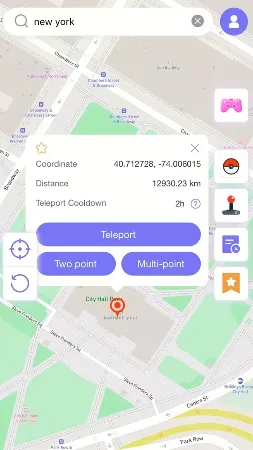
Step 3 The GPS of your device will update instantly. Your avatar drops on the nearest stop, so the first spin of the session starts dropping berries into your bag.

2. Complete Research Tasks
Field Research tasks, the small missions you get from spinning PokéStops, often reward berries when you finish them. A task like catching three Pokémon or spinning five stops might hand you a small berry bundle. Some daily and weekly tasks pay out even more, so it is worth checking your Research tab after every session instead of letting completed tasks sit there.

3. Win Raid Battles
Beating a Raid Boss rewards you with a batch of Golden Razz Berries almost every time, along with Premier Balls for the catch phase. Higher star raids tend to hand out bigger bundles, so joining a five star or Mega Raid with a group is one of the fastest ways to stock up on the game’s strongest berry.
4. Level-Up Rewards
Leveling up your Trainer often drops a handful of berries straight into your bag. Reaching Trainer Level 5 is also worth noting, because that is the level at which you can join Raid Battles, and raids remain the fastest way to stock up on Golden Razz Berries. Pushing your XP pays off in berries on top of everything else you earn.

5. Open Gifts from Friends
Gifts sent by friends can include berries too, alongside Poké Balls and Stickers. If you have a solid list of in-game friends who send Gifts daily, opening them each morning becomes a steady, low-effort source of berries you can lean on without any extra walking.
Expert Tips: How to Use Berries Like a Pro
Once you have a solid stash of berries in Pokémon GO, the next step is using them well. Here are four tips that seasoned players swear by.
1. Maximize Pinap Berry with Evolved Pokémon
Pinap Berries double your Candy reward, and that reward scales with rarer or evolved Pokémon. Save your Pinap and Silver Pinap Berries for evolved forms or harder to find species, since a doubled Candy payout matters far more there than on a common first stage Pokémon you will catch a dozen times anyway.

2. Golden Razz Berry: Use It for Gym Defense Too
Most players save Golden Razz Berries purely for catching, but they have a second job worth remembering. Feeding one to a friendly Gym Pokémon restores its motivation, that energy bar mentioned earlier, all the way to full in a single feed, while regular berries only chip away at it slowly and lose effectiveness the more you feed in a row.
3. Nanab Berry’s Hidden Value: Save Your Premium Balls
Nanab Berries get overlooked because they do not touch your catch rate. Their real value shows up when a Pokémon keeps dodging your throws and wasting your Poké Balls in the process. Calm it down first with a Nanab, line up your throw, and you will waste far fewer balls chasing a moving target.
4. Farm Stardust by Feeding Berries to Gyms
Every berry you feed to a Gym Pokémon earns you precious Stardust, the resource you need to power up your team. Feeding friendly Gyms during a walk or a quick break adds up to a steady trickle of Stardust over time, on top of keeping your team’s Gyms strong against rival attacks.
FAQs about Pokémon GO Berries
Before you start farming, here are a few questions players ask most about berries in Pokémon GO.
Q1: Can you buy berries in Pokémon GO?
No. Berries cannot be bought with real money or PokéCoins in the shop. You earn every single one through gameplay, whether that is spinning stops, finishing Research, winning Raids, or leveling up.
Q2: How many berries can you feed to a Gym defender?
You can feed up to 10 standard berries to a Gym Pokémon within a rolling 30-minute window, and each extra berry restores a little less motivation than the one before it. Golden Razz Berries are the exception, since one feed restores full motivation, so you rarely need more than that.
Q3: How do you throw berries in Pokémon GO?
During a catch encounter, tap the berry icon near your Poké Balls before you throw. Pick the berry you want from your bag, feed it to the Pokémon on screen, and then make your throw as normal once you see the effect kick in.
Q4: Can you use berries in Raid Battles?
Yes. Once you defeat a Raid Boss, you get a set of Premier Balls for the catch phase, and you can feed berries, including Golden Razz Berries, before each throw to boost your odds against its already lowered capture rate.
Summary
Berries in Pokémon GO are small items with a big impact on every catch and every Gym visit. Match the right berry to the right moment: Golden Razz for rare finds, Pinap or Silver Pinap for Candy grinding, and Nanab for anything that will not sit still.
If farming enough berries on foot feels slow, a tool like AnyGo Location Changer can help you reach berry-rich areas faster, so you spend less time walking and more time actually playing. Try AnyGo free and fill your berry bag without leaving the couch.