
“Sometimes, when I try to access government-related apps, bank apps, or even food delivery apps, I get a warning saying I need to disable my mock location,” a user recently asked on the XDA developer forum.
If that sounds familiar, you’re in the right place. Mock location apps are useful for privacy and gaming, but many services can detect them and block your access. The good news is that some apps are better at staying undetected than others.
In this guide, we’ve tested and rounded up the 10 best undetectable mock location apps for both Android and iOS, so you can choose the perfect undetectable fake gps app that fits your needs.
10 Undetectable Mock Location Apps You Should Know
This section covers the top undetectable mock location apps available today. Each application is discussed with enough detail to help you make an informed decision. Let’s get started with fake GPS location apps:
1. iToolab AnyGo
iToolab AnyGo is a powerful mock location app designed to change your GPS location without triggering detection in most apps. It also allows you to customize your route and adjust your walking speed, which is ideal for both gaming and privacy protection.
Whether you’re catching rare Pokémon in Pokémon GO, sharing a fun location on Instagram or Snapchat, or matching with someone on Tinder and Bumble, AnyGo lets you set your virtual location anywhere you want.
If you’re ready to give it a shot, this software allows you to try it for free up to 5 times. Use the discount code to get this product at a better price.

iToolab AnyGo Coupon
20% OFF iToolab coupon code for all products
168,282 people have downloaded it.
- Change GPS location on iPhone/iPad with 1 click (No Jailbreak).
- Exclusive Native Mode: safe iPhone location spoofing on official apps.
- Simulate GPS movement along any custom path with a joystick.
- Collect and import popular GPX route files for next use.
- Mock GPS location on up to 15 devices simultaneously.
- Works well with location-based social apps and AR games.
- Fully support the latest iOS 27/Android 17.
How to use iToolab AnyGo to mock location on Android or iPhone:
Step 1 Download and install the iToolab AnyGo app on your iPhone or Android, then select General Mode from the bottom of the screen.
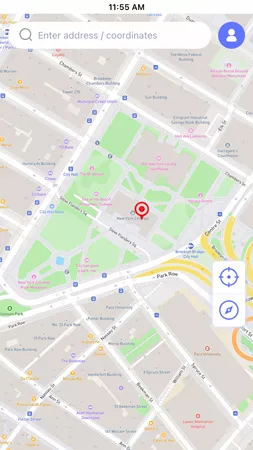
Step 2 Enter your desired location in the search box and hit “Teleport”.
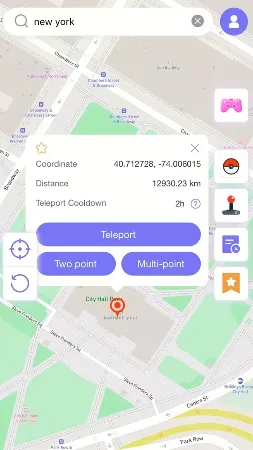
Step 3 The GPS of your device will update instantly.

Pros:
- User-friendly interface.
- Supports the native Pokémon GO app without requiring modified versions.
- Built-in cooldown timer helps you avoid account restrictions.
- Works with all LBS apps and games, including Pokémon GO, Life360, WhatsApp, Tinder, and more.
- Runs on Windows, Mac, iOS, and Android.
- 5 free tries.
Cons:
- Full feature access requires a premium subscription..
2. Fake GPS 360

Fake GPS 360 offers useful features to spoof locations according to your needs. The application makes it easy and fast to change your device GPS location. If you’re looking for a location spoofer for your social media accounts, Fake GPS 360 is a recommended choice. The search feature helps you find new places quickly. Apart from this, you can set a target location using coordinates or the global map.
Pros:
- Easy to change locations.
- Easy navigation and interface.
- Bookmark favorite place.
Cons:
- Doesn’t work with all applications.
- It crashes often.
- The joystick doesn’t work.
Also Read: Everything about Allow Mock Location on Samsung
3. VPNa – Fake GPS Location

VPNa – Fake GPS Location enables users to fake their current location. You can easily teleport to a new location within seconds. This app works more like a professional VPN. You just need to enter coordinates to lock a desired location. Furthermore, you can use avatars to make your experience more enjoyable and interactive. This application doesn’t require you to root your phone.
Pros:
- Save new locations.
- You don’t have to root your phone.
Cons:
- It isn’t compatible with video games.
- Features don’t work properly.
- It contains annoying ads.
4. Hola – Fake GPS Location App

Hola – Fake GPS Location App is one of the more reliable options for spoofing locations anywhere in the world. The application comes with an easy-to-use interface that guides users at every step. It’s also popular for helping bypass geo-restrictions imposed by other apps.
Pros:
- The free version works well.
- Easy to use.
- 3 adjustable speed levels (walk, run, drive).
Cons:
- It doesn’t simulate GPS movement.
- Possible security and privacy hazards.
- Often crashes.
5. GPS JoyStick

GPS JoyStick replaces your current GPS location with a new one. It works well with websites, third-party apps, and other location-based services. A standout feature of this app is the joystick control, which lets you hover over or move around a specific location with ease. Moreover, it doesn’t require you to root your phone.
Pros:
- Good customer support.
- Joystick makes it easy to switch between locations.
- Supports custom route creation and auto-walk.
Cons:
- Contains annoying ads.
- May be blocked by some apps.
6. iSpoofer

iSpoofer is a desktop application primarily designed for iPhone users. It helps users spoof their GPS position on iOS devices. The user-friendly interface makes it easy to lock a new location or switch between multiple locations. iSpoofer doesn’t require jailbreaking, and it offers a solid range of features to simplify the spoofing process, ranking it among the best undetectable fake GPS app options for iOS systems.
Pros:
- No jailbreak required.
- Compatible with iOS devices.
- Secure and easy to use.
Cons:
- Paid versions are very expensive.
- Only available for iPhone devices.
7. iTools

iTools offers a range of tools for performing location spoofing on iOS devices. It is a solid undetectable mock location app, especially suitable for users who are new to location spoofing. iTools is available on both Mac and Windows.
Pros:
- Includes useful additional features in the toolbox.
- 1-day free trial available.
Cons:
- Location spoofing takes more time compared to other tools.
- Only available for iOS devices.
8. iPogo

iPogo is one of the best undetectable mock location apps exclusive to iOS users, designed for seamless Pokémon GO gameplay. It packs an extensive feature set, including auto‑catch and auto‑spin, spawn booster, one‑tap bag cleaner, and automatic removal of unwanted Pokémon. Many additional tools in iPogo help elevate your in‑game experience.
Pros:
- Feature‑rich toolset tailored for Pokémon GO.
- Intuitive user interface.
Cons:
- Complicated installation process.
- Poor app stability.
9. Fake GPS Run

Fake GPS Run is a solid choice for those who frequently need to change their location to access geo-restricted content. To spoof your location, you’ll need to grant certain permissions on your device. Fake GPS Run offers a straightforward interface that makes it easy to fake your current location. It works well on both rooted and non-rooted devices.
Pros:
- Supports a wide range of devices.
- Easy to use.
Cons:
- Free version contains ads.
- Lacks advanced features.
10. Mock Locations

Just like other fake location applications, the Mock locations app is best in its sphere. The app is a reliable fake GPS app for Android devices, making location switching simple and straightforward. It has proven to be a great resource for people who need a reliable location spoofer for gaming purposes.
Pros:
- Easy to create routes.
- The user interface is good for beginners.
Cons:
- Only 1-day free trial available.
- The Joystick feature doesn’t work properly.
Summary
Undetectable Mock location apps are highly sought-after for those who love to play location-based games such as PokemonGo. In this blog, we’ve reviewed several popular applications that are widely used for location spoofing. Each tool covered in this roundup delivers solid performance for spoofing GPS positions, and you can test different options to find the one that best fits your use case.
Among all these products here, iToolab AnyGo stands out as our top recommendation. Download AnyGo today for flexible, hassle-free GPS location spoofing across multiple scenarios.