

You set up your Facebook Dating account, and soon you’re swiping through profiles from people nearby. But what if your location isn’t updating correctly after a move? Or you’ve already run out of new matches in your small town and want to see who’s out there in a bigger city? Whatever the reason, the default location settings don’t always work in your favor.
Fortunately, there are 3 practical ways to modify your location on Facebook Dating. If you’re looking for how to change location on Facebook Dating quickly and reliably, you’ll find the answer here.

Part 1. How Facebook Dating Determines Your Location
Before making any changes, you first need to understand how your location is pinpointed.
Facebook Dating is an integrated feature within the main Facebook app, designed to connect you with other singles based on shared interests, groups or events. Launched in 2019, it is now available in many regions worldwide.
So, how does Facebook Dating determine your location? It automatically pulls your whereabouts from three primary data sources:
- Device GPS: Uses your device’s internal GPS to provide real-time latitude and longitude coordinates.
- System Location Permission: Relies on the location access you’ve granted through your phone’s system settings.
- IP Address: Provides an approximate location based on your internet service provider.
If one of the sources above can’t be reached by Facebook Dating, for example, if you disable location services for the Facebook app, then Facebook Dating will still have access via the other two data sources.
Part 2. How to Manually Change Location on Facebook Dating
Facebook Dating does offer a built-in option to adjust your displayed location. Here is how to use it manually:
- Launch the Facebook app on your mobile device.
- Tap the Menu icon (three horizontal lines).
- Choose Dating from the Menu.
- Tap your Profile icon in the top corner.
- Go to the General Settings.
- Find Dating Location under the Location section and tap it.
- Select Change Dating Location.
- Authorize location access if prompted, then confirm the change.

Once completed, Facebook will update your dating location to the new city you selected. However, keep in mind that this only changes what other users see; it does not alter your actual GPS coordinates.
Key Limitations to Keep in Mind:
- Change frequency is restricted. You can only manually update your dating location once per day.
- Country boundaries apply. You cannot use this method to move your profile to a different country. Facebook Dating is only available in supported countries.
- Your real location remains visible. Even after updating, Facebook still knows your actual GPS coordinates through your device.
Given these limits, this built-in method is only practical when you are physically traveling within your own country and want to scout matches in a city you’re about to visit.
Part 3. How to Change Location on Facebook Dating App via VPN
A VPN (Virtual Private Network) routes your internet traffic through a remote server. For example, if you connect to a VPN server in London, websites and apps will see a London IP address instead of your real one.
Here’s how to use a VPN for Facebook Dating:
- Install a trusted VPN app (e.g., NordVPN or ExpressVPN).
- Connect to a server in your desired city or country.
- Open Facebook Dating, the app will now detect the VPN’s IP location.
While these steps may seem simple, using a VPN for Facebook Dating comes with significant drawbacks that often outweigh its benefits.
Key Limitations:
- GPS remains unchanged. A VPN only spoofs your IP, but Facebook Dating relies heavily on your device’s GPS. Your physical coordinates stay the same, so the app still knows where you actually are.
- High risk of account bans. Facebook actively detects mismatches between your IP address and GPS location. If the two don’t align, your account may be flagged or even suspended.
- Unstable connections cause errors. VPNs frequently disconnect or switch servers. Each reconnection can place you in a different virtual location, confusing the app and triggering glitches.
In short, while VPNs provide privacy, they are not built for GPS-based apps like Facebook Dating. The persistent IP/GPS conflict makes them unreliable for anyone trying to change their location on Facebook Dating.
Part 4. Best Way to Change Facebook Dating Location with iToolab AnyGo🔥
Neither the manual update nor a VPN offers a complete solution. The built-in method is too restrictive, while a VPN creates risky IP/GPS mismatches that could get your account flagged. So, what actually works?
If you’re looking for a reliable and risk-free way to change your phone’s GPS location, iToolab AnyGo is the best solution.
IToolab AnyGo is a professional GPS location changer. Unlike a VPN, which only masks your IP address, AnyGo directly changes the GPS coordinates your device sends to apps. Facebook Dating will then see you at your chosen location, just as if you had physically travelled there.
- Jump to any global spot to bypass Facebook Dating regional limits.
- Sync fake GPS data across all mainstream dating platforms seamlessly.
- Fix Facebook Dating location mismatch easliy.
- Easy to use, no technical skills required.
- Run seamlessly on Windows, Mac, iOS, and Android devices.
- Fully support the latest iOS 27/Android 16.
Core Features of AnyGo:
- Teleport anywhere in the world with one click and bypass all of Facebook Dating’s manual location and country restrictions.
- Work with Facebook Dating, Tinder, Bumble, Hinge, and all other location-based dating apps without additional setup.
- Protect your device with no jailbreak or rooting needed.
How to use AnyGo for Facebook Dating:
Step 1 Download and install the iToolab AnyGo app on your iPhone or Android.
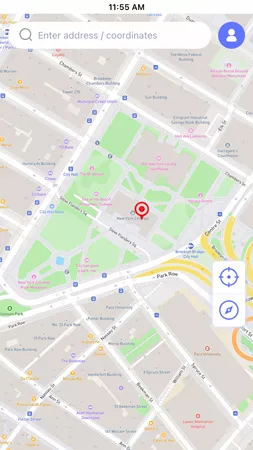
Step 2 Choose Teleport Mode in the AnyGo interface. Enter the city or address where you want to appear.
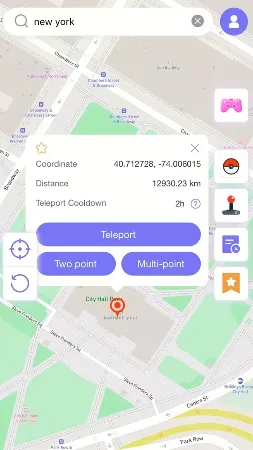
Step 3 Click Teleport. Your GPS location updates immediately. Open Facebook Dating. Your location will now reflect the new GPS coordinates.

That is the full process. No IP/GPS mismatch errors, no account flags, and no country restrictions.
Part 5. FAQs about Changing Location on Facebook Dating
Still have questions? Below we answer the most common concerns about changing your Facebook Dating location.
1. Can I change my Facebook Dating location to another country?
The official in-app manual method only works within your current country. To move your profile to a different country, you’ll need a GPS location changer like iToolab AnyGo, which lets you select any country where Facebook Dating is available.
2. Is it safe to change my location on Facebook Dating?
The built-in method is completely safe but limited. For third-party tools, the important thing is to avoid a mismatch between your IP and GPS, which is exactly why VPNs can get you flagged.
3. Can my friends see if I use Facebook Dating?
No. Facebook Dating is not connected to your main profile. Your friends will NOT see your Dating activity, your matches, or even that you are using the Dating feature.
4. How far away can I match with someone on Facebook Dating?
The standard distance can be extended up to 124 miles (200km). However, when you use AnyGo to set a new GPS location, Facebook Dating treats that spot as your real location, effectively allowing you to connect with people in any city or country, beyond the usual radius limit.
Summary
There are three ways to change your location on Facebook Dating. The built-in manual update is easy to use, but it only works within your current country and limits you to one change per day. A VPN masks your IP address but leaves your GPS unchanged, creating inconsistencies that Facebook can easily detect and flag.
For a stable and worry-free solution, AnyGo Location Changer for Facebook Dating is the clear winner. It changes your GPS location directly, no jailbreak required and no account risk. If you’re looking to change your location on Facebook Dating and expand your dating pool beyond your local area, AnyGo is the easiest and most dependable way to do it.
Download iToolab AnyGo now and start matching with people from anywhere in the world.