

Millions of Pokémon GO trainers want to catch rare pocket monsters without leaving the couch. That’s the whole idea behind GPS spoofing: tricking your phone into showing a location you’re not actually at. iMyFone AnyTo is one of the biggest names in this space, but is it actually safe, and does it still hold up in 2026?
This iMyFone AnyTo review breaks down the features, the pricing, the real risks, and what everyday users are saying about it. By the end, you’ll know if AnyTo fits your needs, or if a different tool makes more sense for you.

What Is iMyFone AnyTo?
iMyFone AnyTo is a GPS spoofing tool, also called a location changer. In plain terms, it lets you fake your phone’s location and show a spot anywhere in the world instead of where you really are.
AnyTo works on both iOS and Android devices, and it runs from a companion app on Windows or Mac. You connect your phone to the computer with a USB cable, then pick a new spot on the map. Within seconds, your device believes it’s sitting in that new location.

No jailbreak or rooting is required. AnyTo skips that step entirely, so your phone’s operating system stays fully protected and eligible for normal software updates.
People use AnyTo for more than just gaming. Some want to test how an app behaves in a different country. Others want to grab a software update that’s rolling out region by region before it reaches them. And plenty just want privacy, hiding their real address from apps that don’t need to know it.
AnyTo is more than a one-trick app. Several built-in modes cover different situations:
- Teleport Mode: Jump your location to anywhere on the globe with a single click, no walking simulation involved.
- Two-Spot Mode & Multi-Spot Mode: Set a start point and an end point, then watch your location move smoothly between the two at a speed you choose.
- Joystick Mode: Steer your location in real time using on-screen directional controls, similar to a video game controller.
- Cooldown Timer: A built-in pause between location changes, designed to keep your movement pattern from looking suspicious.
- GPX Import: Load a GPX file, a common route format used by hikers and cyclists, to follow a pre-made path automatically.
- SVIP Perks: An add-on tier with extra tools built for more advanced location-based gameplay.
Together, these features cover most reasons someone would want to change their GPS location, whether that’s exploring a game world from home or simply keeping their whereabouts private.
iMyFone AnyTo Pros and Cons
No app is perfect, and AnyTo is no exception. Let’s weigh both sides before you make a decision.
Pros👍
- 🟢No jailbreak or root needed: Works on both iOS and Android without touching your phone’s core security settings.
- 🟢Beginner-friendly design: The interface takes just a few clicks to learn, even if you’ve never used a spoofing tool before.
- 🟢Multiple movement modes: Teleport instantly, or simulate a realistic walk, bike ride, or drive depending on what an app expects to see.
- 🟢Free trial available: You can test the core tools before spending any money, which helps you avoid buying blind.
- 🟢Broad app compatibility: Works with many location-based apps beyond Pokémon GO, including social media, dating apps, and fitness trackers.
Cons👎
Now, before you consider buying, weigh these downsides too:
- 🔴Frequent Pokémon GO Error 12: This message blocks the game from loading your spoofed spot, and it has become more common as the developer tightens its detection systems.
- 🔴Unavoidable automatic location resetting: Some users report their spoofed location reverting to their real one mid-session, without warning.
- 🔴Advanced tools locked behind SVIP: The most useful Pokémon GO features sit behind the pricier subscription tier, not the standard plan.
- 🔴Speed abnormal warnings: Moving too fast between spoofed points can trigger alerts in various location-based apps, not just games.
- 🔴No Joystick Mode on iOS: Android users get real-time joystick steering, but the iOS mobile version doesn’t offer the same control.
- 🔴10-device cap: That limit feels tight if you’re managing several phones or multiple game accounts at once.
What Users Say About iMyFone AnyTo
Across Reddit threads and app review sites, feedback on AnyTo is mixed but leans practical. Many users say the desktop-tethered setup feels more stable than mobile-only spoofers, and they appreciate that no jailbreak is needed to get started. That stability seems to matter most to people who spoof occasionally rather than every day.
That said, a recurring complaint is the SVIP paywall blocking features some players feel should come standard with a paid plan. A handful of reviewers also mention that AnyTo handles basic teleporting fine but struggles to keep up whenever Pokémon GO rolls out a fresh anti-cheat update. This lines up directly with the Error 12 complaints listed above, since these detection updates target the exact kind of location mismatch that spoofing creates.
On balance, most user feedback treats AnyTo as a reliable starting point rather than a flawless solution. It gets the basics right, but it isn’t immune to the cat-and-mouse game between spoofers and game developers.
How Much Does iMyFone AnyTo Cost?
This is one of the most common questions in any iMyFone AnyTo review, so let’s break down the pricing. AnyTo typically offers three tiers, each aimed at a different type of user.
- Free Trial: Lets you test Teleport Mode and the basic movement tools with a limited number of uses, which is enough to see whether the app fits your workflow before you commit.
- VIP: A paid monthly or yearly plan that unlocks full teleport and route features across your devices, without the advanced Pokémon GO extras.
- SVIP: The top tier, adding the advanced Pokémon GO tools, more device support, and the newest feature updates that VIP leaves out.

iMyFone runs frequent seasonal discounts, so exact prices shift throughout the year rather than staying fixed. It’s worth checking the official site directly before buying, since a sale can knock a meaningful chunk off the SVIP price. If you only need basic teleporting a few times a month, the free trial or Basic VIP tier is usually enough. Heavy Pokémon GO players tend to be the ones who end up needing SVIP.
Is iMyFone AnyTo Safe?
This question really splits into two separate parts: is it safe for your device, and is it safe for your game account.
Device Safety
On the device side, AnyTo doesn’t require jailbreaking or rooting, and that matters a lot. Jailbreaking removes built-in security protections and can expose your phone to malware, unstable updates, and app crashes. Since AnyTo runs from your computer and connects over USB, your phone’s operating system stays untouched and fully supported by regular software updates.
Game and Account Safety
The bigger iMyFone AnyTo ban risk sits with your game accounts, not your device itself. Niantic, the company behind Pokémon GO, actively looks for location mismatches, unrealistic travel speeds, and other telltale spoofing signs. Getting caught can lead to a warning, a temporary suspension, or, in repeat cases, a permanent ban under Niantic’s three-strike policy.
What Is the Best Alternative to iMyFone AnyTo?
If AnyTo’s cons outweigh the pros for you, there’s a strong iMyFone AnyTo alternative worth checking out: iToolab AnyGo. It handles the same location-changing job that AnyTo covers, while fixing several of the pain points described above.
- Change GPS location on iPhone/iPad in clicks (No Jailbreak).
- Simulate GPS movement along any custom path with joystick.
- Collect and import popular GPX route files for future use.
- Change iPhone location in official apps with Native Mode.
- Work well with location-based social apps and AR games.
- Run seamlessly on Windows, Mac, iOS, and Android devices.
- Fully support the latest iOS 27/Android 17.
Why AnyGo Is a Better Choice
AnyGo stands out for a few clear reasons:
- No Failed to Detect Location Error 12: AnyGo is built to keep pace with Pokémon GO’s detection updates, so location mismatches are far less common than with older spoofing tools.
- A Location That Stays Put: Once you apply a new spot, it holds through the session. You won’t get snapped back to your real street in the middle of a raid or a timed event.
- No SVIP-Style Paywall: With AnyGo you pick a plan by how many devices you need, not by which features get unlocked. The tools that matter aren’t split behind a pricier tier.
- Bluetooth spoofing: An extra layer that helps your location changes stay consistent across other connected devices, like a smartwatch.
- Go Catcher: A built-in tool that works like a virtual Pokémon GO Plus+, automatically collecting items as you move through the game.
- Works with all LBS apps, no cracks needed: AnyGo runs on the original, unmodified app instead of a cracked version, and it covers location-based service (LBS) apps well beyond Pokémon GO.
How to Change Location with AnyGo
Step 1 Download and install iToolab AnyGo on your Windows or Mac computer. Launch AnyGo and select General Mode.

Step 2 Connect your iPhone or Android phone to your computer with a USB cable.
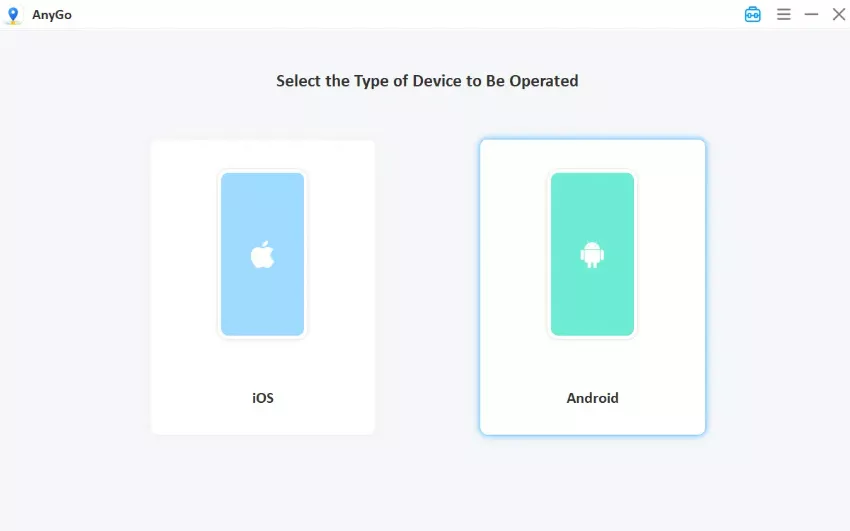
Step 3 Search for your target location on the built-in map, or import a GPX route if you want a custom path. Click Go to apply the new location, then choose Teleport Mode for instant jumps or Joystick Mode for hands-on movement.

Conclusion
iMyFone AnyTo is a solid, easy-to-use spoofing tool, especially for beginners who want a jailbreak-free way to change their GPS location. But Error 12 issues, a locked SVIP tier, and no iOS joystick support are real drawbacks worth knowing before you buy.
If those cons matter to you, iToolab AnyGo is worth a look. It covers the same core features, adds full cross-platform joystick support, and skips the hidden fees. Either way, spoof responsibly, and always weigh the ban risk against what you’re hoping to gain.