

“Which location changer is the best? I want to spoof my GPS to preserve my online privacy on an iPhone. Is it possible? Also, can I fake the position on the map on an Android?”

Nowadays, finding an application or program that does not use your location is impossible. So, how to trick such apps? You can use a location changer to pretend that your device is positioned in another place. We have discussed the top 10 apps for iOS and Android here. With location changer for iPhone or Android, you can easily change your location to avoid being tracked.
168,282 people have downloaded it.
- Change GPS location on iPhone/iPad in clicks (No Jailbreak).
- Simulate GPS movement along any custom path with joystick.
- Collect and import popular GPX route files for next use.
- Mock GPS location on up to 15 devices simultaneously.
- Works well with location-based social apps and AR games.
- Fully support the latest iOS 27/Android 17.
- Newly released Native Mode: spoof iOS location without modded apps for all LBS apps safely.
Why You Might Need a Location Changer?
A location changing app is a software tool that lets you change your location on your device. It tricks your real GPS signal and replaces it with a fake location, making your phone appear to be anywhere in the world, even if you’re sitting at home. Some work on both iOS and Android without jailbreak or root, while others require more advanced setup.
There are a few benefits to spoofing your GPS location on your device. Check them out:
1. Playing Location-based Games
Games like Pokémon GO and Pikmin Bloom rely on your phone’s GPS to unlock basic features. You can spoof your location to play the game elsewhere and explore new things.
2. Hide Your Location
A location changer keeps your location hidden. If anyone is tracking you online, they will only see the fake position you have set via the tool.
3. Unlock Region Restricted Content
You can bypass geo-restrictions with these tools, enabling you to watch a favorite show that isn’t available in your region for various reasons.
4. Trick Friends
These tools can also be fun. For example, you can trick your family and friends into thinking you are in another part of the world.
How to Choose the Right Location Changer
With many options available, picking the right location changing app comes down to a few key factors:
- Platform compatibility: Make sure the tool supports your device. Some work only on iOS or Android, while others support both.
- No jailbreak or root required: The safest tools work without modifying your device’s system.
- Safety and ban risk: Look for built-in safeguards like cooldown timers that help you avoid detection.
- Ease of use: A clean interface and simple setup save time, especially for beginners.
- Features: Consider what you actually need: teleport, joystick control, GPX import, multi-device support, or route simulation.
Keep these factors in mind as you go through the list below.
Top 5 Location Changers for iPhone
Here are the 5 best iPhone location changers you can use to fake your whereabouts online:
- 1. iToolab AnyGo for iOS
- 2. iSpoofer Location Spoofer
- 3. iTools Location Changer
- 4. Fake GPS Location Tool
- 5. iTeleporter Location Spoofer
1. iToolab AnyGo for iOS
The best iOS location changer we recommend is iToolab AnyGo. It offers a user-friendly yet powerful interface to change the GPS position your apps see. So you can spoof dating apps, play games elsewhere, and keep your real location private. There is no need to install any third-party app or jailbreak your iPhone to utilize this platform. AnyGo for iOS works well with all active iPhone models and iOS versions.
How to Change Location with AnyGo
Step 1. Download and launch the AnyGo iOS app, then select Native Mode from the bottom of the screen.

Step 2. Enter your target city or coordinates in the search bar, or tap any desired spot on the map. Tap Teleport.

Step 3. Set up the required VPN connection and trust the certificate. (This is a one-time setup for first use only.)

Step 4. Your iPhone GPS will update to the target location immediately. The spoofed location remains active even after you fully close the AnyGo app.

This spoofing app is cost-effective and also allows you to simulate GPS movements. You can also change the location of multiple iPhones at the same time! You can also check the video guide:
2. iSpoofer Location Spoofer
Whether you want to catch rare Pokemon in another country or check out the latest local deals from a different city, iSpoofer Location Spoofer is an app that changes your location on the iPhone, making it easy and fun.

🙂 Pros:
- Various spoofing modes and features.
- Lets you upload a game’s GPX file.
🙁 Cons:
- Expensive.
- It doesn’t work with iTunes.
Important Update: iSpoofer was once a popular iOS location changer, but it was shut down after violating Niantic’s Terms of Service and facing legal action. It is no longer available for download or use. We’ve included it here for reference only.
3. iTools Location Changer
It supports both Single-Spot Mode for instant teleportation and Multi-Spot Mode for simulating movement along a custom route, and also allows GPX file import/export for more complex route planning.

🙂 Pros:
- No jailbreak needed.
- Joystick navigation available.
- No app installation required.
🙁 Cons:
- It doesn’t support newer iPhones (iPhone 12 and later)..
- Complicated for beginners.
4. Fake GPS Location Tool
What sets it apart is its simplicity and low one-time cost. It is one of the earliest paid iOS spoofing tools, requiring no jailbreak and no desktop software.

🙂 Pros:
- Accessible on the App Store.
- User-friendly.
- Supports older iOS versions (iOS 8.0 and above).
🙁 Cons:
- It might not work on platforms like Pokemon Go.
- Compatibility with newer iOS versions is uncertain.
5. iTeleporter Location Spoofer
Whether you aim to spoof your location to date on Tinder or catch rare Pokemon on Pokemon Go, iTeleporter will enable you to do that, no matter what model of iPhone you use.

🙂 Pros:
- Works without any computer.
- No jailbreaking needed.
🙁 Cons:
- It requires an official dongle to work.
- Complicated to use.
Top 5 Location Changers for Android
Spoofing your location on an Android device is relatively easier compared to iOS. The main reason is that you can access dedicated apps straight from the Google Play Store, whereas the Apple App Store prohibits such apps.
Check out the best location changer for Android:
- 1. iToolab AnyGo
- 2. GPS Emulator
- 3. Fake GPS Location – GPS JoyStick
- 4. Fake GPS location – Lexa
- 5. VPNa – Fake GPS Location
1. iToolab AnyGo
If you’re looking for a cross-platform option, iToolab AnyGo also supports Android devices. You can change location directly with AnyGo Andriod app, no root required. It offers the same features we covered in the iPhone section, including one-click teleport, joystick control, GPX import, and multi-device support.
🙂 Pros:
- Works on both iOS and Android.
- Same features as the iOS version.
🙁 Cons:
- Paid subscription for advanced features.
How to Use AnyGo on Android
Step 1 Download and install the iToolab AnyGo app on your iPhone or Android, then select General Mode from the bottom of the screen.
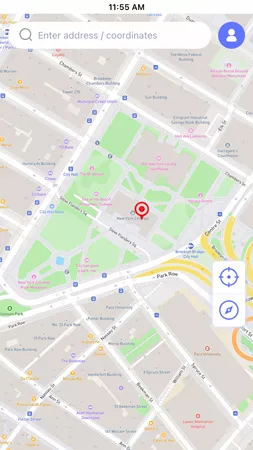
Step 2 Enter your desired location in the search box and hit “Teleport”.
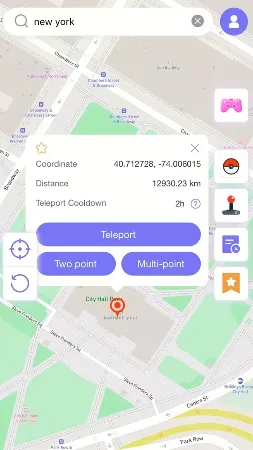
Step 3 The GPS of your device will update instantly.

2. GPS Emulator
GPS Emulator is an app that changes your location on Android, letting you make any location in the world your default region. You can play Pokemon GO or use dating apps without getting detected.
What sets this tool apart is its advanced GPS route simulator, which can generate realistic movement paths that follow actual roads. It also offers three map types (Normal, Satellite, and Terrain) and lets you customize altitude and GPS accuracy.

🙂 Pros:
- Comprehensive interface and features.
- Easy to use.
- Three map types (Normal, Satellite, Terrain) with customizable altitude.
🙁 Cons:
- It lags and crashes frequently.
- Resets the location instantly due to inactivity.
- It is not free.
3. Fake GPS Location – GPS JoyStick
Fake GPS Location is a great location spoofing app for Android that you can use to easily change your location without needing to root your phone. Moreover, you can navigate the map using the overlay joystick control. Also, it lets you customize your walking speed.

🙂 Pros:
- Handy cooldown feature to conveniently play Pokemon Go.
- Free.
🙁 Cons:
- It may share your data with third parties.
- The app is not encrypted.
- Intrusive ads.
4. Fake GPS location – Lexa
Fake GPS is a widely recognized application to manage your location settings. If you want to play Pokemon Go to access new features and Pokemon or to find the love of your life using dating apps in a different part of the world, this app works wonders.

🙂 Pros:
- Easy to use.
- Best for streaming apps.
🙁 Cons:
- Unresponsive customer support.
- Contains bugs.
5. VPNa – Fake GPS Location
This free-to-use application is definitely not a VPN but a proper location changer that allows you to make your Android phone jump to any part or region of the world in a few seconds.
It works through Android’s Developer Options and Mock Locations setting, without requiring root access. It also lets you save frequently used locations for quick access later.

🙂 Pros:
- No root required.
- Free to use, all features available at no cost.
🙁 Cons:
- Too many pop-ups and ads upon startup.
- It doesn’t 100% work.
- Requires you to uninstall Google Play Services.
Summary
This article discusses 10 location changer apps for iOS and Android that can spoof your GPS to an area of your choice. These are some of the best tools available, which can help you not only play Pokémon GO in a different place but also find dates wherever you want, all while preserving your privacy.
However, when it comes to spoofing on either iOS or Android, AnyGo Location Changer stands out as one of the best options, thanks to its interactive interface, easy-to-read map, and cross-platform support.