

You wake up early on a weekend, ready for the latest Gigantamax Battle—only to be locked out of the lobby because your Max Particles are empty. Running dry on particles right before an elite encounter is frustrating, but with the daily cap in place, you need a smart strategy to keep your reserves topped off.
This guide cuts through the noise and shows you exactly how to get Max Particles efficiently, so you never miss another big fight.

Part 1. What Are Max Particles in Pokémon GO
If you want to understand what Max Particles in Pokémon GO are, think of them as a unique power source introduced alongside the Dynamax phenomenon. Unlike Stardust or Candy, Max Particles function as a specialized energy currency required to interact with Power Spots scattered across your local map.
What Do Max Particles Do in Pokémon GO?
This resource serves two critical purposes. First, you must spend Max Particles to enter Power Spots and engage in Dynamax or Gigantamax Max Battles. Second, they are the essential fuel required to upgrade your Pokémon’s Max Moves, boosting offensive and defensive capabilities.
However, since the game enforces a strict daily collection cap, learning how to get Max Particles efficiently and how to manage them wisely is vital for both casual players and busy professionals who want to stay battle-ready without wasting time.
Part 2. How to Get Max Particles in Pokémon GO
Once you understand what Max Particles in Pokémon GO are, the next question is obvious: where do you get them? Here are the most effective ways to collect them:
1. Collect Max Particles from Power Spots
Power Spots are scattered across your local map. Simply walking up to these locations and interacting with them yields a steady stream of Max Particles. You’ll even receive a large bonus for visiting a Power Spot for the first time each day.
2. Earn Max Particles via Walking & Adventure Sync
The game rewards physical movement. By enabling Adventure Sync, every step you take during your busy workday counts toward your Max Particle reserves. This passively builds up your stockpile while your phone rests in your pocket.
3. Extra Sources: Special Research & Shop Packs
When you need a quick top-off, look toward external resources. Completing specific Special Research tasks often awards bonus Max Particles. You can also purchase event packs in the in-game shop or official web store to instantly boost your count beyond the standard daily limits.
Part 3. How to Collect 800 Max Particles a Day Easily in Pokémon GO
Being stuck at an office desk all day makes hitting your daily 800 MP cap exhausting. Busy trainers looking for a clear strategy on how to collect Max Particles in Pokémon GO effortlessly often turn to iToolab AnyGo.
This reliable GPS location changer teleports your device to major global cities and dense Power Spot clusters safely. Instead of walking for miles during a packed workday, you can use joystick mode to travel between locations straight from your desk, maximizing your daily Max Particle intake in just minutes.

- Instantly teleport your GPS to high-density Power Spot clusters worldwide with a single click.
- Simulate natural human movement to complete 2km walking milestone rewards automatically.
- Import custom GPX files to establish continuous Power Spot route farming.
- Stay completely safe with an integrated cooldown timer.
- Run seamlessly on Windows, Mac, iOS, and Android devices.
- Fully support the latest iOS 27/Android 16.
How to Use AnyGo to Get More Max Particles
Step 1 Download and install iToolab AnyGo on your Windows or Mac computer.

Step 2 Connect your iPhone or Android phone to your computer with a USB cable.
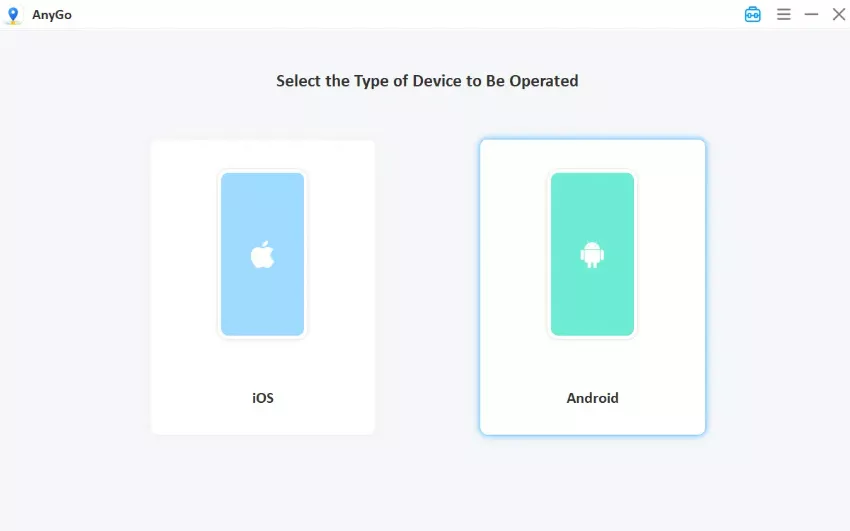
Step 3 Enter a place with dense Power Spot hotspots in the search bar. Click Go to jump your avatar to the cluster immediately. Once there, interact with nearby Power Spots to start collecting Max Particles right away.

Part 4. How to Get Rid of Max Particles Pokémon GO
Since your storage caps at 1,500 MP, hitting the maximum limit prevents you from collecting more resources or completing certain Special Research tasks. When your inventory is full, knowing how to get rid of Max Particles becomes essential for managing your storage efficiently.
The quickest way to burn through excess Max Particles is to upgrade the Max Moves of your Dynamax and Gigantamax Pokémon. Unlock or upgrade Max Moves directly from your Pokémon’s profile page—each action consumes 400 to 600 Max Particles instantly.
Alternatively, participate in Max Battles at local Power Spots. Defeating a Power Spot Boss consumes a significant entry fee based on the battle tier, clearing out your surplus reserves immediately.
Part 5. How to Use Max Particles in Pokémon GO Efficiently
Smart resource management lets you rapidly assemble a top-tier roster of powerful attackers. Learning how to use Max Particles in Pokémon GO efficiently keeps you competitive in the current meta and avoids unnecessary item shortages.
1. Prioritize High-Star Max Battles
Allocate most Max Particles to high-star Max Battles targeting rare Pokémon, rather than squandering resources on common spawns. High-tier Max Battle opponents grant top-tier Pokémon with perfect IV values. Focus on 3-star and 5-star bosses—these battles deliver far better combat rewards and rarer spawn opportunities.
2. Avoid Wasting Resources from Inventory Caps
Use your Max Particles before your bag hits the 1,500-item limit. A full inventory blocks all new particles collected via walking and field rewards. Regularly spend your stock to reserve inventory space and never miss out on daily walking bonuses.
3. Stock Up Max Particles with AnyGo Ahead of Events
Stockpile ample Max Particles via iToolab AnyGo prior to major in-game events to prevent resource shortages. This desktop tool lets you safely teleport your avatar to global resource hotspots before event launches. Pre-farming dense resource clusters fills your inventory in advance, enabling nonstop high-star battles without going outdoors.
Conclusion
Mastering Max Particles in Pokémon GO is no longer optional. It’s the key to unlocking Gigantamax battles, powering up your strongest Pokémon, and staying competitive in the current meta.
If you want to maximize your gameplay rewards without spending hours walking outdoors, iToolab AnyGo is the perfect solution. This powerful location-changing tool allows you to safely teleport to active Power Spots and farm maximum resources right from your desk.
Download iToolab AnyGo today and start collecting Max Particles like never before!