

Ever wanted to catch a region‑exclusive Pokémon without leaving your living room? Or test a location‑based app feature while sitting at your desk? That’s exactly where mock location apps come in. They let you spoof your device’s GPS to anywhere in the world. Both iOS and Android users have plenty of options, but not all tools are created equal. Some are built into the system, others require extra setup, and each comes with its own strengths and trade‑offs.
In this guide, we’ll look at the top five mock location apps for both platforms, emphasizing their essential features, ease of use, and practical applications.
Part 1. What is a Mock Location App?
A location mock app is a tool that changes your device’s GPS coordinates to any place you choose. It tricks apps into thinking you’re somewhere else without actually moving.
On Android, you can enable the native mock location app for Android via Developer Options; on iOS, you usually need a desktop tool. Common uses include catching region-locked Pokémon, protecting your privacy from tracking apps, or testing location-based features during development.
In short, a location mock app gives you full control over your virtual position, making it useful for gaming, security, and work, all with just a few taps.
Part 2. Is It Safe to Use the Mock Location Apps?
Worried about safety? The answer depends on how and where you get your mock location app. On Android, the built‑in mock location feature is native and generally harmless. For iOS, reputable third‑party tools like iToolab AnyGo are safe when downloaded from official websites.
However, risks exist. The main danger is getting banned in games like Pokémon Go, which actively detects spoofing. Unreliable apps may also carry malware or leak your data. To stay safe, always use trusted sources, avoid sudden long‑distance jumps, and respect each app’s rules. When used cautiously, a mock location app is both useful and secure, but ignoring these risks can lead to trouble.
Part 3. Best 5 Mock Location Apps on iOS & Android
Here is a list of the 5 best mock location apps for both Android and iOS along with their key features and compatibility. Whether you need a reliable android mock location app or an iOS solution, make the right choice by deciding which features suit your needs well.
- Top 1. iToolab AnyGo Location Spoofer
- Top 2. iSpoofer
- Top 3. iTools
- Top 4. GPS Emulator
- Top 5. TailorGo
Top 1. iToolab AnyGo Location Spoofer
AnyGo Location Changer, a location changer for Pokémon GO, is a widely used spoofing tool that allows you to change your GPS location without physically being there. Apart from changing its GPS location, it also has several features like multi-stop routes, joystick control, and switching between different locations. iToolab AnyGo users can also add routes to their favorites and can access them later without entering them again and again manually.
It is especially useful for Pokémon GO players who want to spoof their location, access different regions, and catch rare Pokémon. In short, it is a compatible and user-friendly tool that will enhance your gaming experience.
Pros:
- Auto-catch feature automatically catches nearby Pokémon for you.
- Built-in cooldown timer helps you avoid account restrictions.
- Supports the native Pokémon GO app without requiring modified versions.
- New released Native Mode: spoof iOS location for all LBS apps safely.
- POGO Assistant for iOS streamlines gameplay.
- Runs on Windows, Mac, iOS, and Android.
Cons:
- Full feature access requires a premium subscription.
- Desktop version requires a USB connection to a computer.
168,282 people have downloaded it.
- Top-notch iPhone/iPad location changer without jailbreak.
- Fake Uber GPS on Android and iOS devices.
- Simulate GPS movement along any custom path with joystick.
- Fully support the latest iOS 27/Android 17.
- Collect and import popular GPX route files for next use.
How to Use iToolab AnyGo to Change Your Location
Step 1 Download and install the iToolab AnyGo app on your iPhone or Android.
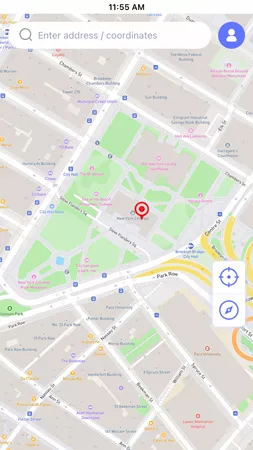
Step 2 Open the map interface, select the place that you would like to set and hit “Teleport”.
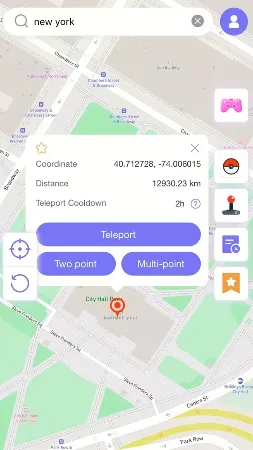
Step 3 Your Phone’s GPS location will update instantly.

Top 2. iSpoofer
iSpoofer is a popular spoofing tool among Pokémon GO players, mainly designed for iOS. It comes with built-in features like joystick control, customizable speed, and privacy protection. You can simulate movement, whether walking, running, or driving, with precision. iSpoofer also lets you save your favorite routes and supports GPX file import for reusable paths. With this tool, you can spoof your location safely and access rare Pokémon.
Pros:
- Built-in IV checker to evaluate Pokémon stats instantly.
- Enhanced throw accuracy for easier catches.
- Nearby radar shows Pokémon locations on the map.
Cons:
- iOS only, not available for Android.
- Requires third-party installation, not available on the App Store.
- Higher detection risk compared to desktop-based tools.

Top 3. iTools
iTools is a versatile spoofing tool designed for iOS users. It lets you teleport anywhere in the world without physical movement and access Pokémon limited to specific regions. You can also set up custom routes for tasks like hatching eggs in Pokémon GO. iTools requires no jailbreaking, offers battery management features, and is beginner-friendly.
Pros:
- One-click teleport to any saved location.
- Stable performance with minimal lag.
- Includes data backup and restore features for device management.
Cons:
- iOS only, not available for Android.
- Requires a computer to run the desktop software.
- Free trial has limited teleport attempts.

Top 4. GPS Emulator
GPS Emulator is a mock location app for Android that provides an effective way to change your GPS location. Its biggest strength is simplicity. You can manually enter a location or click a spot on the map, and it updates instantly. GPS Emulator also offers a real-time simulation mode, making it ideal for games like Pokémon GO. It is a lightweight app compatible with most Android versions.
Pros:
- Completely free with no hidden costs.
- No root required on Android devices.
- Clean, ad-free interface.
Cons:
- Android only, not available for iOS.
- No joystick or advanced route planning features.
- No cooldown timer to warn about unsafe location changes.

Top 5. TailorGo
TailorGo works on both iOS and Android, and with a single tap, you can send your GPS anywhere on the map. It’s especially popular among Pokémon GO and Monster Hunter Now players who want to catch region‑exclusives without leaving home.
You get a joystick for real‑time movement, plus you can plot custom routes using GPX files, whether you want a straight walk, a two‑point trip, or a multi‑stop adventure. There’s also a built‑in cooldown timer that helps you play it safe and avoid triggering anti‑cheat systems.
Pros:
- No jailbreak or root required for iOS and Android devices
- Supports up to 5 devices simultaneously.
- GPX file import/export for custom route planning
Cons:
- Free version has limited features.
- Requires a computer connection for initial setup.
- Full functionality requires a paid subscription.

Part 4. Important Tips for Using Mock Location Apps Without Getting Banned
Here are some useful tips to help you spoof your location without getting banned. But before that, make sure you’ve chosen the best mock location app for Android or iOS that suits your needs, because even the safest tips won’t help if the tool itself is unreliable.
💡Tip 1: Always download a reputable and user-friendly app, such as iToolab AnyGo, that comes with built-in safety features.
💡Tip 2: Make sure to simulate natural movements and avoid teleporting too quickly. This can be done by using joystick controls. Some apps also have cooldown timers that remind you to wait the right amount of time between movements.
💡Tip 3: Stay under the radar and limit your use of these apps to special occasions, like catching rare Pokémon or specific gym battles.
💡Tip 4: You can also create a secondary account to test these spoofing tools and find the one that works best for you.
By following these tips, you can enjoy a smooth gaming experience while using location mock apps without the risk of getting banned.
Final Words
In conclusion, mock location tools are used by players worldwide to enhance their gaming experience. Each tool has its own advantages and limitations, and this guide has covered the top 5 options: iToolab AnyGo, TailorGo, iSpoofer, iTools, and GPS Emulator.
Among them, AnyGo Location Changer stands out for its features, precision, and cross-platform compatibility. It works on iOS, Android, Windows and Mac, and comes with tools like multi-stop routes and joystick control to make location spoofing simple and safe.
If you’re looking for a reliable way to change your GPS location, iToolab AnyGo is a great place to start.